Podargus.UI.WinForms
1.0.0
dotnet add package Podargus.UI.WinForms --version 1.0.0
NuGet\Install-Package Podargus.UI.WinForms -Version 1.0.0
<PackageReference Include="Podargus.UI.WinForms" Version="1.0.0" />
<PackageVersion Include="Podargus.UI.WinForms" Version="1.0.0" />
<PackageReference Include="Podargus.UI.WinForms" />
paket add Podargus.UI.WinForms --version 1.0.0
#r "nuget: Podargus.UI.WinForms, 1.0.0"
#:package Podargus.UI.WinForms@1.0.0
#addin nuget:?package=Podargus.UI.WinForms&version=1.0.0
#tool nuget:?package=Podargus.UI.WinForms&version=1.0.0
Podargus UI Component Suite





The ultimate zero-dependency, hardware-accelerated UI framework for Windows Forms.
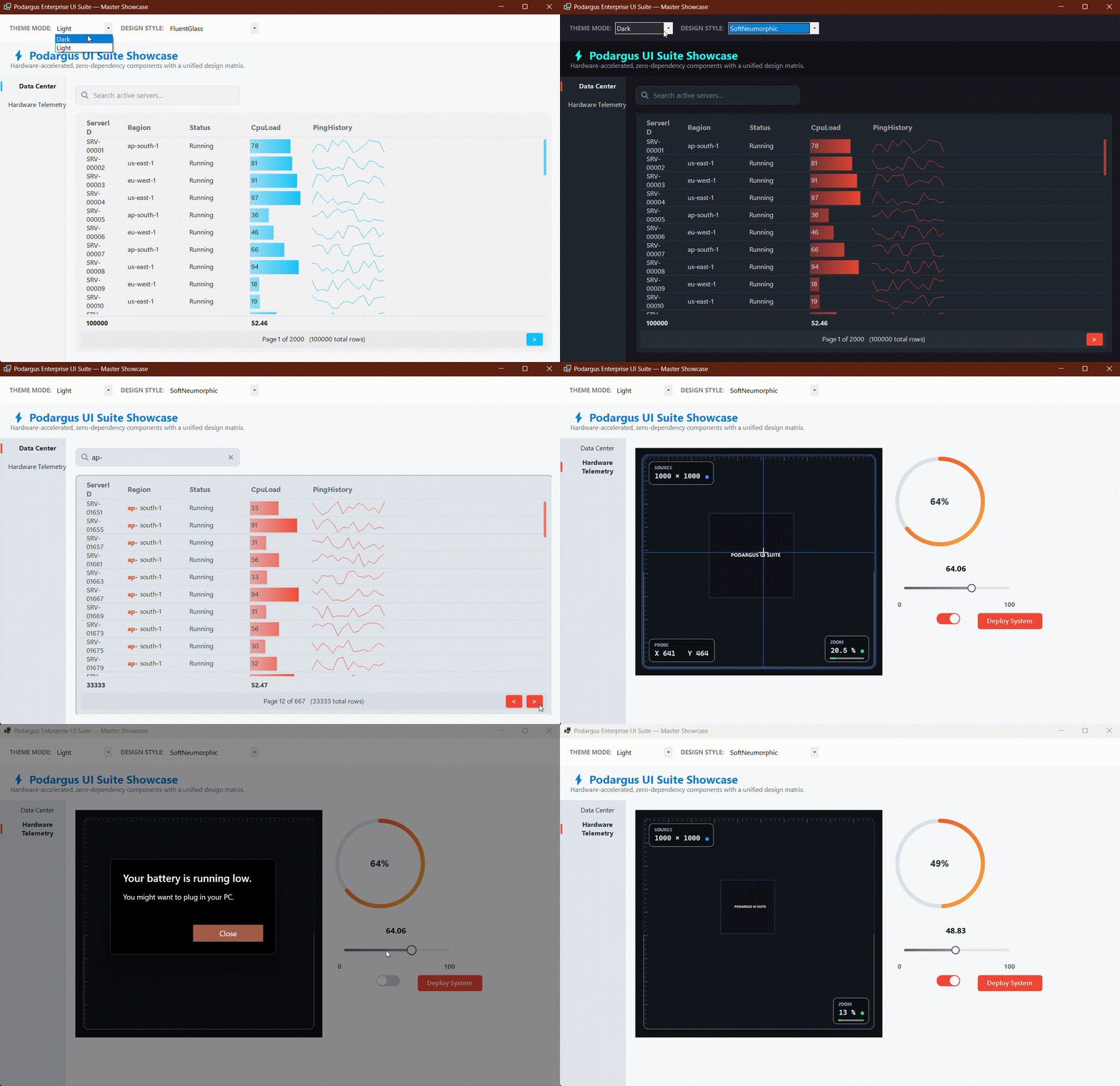
🛑 The Legacy WinForms Problem
Building modern, dark-mode desktop applications in standard Windows Forms is notoriously difficult. Developers are forced to either tolerate flickering, 20-year-old 3D gray controls, or purchase bloated, 50MB commercial UI frameworks that cost thousands of dollars per license.
🟢 The Podargus Solution
Podargus.UI.WinForms is a single, unified assembly that completely overhauls the WinForms rendering engine using pure native GDI+. It provides an ecosystem of heavily optimized, anti-aliased controls that support 60 FPS animations, global dark mode, and a unified design matrix—all with zero external dependencies.
🚀 The 10-Component Ecosystem
By installing this single flagship package, you get instant access to our complete UI library:
ModernDataGridView: 1M+ Row Virtualization, Pagination, Sparklines, DataBars, and PDF/CSV Export.ModernTabControl: Animated Sidebar routing and floating pill navigation.ModernTextBox: Glowing focus rings, integrated search icons, and password reveals.ModernButton: Hardware-accelerated rounded action buttons with tactile hover physics.ModernToggle: 60 FPS animated sliding switch replacing the legacy CheckBox.ModernTrackBar: Ultra-smooth gradient slider with floating value tooltips.ModernDialogs: Alpha-blended layered message boxes and non-blocking stacking toast notifications.ModernProgressRing: Dual-mode circular progress bar and infinite loading spinner.AdvancedImageViewer: 4K/8K hardware-accelerated image canvas with mouse pan & zoom.SpeedoMeter: Analog radial dial gauge with physics-damped needle interpolation.
📦 Installation
Package Manager Console
Install-Package Podargus.UI.WinForms
.NET CLI
dotnet add package Podargus.UI.WinForms
🎨 The Unified Design Matrix
Podargus features a globally unified design system. Set it once, and your entire application adapts automatically.
2 Theme Modes
Seamlessly adapt to user OS preferences:
Dark: Deep obsidian and matte charcoal aesthetics.Light: Clean platinum and soft daylight panels.
5 Design Styles
Apply cohesive branding across every control in your application:
DashboardPremium: Executive corporate slate with blue/cyan highlights (Default).FluentGlass: Windows 11 frosted glass with electric cyan hover states.MaterialFlat: Modern material flat geometry with deep purple/indigo accents.SoftNeumorphic: Organic, embossed shadows with warm coral accents.Cyberpunk: High-voltage industrial stealth black with neon emerald focus glows.Custom: Unlocked enterprise mode for exact corporate hex color overrides.
⚡ Quick Start
Simply drag and drop the controls from the Visual Studio Toolbox, or initialize them instantly in code. The controls natively inherit standard WinForms behaviors (like DataSource, DialogResult, and Checked), meaning your existing C# logic works flawlessly without rewrites.
using Podargus.UI.WinForms.Button;
using Podargus.UI.WinForms.Button.Enums;

// Create a globally themed Primary Action Button
var btnDeploy = new ModernButton
{
    Text = "Deploy System",
    Theme = ThemeMode.Dark,
    Style = ButtonDesignStyle.DashboardPremium,
    IsPrimary = true,
    Size = new Size(160, 42)
};

this.Controls.Add(btnDeploy);
⚙️ Specifications
| Technical Metric | Underlying Architecture Profile |
|---|---|
| Package Identity | Podargus.UI.WinForms |
| Framework Category | Hardware-Accelerated UI Component Suite |
| Language Target | C# (Optimized for .NET Framework 4.7.2+ & .NET 6.0/8.0+) |
| Rendering Engine | Anti-Aliased Surface Vector Paint Mapping (GDI+) |
| Target Platforms | Microsoft Windows Desktop Environment (WinForms) |
| Dependencies | None (System.Windows.Forms & System.Design Only) |
📄 License
Distributed under the MIT License. See the repository LICENSE file for details.
Podargus
Build Incredible.
High-performance developer tooling, modern component architectures, and zero-dependency software.
| Product | Versions Compatible and additional computed target framework versions. |
|---|---|
| .NET | net6.0-windows7.0 is compatible. net7.0-windows was computed. net8.0-windows was computed. net8.0-windows7.0 is compatible. net9.0-windows was computed. net10.0-windows was computed. |
| .NET Framework | net472 is compatible. net48 is compatible. net481 was computed. |
-
.NETFramework 4.7.2
- No dependencies.
-
.NETFramework 4.8
- No dependencies.
-
net6.0-windows7.0
- No dependencies.
-
net8.0-windows7.0
- No dependencies.
NuGet packages
This package is not used by any NuGet packages.
GitHub repositories
This package is not used by any popular GitHub repositories.
| Version | Downloads | Last Updated |
|---|---|---|
| 1.0.0 | 126 | 9/27/2026 |
v1.0.0 Initial Flagship Release:
- Consolidated the entire Podargus ecosystem (10 controls) into a single, high-performance UI suite.
- Unified namespaces to Podargus.UI.WinForms for seamless developer onboarding.
- Integrated global 2-Theme (Dark/Light) and 5-Style design matrix across all components.
- Includes: ModernDataGridView, ModernTabControl, ModernTextBox, ModernButton, ModernToggle, ModernTrackBar, ModernProgressRing, AdvancedImageViewer, SpeedoMeter, and ModernDialogs.
- Zero external dependencies with native multi-targeting for .NET Framework 4.7.2+ and .NET 6.0/8.0+.