Syncfusion.Blazor.BlockEditor
34.2.6
Prefix Reserved
See the version list below for details.
dotnet add package Syncfusion.Blazor.BlockEditor --version 34.2.6
NuGet\Install-Package Syncfusion.Blazor.BlockEditor -Version 34.2.6
<PackageReference Include="Syncfusion.Blazor.BlockEditor" Version="34.2.6" />
<PackageVersion Include="Syncfusion.Blazor.BlockEditor" Version="34.2.6" />
<PackageReference Include="Syncfusion.Blazor.BlockEditor" />
paket add Syncfusion.Blazor.BlockEditor --version 34.2.6
#r "nuget: Syncfusion.Blazor.BlockEditor, 34.2.6"
#:package Syncfusion.Blazor.BlockEditor@34.2.6
#addin nuget:?package=Syncfusion.Blazor.BlockEditor&version=34.2.6
#tool nuget:?package=Syncfusion.Blazor.BlockEditor&version=34.2.6
Syncfusion® Blazor Block Editor
Modern block-based content editor for Blazor applications. Compose rich, structured documents with an intuitive drag-drop interface ideal for knowledge bases, documentation, note-taking, and content creation.
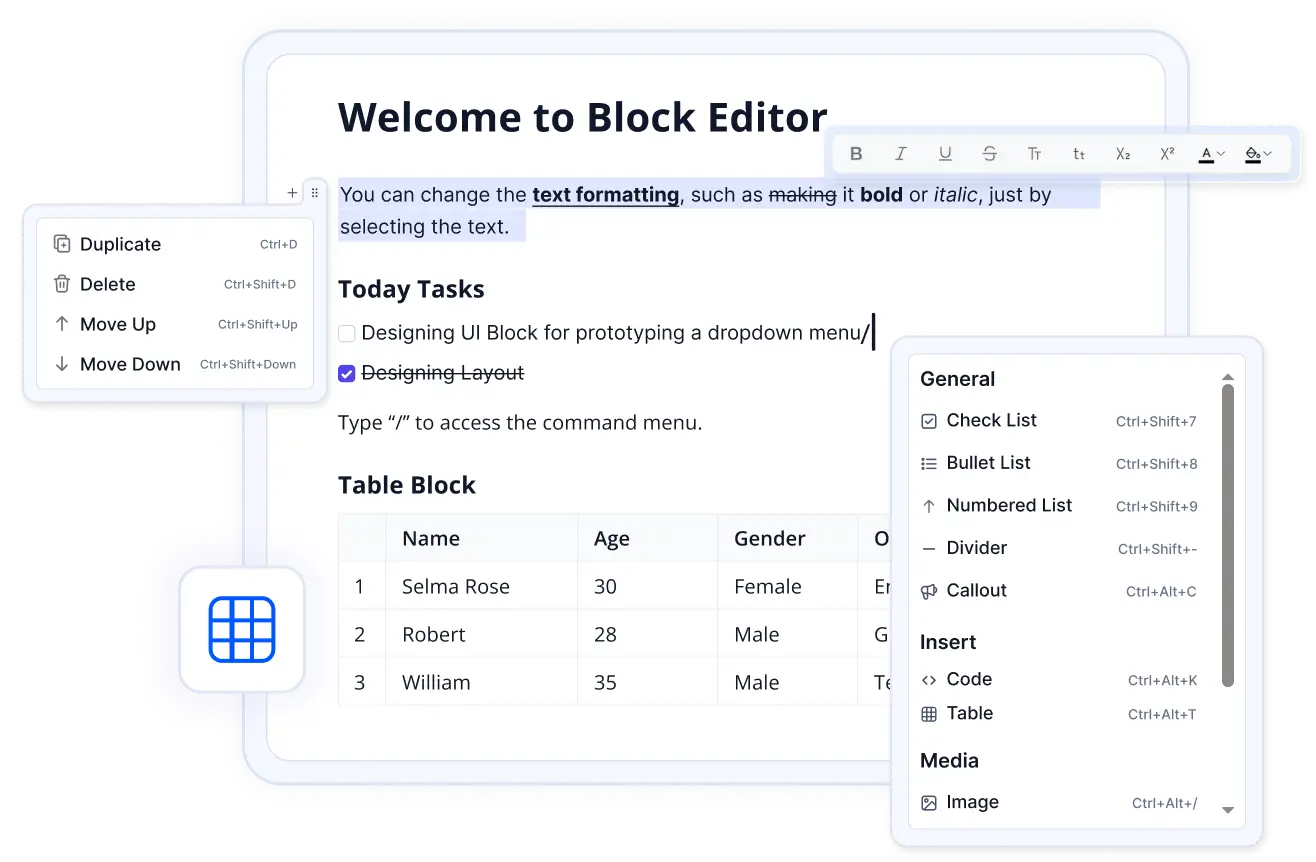
Key features
- Block-Based Editing: Intuitive block structure for organizing content
- Rich Content Types: Support for text, images, headings, lists, and more
- Customizable Blocks: Create custom block types for specific content needs
- Mobile Support: Responsive design optimized for mobile devices
- Undo/Redo: Complete undo/redo functionality for content editing
- Export Options: Export content as HTML, Markdown, or JSON
System Requirements
- .NET 8.0 or later (Blazor Server, Blazor Web App, Blazor WebAssembly, Blazor Hybrid)
- See full requirements: System Requirements
Installation
.NET CLI
dotnet add package Syncfusion.Blazor.BlockEditor
dotnet add package Syncfusion.Blazor.Themes
Package Manager Console
Install-Package Syncfusion.Blazor.BlockEditor
Install-Package Syncfusion.Blazor.Themes
Add stylesheet and script references
- For Blazor Web App / Blazor Server App, add these to
Components/App.razororApp.razorfile. - For Blazor WebAssembly App, add these to
wwwroot/index.htmlfile.
<link href="_content/Syncfusion.Blazor.Themes/bootstrap5.css" rel="stylesheet" />
<script src="_content/Syncfusion.Blazor.BlockEditor/scripts/sf-blockeditor.min.js" type="text/javascript"></script>
Quick start
- Register the Syncfusion® Blazor service in the
Program.csfile.
using Syncfusion.Blazor;

builder.Services.AddSyncfusionBlazor();
- Add Blazor Block Editor component to your Razor page:
@using Syncfusion.Blazor.BlockEditor

<SfBlockEditor></SfBlockEditor>
Documentation
- Getting Started with Blazor Web App
- Getting Started with Blazor WebAssembly App
- API Reference
- Live Demos
- Feature Overview
- Video Tutorials
Support
License
This is a commercial product and requires a paid license for possession or use. Review the Syncfusion® EULA.
About Syncfusion®
Syncfusion® provides 1600+ UI components and frameworks for web, mobile, and desktop development across multiple platforms:
Web: Blazor | ASP.NET Core | ASP.NET MVC | JavaScript | Angular | React | Vue
Desktop: WinForms | WPF | WinUI
Learn more at www.syncfusion.com.
sales@syncfusion.com | Toll Free: 1-888-9-DOTNET
| Product | Versions Compatible and additional computed target framework versions. |
|---|---|
| .NET | net8.0 is compatible. net8.0-android was computed. net8.0-browser was computed. net8.0-ios was computed. net8.0-maccatalyst was computed. net8.0-macos was computed. net8.0-tvos was computed. net8.0-windows was computed. net9.0 is compatible. net9.0-android was computed. net9.0-browser was computed. net9.0-ios was computed. net9.0-maccatalyst was computed. net9.0-macos was computed. net9.0-tvos was computed. net9.0-windows was computed. net10.0 is compatible. net10.0-android was computed. net10.0-browser was computed. net10.0-ios was computed. net10.0-maccatalyst was computed. net10.0-macos was computed. net10.0-tvos was computed. net10.0-windows was computed. |
-
net10.0
- Syncfusion.Blazor.Buttons (>= 34.2.6)
- Syncfusion.Blazor.Core (>= 34.2.6)
- Syncfusion.Blazor.DropDowns (>= 34.2.6)
- Syncfusion.Blazor.Inputs (>= 34.2.6)
- Syncfusion.Blazor.Navigations (>= 34.2.6)
- Syncfusion.Blazor.Popups (>= 34.2.6)
- Syncfusion.Blazor.ProgressBar (>= 34.2.6)
- Syncfusion.Blazor.SplitButtons (>= 34.2.6)
- Syncfusion.Telemetry (>= 34.2.6)
-
net8.0
- Syncfusion.Blazor.Buttons (>= 34.2.6)
- Syncfusion.Blazor.Core (>= 34.2.6)
- Syncfusion.Blazor.DropDowns (>= 34.2.6)
- Syncfusion.Blazor.Inputs (>= 34.2.6)
- Syncfusion.Blazor.Navigations (>= 34.2.6)
- Syncfusion.Blazor.Popups (>= 34.2.6)
- Syncfusion.Blazor.ProgressBar (>= 34.2.6)
- Syncfusion.Blazor.SplitButtons (>= 34.2.6)
- Syncfusion.Telemetry (>= 34.2.6)
-
net9.0
- Syncfusion.Blazor.Buttons (>= 34.2.6)
- Syncfusion.Blazor.Core (>= 34.2.6)
- Syncfusion.Blazor.DropDowns (>= 34.2.6)
- Syncfusion.Blazor.Inputs (>= 34.2.6)
- Syncfusion.Blazor.Navigations (>= 34.2.6)
- Syncfusion.Blazor.Popups (>= 34.2.6)
- Syncfusion.Blazor.ProgressBar (>= 34.2.6)
- Syncfusion.Blazor.SplitButtons (>= 34.2.6)
- Syncfusion.Telemetry (>= 34.2.6)
NuGet packages (1)
Showing the top 1 NuGet packages that depend on Syncfusion.Blazor.BlockEditor:
| Package | Downloads |
|---|---|
|
Syncfusion.Blazor.A2UI
Syncfusion® Blazor A2UI Library is a thin Blazor renderer for the A2UI v0.9 protocol (originally @a2ui/web_core by Google LLC). Built on top of Syncfusion.A2UI.Core, it provides Blazor nodes, a node-surface, binder adapters and an optional rich set of Syncfusion Syncfusion.Blazor.*-backed component implementations for DataGrid, Chart, Scheduler, RichTextEditor, Kanban, Diagram, Document Editor, Spreadsheet, PDF Viewer and more. Compatible with .NET 8, .NET 9, .NET 10, and .NET 11. Targets Microsoft.AspNetCore.App. |
GitHub repositories
This package is not used by any popular GitHub repositories.
| Version | Downloads | Last Updated |
|---|---|---|
| 35.2.13 | 214 | 11/23/2026 |
| 35.2.12 | 299 | 11/18/2026 |
| 35.1.46 | 361 | 11/11/2026 |
| 35.1.43 | 1,177 | 11/2/2026 |
| 35.1.42 | 350 | 10/27/2026 |
| 35.1.41 | 442 | 10/20/2026 |
| 35.1.40 | 776 | 10/13/2026 |
| 35.1.39 | 300 | 10/6/2026 |
| 35.1.37 | 1,715 | 9/29/2026 |
| 34.2.9 | 312 | 9/21/2026 |
| 34.2.8 | 314 | 9/14/2026 |
| 34.2.7 | 1,030 | 9/8/2026 |
| 34.2.6 | 434 | 8/31/2026 |
| 34.2.5 | 261 | 8/25/2026 |
| 34.2.4 | 270 | 8/17/2026 |
| 34.2.3 | 232 | 8/11/2026 |
| 34.2.2 | 754 | 8/5/2026 |
| 34.1.33 | 225 | 7/27/2026 |
| 34.1.32 | 320 | 7/21/2026 |
| 34.1.31 | 220 | 7/14/2026 |