Podargus.ModernToggle.WinForms
1.0.0
dotnet add package Podargus.ModernToggle.WinForms --version 1.0.0
NuGet\Install-Package Podargus.ModernToggle.WinForms -Version 1.0.0
<PackageReference Include="Podargus.ModernToggle.WinForms" Version="1.0.0" />
<PackageVersion Include="Podargus.ModernToggle.WinForms" Version="1.0.0" />
<PackageReference Include="Podargus.ModernToggle.WinForms" />
paket add Podargus.ModernToggle.WinForms --version 1.0.0
#r "nuget: Podargus.ModernToggle.WinForms, 1.0.0"
#:package Podargus.ModernToggle.WinForms@1.0.0
#addin nuget:?package=Podargus.ModernToggle.WinForms&version=1.0.0
#tool nuget:?package=Podargus.ModernToggle.WinForms&version=1.0.0
ModernToggle.WinForms





Stop using legacy square WinForms checkboxes. Upgrade to a 60 FPS hardware-accelerated animated toggle switch.
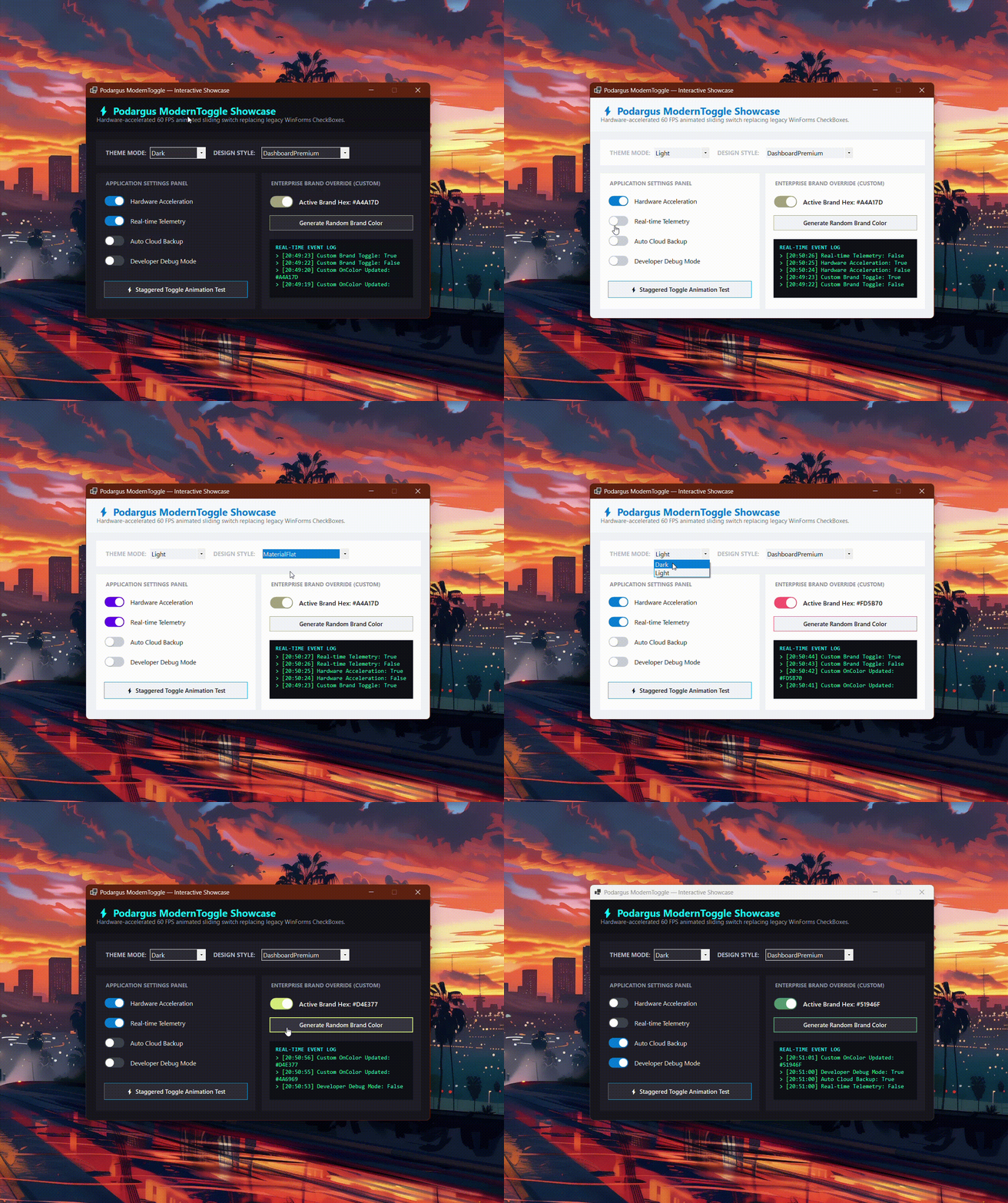
🛑 The Problem with Standard WinForms CheckBoxes
Windows Forms completely lacks a modern Toggle Switch. Developers are stuck with the 1995 square CheckBox control, which breaks modern dark mode UI layouts and looks out of place in modern desktop applications.
🟢 The Podargus Solution
ModernToggle.WinForms is a zero-dependency, anti-aliased sliding switch. It delivers smooth 60 FPS ease-out sliding transitions and full Dark/Light mode integration while inheriting directly from System.Windows.Forms.CheckBox—meaning your Checked bindings, events, and logic work out of the box!
🚀 Key Features
- 🏎️ 60 FPS Sliding Animation: Smooth ease-out interpolation engine built natively in GDI+.
- 📦 Native CheckBox Inheritance: Perfect compatibility with standard WinForms data-binding,
Checkedproperties, andCheckedChangedevents. - 🏢 Custom Color Overrides: Set
Style = ToggleStyle.Customto assign your exact corporate ON/OFF hex colors. - 🌗 Native Dark Mode: Adapts contrast automatically between Light and Dark mode.
- 🎭 5 Core Styles: Full support for DashboardPremium, FluentGlass, MaterialFlat, SoftNeumorphic, and Cyberpunk presets.
📦 Installation
Package Manager Console
Install-Package ModernToggle.WinForms
.NET CLI
dotnet add package ModernToggle.WinForms
⚡ Quick Start
using Podargus.UI.Controls.WinForms.ModernToggle;
using Podargus.UI.Controls.WinForms.ModernToggle.Enums;

var toggle = new ModernToggle
{
    Checked = true,
    Theme = ThemeMode.Dark,
    Style = ToggleStyle.DashboardPremium,
    Size = new Size(52, 28)
};

toggle.CheckedChanged += (s, e) =>
{
    Console.WriteLine($"Toggle is now: {toggle.Checked}");
};

this.Controls.Add(toggle);
🎨 Theme & Style Matrix
| Design Style | Aesthetic Concept | Key Visual Characteristics |
|---|---|---|
DashboardPremium |
Modern Executive Suite | Smooth cyan/blue active pill with dark slate track (Default). |
FluentGlass |
Windows 11 Fluent | High-contrast neon blue active track with translucent off-state. |
MaterialFlat |
Elevated Material Flat | Flat purple active track with sharp contrast. |
SoftNeumorphic |
Soft Embossed Surfaces | Warm coral/orange accent with soft 3D thumb shadow. |
Cyberpunk |
High-Voltage Industrial | Sharp 0px-radius square slider with neon emerald border glow. |
Custom |
Unlocked Enterprise | Full manual control over CustomOnColor, CustomOffColor, and CustomThumbColor. |
⚙️ Specifications
| Technical Metric | Underlying Architecture Profile |
|---|---|
| Package Identity | ModernToggle.WinForms |
| Component Type | Hardware-Accelerated Animated Toggle Switch |
| Base Type | System.Windows.Forms.CheckBox |
| Language Target | C# (Optimized for .NET Framework 4.7.2+ & .NET 6.0/8.0+) |
| Rendering Engine | Anti-Aliased Surface Vector Paint Mapping (GDI+) |
| Target Platforms | Microsoft Windows Desktop Environment (WinForms) |
| Dependencies | None (System.Windows.Forms Base Assembly Only) |
📄 License
Distributed under the MIT License. See the repository LICENSE file for details.
Maintained by Podargus
Build Incredible
Building zero-dependency, ultra-performance developer workflows and hardware-accelerated UI components.
| Product | Versions Compatible and additional computed target framework versions. |
|---|---|
| .NET | net6.0-windows7.0 is compatible. net7.0-windows was computed. net8.0-windows was computed. net8.0-windows7.0 is compatible. net9.0-windows was computed. net10.0-windows was computed. |
| .NET Framework | net472 is compatible. net48 is compatible. net481 was computed. |
-
.NETFramework 4.7.2
- No dependencies.
-
.NETFramework 4.8
- No dependencies.
-
net6.0-windows7.0
- No dependencies.
-
net8.0-windows7.0
- No dependencies.
NuGet packages
This package is not used by any NuGet packages.
GitHub repositories
This package is not used by any popular GitHub repositories.
| Version | Downloads | Last Updated |
|---|---|---|
| 1.0.0 | 111 | 9/26/2026 |
v1.0.0 Initial Stable Release:
- Launched ModernToggle featuring 60 FPS smooth sliding ease-out animation.
- Native inheritance from CheckBox for complete databinding and event compatibility.
- Integrated Podargus 2-Theme (Dark/Light) and 5-Style matrix plus Custom color overrides.
- Anti-aliased pill rendering with high-DPI scaling and zero-flicker double buffering.