IronPdf 2026.10.3
Prefix Reserveddotnet add package IronPdf --version 2026.10.3
NuGet\Install-Package IronPdf -Version 2026.10.3
<PackageReference Include="IronPdf" Version="2026.10.3" />
<PackageVersion Include="IronPdf" Version="2026.10.3" />
<PackageReference Include="IronPdf" />
paket add IronPdf --version 2026.10.3
#r "nuget: IronPdf, 2026.10.3"
#:package IronPdf@2026.10.3
#addin nuget:?package=IronPdf&version=2026.10.3
#tool nuget:?package=IronPdf&version=2026.10.3


%20-107C10?logo=visualstudio)



IronPDF - The C# PDF Library for .NET
Convert HTML to PDF with IronPDF - a C# PDF library for .NET developers who need to create, edit, merge, and secure PDFs.

With IronPDF, developers can build complete PDF workflows around .NET HTML to PDF conversion. It uses a Chrome-based rendering engine to convert HTML, CSS, JavaScript, web pages, templates, and dynamic content into accurate, pixel-perfect PDFs. The library also supports editing existing PDFs, adding security, applying digital signatures, merging files, and integrating PDF generation into desktop, web, cloud, and server-side .NET projects.
Get Started in 3 Steps
1. Install the NuGet Package
PM> Install-Package IronPdf
2. Create Your First PDF
using IronPdf;

// Instantiates Chrome Renderer
var renderer = new ChromePdfRenderer();

// Render Html contents as PDF
var pdf = renderer.RenderHtmlAsPdf("<h1>~Hello World~</h1> Made with IronPDF!");

// Saves the PdfDocument object as a PDF
pdf.SaveAs("html_saved.pdf");
3. Explore More
Dive deeper with the documentation and examples:
Tutorials: Step-by-step guides to help you build your first PDF application.
Code Examples: Practical examples of executable code for common tasks.
How-To Guides: Practical, goal-oriented instructions to solve specific problems.
Demo: Interactive demos of IronPDF in action.
API Reference: Detailed technical descriptions of the API and its components.
Key Features
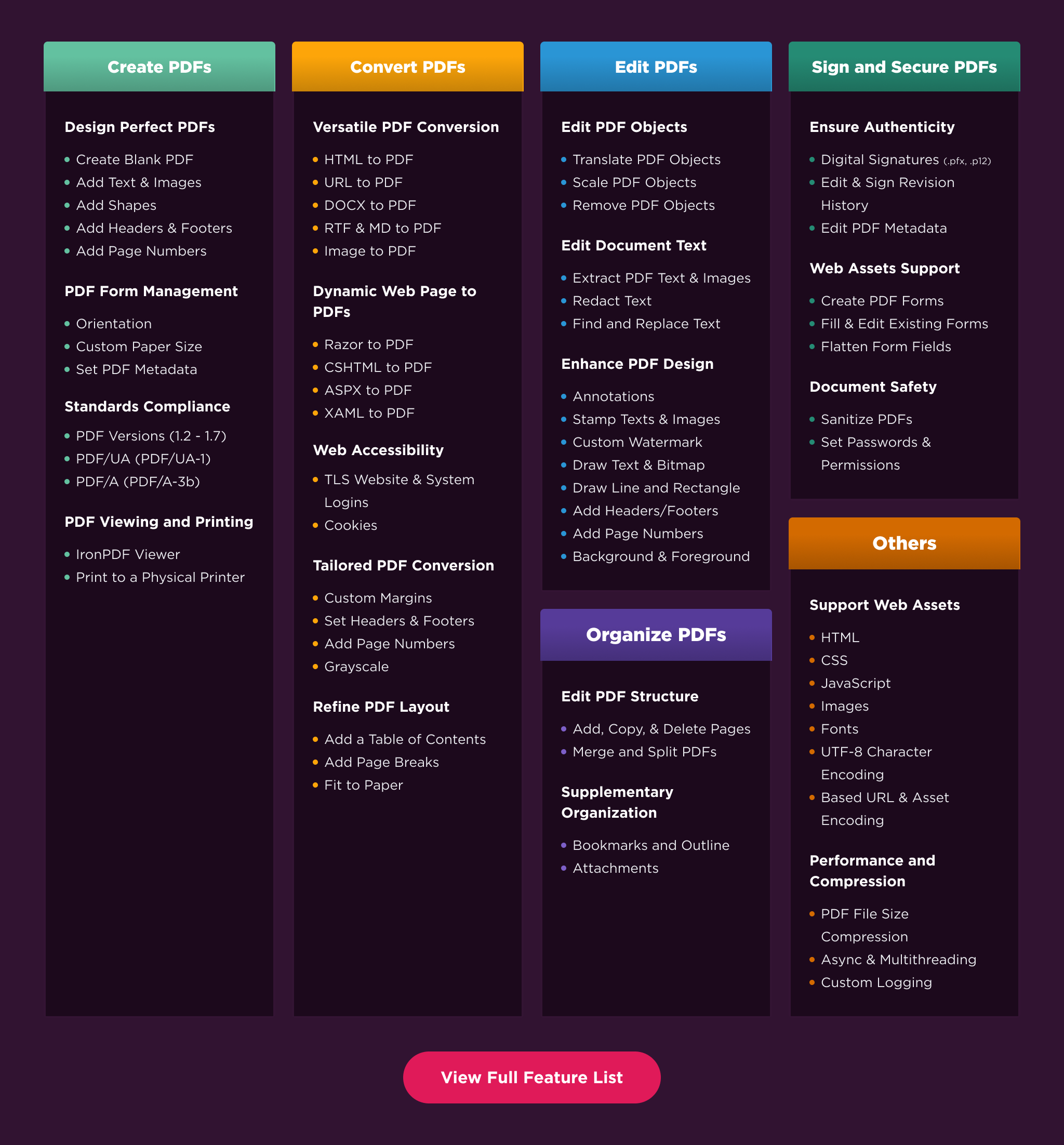
Create PDFs: Create PDFs from scratch in a few lines of code.
Convert PDF: Convert PDFs from HTML, images, docx, and website pages.
Edit PDFs: Modify existing PDF documents. Add text, images, watermarks, and headers/footers.
Organize PDFs: Merge, split, add or remove pages, and manipulate document properties.
Sign & Secure PDFs: Add digital signatures, set passwords, and manage user permissions to protect your documents.
Compatibility
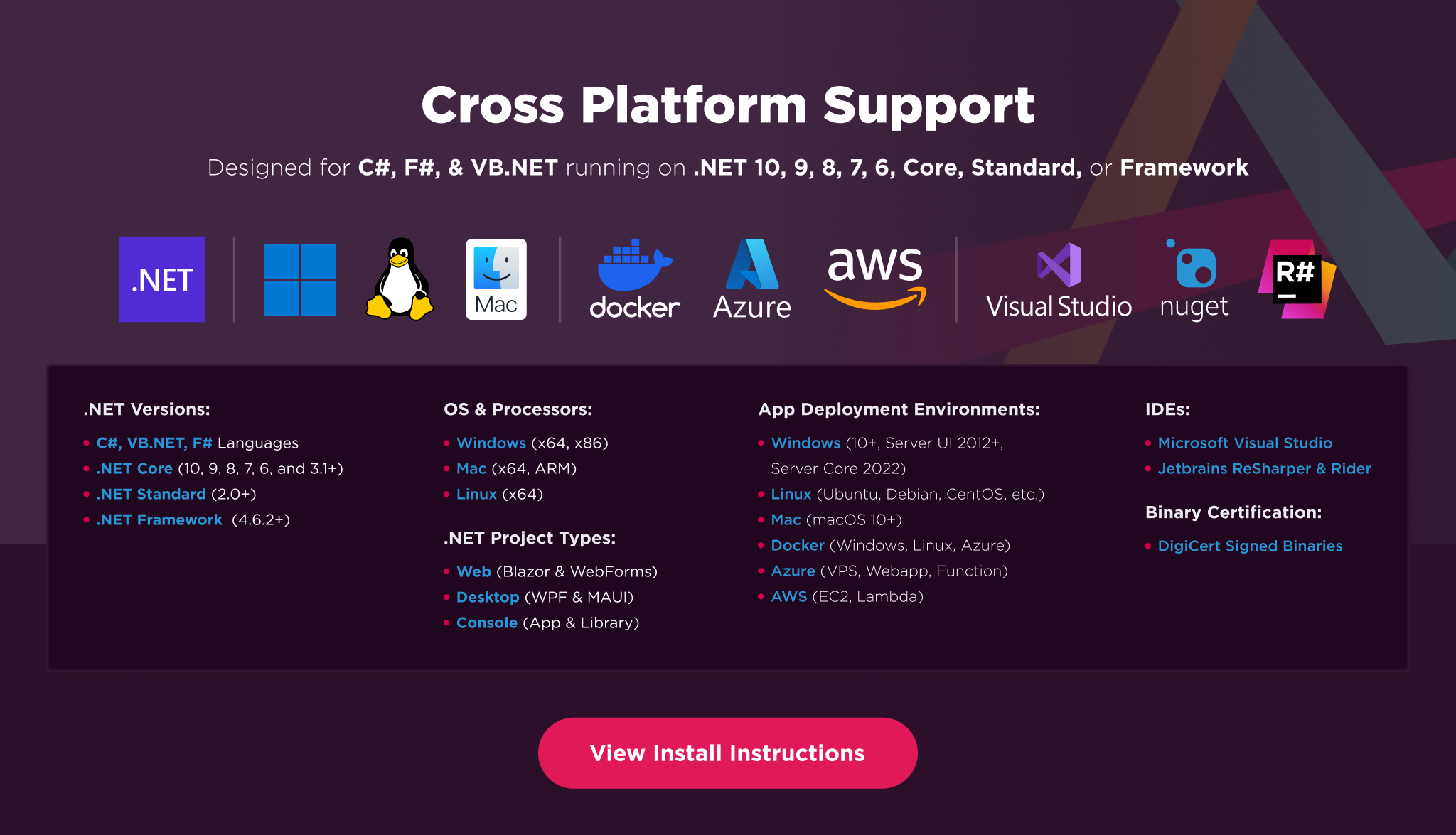
IronPDF is built for modern .NET and supports a wide range of project types and operating systems.
Platforms: .NET 10, .NET 9, .NET 8, .NET 7, .NET 6, .NET 5, Core 2x & 3x, Standard 2
Framework: .NET Framework 4.6.2 (and above)
App Models: Console, Web, and Desktop Apps, MVC, Blazor, MAUI, Razor Pages, Web Forms
Operating Systems: Windows, macOS, Linux (Debian, CentOS, Ubuntu)
IDEs: Microsoft Visual Studio or Jetbrains ReSharper & Rider
License
IronPDF is a commercially licensed product.
Trial License: Get a free developer key to evaluate the full library with no commitment. For development and testing. Start your trial HERE.
Purchase a License: Unlock the library for use in commercial projects and access technical support. Purchase your license HERE.
Getting Help & Support
Have a question or running into an issue?
Email Support: Reach out to support directly at support@ironsoftware.com.
Live Chat Support: https://ironpdf.com/#helpscout-support
Report a Bug: https://ironsoftware.com/ticket-submission/
Community: https://ironsoftware.com/company/iron-slack-community/
| Product | Versions Compatible and additional computed target framework versions. |
|---|---|
| .NET | net5.0 is compatible. net5.0-windows was computed. net6.0 is compatible. net6.0-android was computed. net6.0-ios was computed. net6.0-maccatalyst was computed. net6.0-macos was computed. net6.0-tvos was computed. net6.0-windows was computed. net7.0 was computed. net7.0-android was computed. net7.0-ios was computed. net7.0-maccatalyst was computed. net7.0-macos was computed. net7.0-tvos was computed. net7.0-windows was computed. net8.0 is compatible. net8.0-android was computed. net8.0-browser was computed. net8.0-ios was computed. net8.0-maccatalyst was computed. net8.0-macos was computed. net8.0-tvos was computed. net8.0-windows was computed. net9.0 was computed. net9.0-android was computed. net9.0-browser was computed. net9.0-ios was computed. net9.0-maccatalyst was computed. net9.0-macos was computed. net9.0-tvos was computed. net9.0-windows was computed. net10.0 was computed. net10.0-android was computed. net10.0-browser was computed. net10.0-ios was computed. net10.0-maccatalyst was computed. net10.0-macos was computed. net10.0-tvos was computed. net10.0-windows was computed. |
| .NET Core | netcoreapp2.0 is compatible. netcoreapp2.1 was computed. netcoreapp2.2 was computed. netcoreapp3.0 was computed. netcoreapp3.1 was computed. |
| .NET Standard | netstandard2.0 is compatible. netstandard2.1 was computed. |
| .NET Framework | net461 was computed. net462 is compatible. net463 was computed. net47 was computed. net471 was computed. net472 was computed. net48 was computed. net481 was computed. |
| MonoAndroid | monoandroid was computed. |
| MonoMac | monomac was computed. |
| MonoTouch | monotouch was computed. |
| Tizen | tizen40 was computed. tizen60 was computed. |
| Xamarin.iOS | xamarinios was computed. |
| Xamarin.Mac | xamarinmac was computed. |
| Xamarin.TVOS | xamarintvos was computed. |
| Xamarin.WatchOS | xamarinwatchos was computed. |
-
.NETStandard 2.0
- IronPdf.Native.Chrome.Windows (>= 2026.10.6 && < 2026.11.0)
- IronPdf.Slim (= 2026.10.3)
- IronSoftware.Native.PdfModel (>= 2026.10.6 && < 2026.11.0)
NuGet packages (27)
Showing the top 5 NuGet packages that depend on IronPdf:
| Package | Downloads |
|---|---|
|
PDF.Core
IronPDF for .Net Core 2.x and 3.x allows developers to create, edit and extract PDF content within .Net Core Applications & Websites. The Iron PDF Core library takes the frustration out of generating PDF documents by not relying on proprietary APIs. "Html-To-Pdf" renders pixel-perfect PDFs from open standard document types: HTML, JS, CSS, JPG, PNG, GIF, and SVG. In short, it uses skills that developers already posses. Key features include: * "Html-To-Pdf" creates PDF files from HTML, CSS, JavaScript, and Images. * "Url-To-Pdf" generates PDFs from existing html pages by simply providing their URL. * "Image-To-PDF" creates PDF documents from image files. * PDF to Image functionality can render PDF documents to image files. * Extract text and images from existing PDFs. * Create, Fill and read data from PDF forms. * Merge, Split and Manipulate PDFs to edit PDF structure and content. * Add Page Numbers, Headers, Footers, Watermarks, Tables, Text and Image Assets. * Edit, Stamp and Watermark PDF files with text, images and HTML * Apply HTML or PDF backgrounds to PDF pages * Sign PDF files with digital certificates IronPDF can be used within ASP.NET projects, MVC, Web Services, Console & Desktop Applications. Requires .Net Core 2.x, 3.x or higher. Supports Windows, Ubuntu, Debian, CentOS, BSD, MacOS and Azure platforms. Licensing & Support available for commercial deployments. For code examples, documentation & more visit http://ironpdf.com For support please email us at developers@ironsoftware.com |
|
|
Jari.FnTrust.Shared
Package Description |
|
|
Co.Backend.Packages.Infrastructure
Package Description |
|
|
BopsGeneralUtilities
All implementations for Bops features |
|
|
Bastion.Recipients.Api
Package Description |
GitHub repositories (2)
Showing the top 2 popular GitHub repositories that depend on IronPdf:
| Repository | Stars |
|---|---|
|
devmentors/Cine
Modular monolith in .NET Core
|
|
|
marinasundstrom/YourBrand
Prototype enterprise system for e-commerce and consulting services
|
| Version | Downloads | Last Updated |
|---|---|---|
| 2026.10.3 | 24 | 10/12/2026 |
| 2026.10.1 | 18,816 | 9/30/2026 |
| 2026.9.2 | 74,350 | 9/1/2026 |
| 2026.8.1 | 109,238 | 8/3/2026 |
| 2026.7.2 | 118,254 | 6/26/2026 |
| 2026.6.1 | 120,097 | 5/26/2026 |
| 2026.5.2 | 85,218 | 4/29/2026 |
| 2026.4.1 | 137,120 | 3/27/2026 |
| 2026.3.1 | 165,255 | 2/26/2026 |
| 2026.2.1 | 30,837 | 2/17/2026 |
| 2026.1.3 | 34,259 | 2/9/2026 |
| 2025.12.2 | 226,472 | 12/26/2025 |
| 2025.11.12 | 194,336 | 11/10/2025 |
| 2025.10.8 | 250,219 | 10/8/2025 |
| 2025.9.4 | 169,699 | 9/2/2025 |
| 2025.8.8 | 113,385 | 8/13/2025 |
| 2025.7.17 | 78,150 | 7/22/2025 |
| 2025.6.8 | 255,455 | 6/17/2025 |
Updates
- Added a .NET 8 build of IronPdf compiled against SixLabors.ImageSharp 4.1.3, fixing MissingMethodException when rendering images on .NET 8
- Updated IronSoftware.System.Drawing to 2026.11.3 to resolve CVEs CVE-2026-106110 through CVE-2026-106116 via SixLabors.ImageSharp 4.1.3 on .NET 8+. Earlier .NET frameworks remain unaffected by this fix