Fuse 5.1.0
See the version list below for details.
dotnet tool install --global Fuse --version 5.1.0
dotnet new tool-manifest
dotnet tool install --local Fuse --version 5.1.0
#tool dotnet:?package=Fuse&version=5.1.0
nuke :add-package Fuse --version 5.1.0
 Fuse
Fuse





Faster compiler feedback for AI coding agents on .NET.
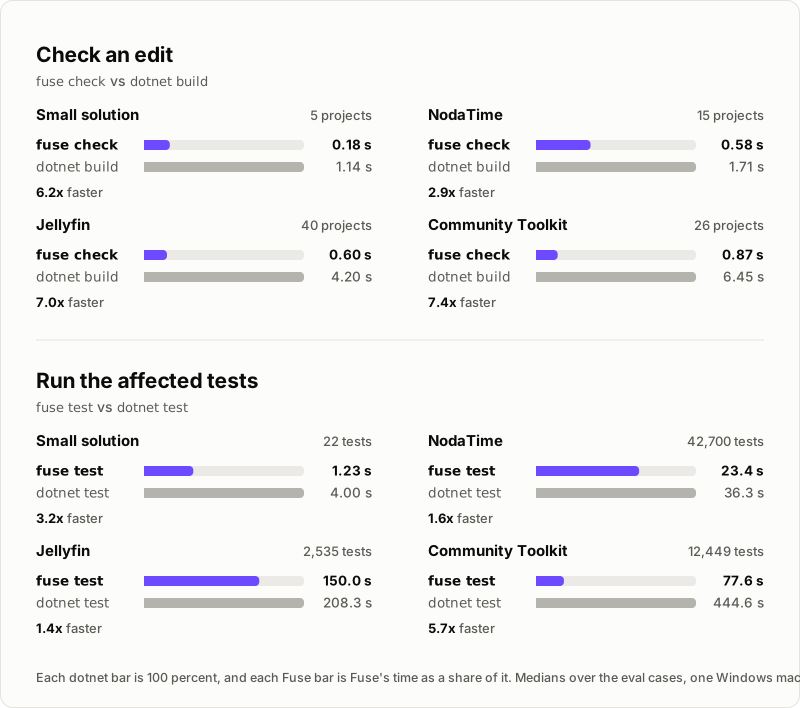
Fuse keeps your solution compiled in memory with Roslyn and checks each edit against it, up to 7.4x faster than dotnet build. The agent gets only the errors its edit introduced, including breaks in other projects, and when it runs dotnet test, only the tests the change can reach run and only failures are printed.
Fuse is built for AI coding agents. After fuse init, the agent's harness runs Fuse after every edit and before the agent finishes, and in most harnesses on every dotnet build and dotnet test, so you do not run it yourself. Its commands also run from a terminal, to try Fuse out, see what the agent receives, or find out why a hook is silent.
Website | Documentation | Getting started | Results | Changelog
Features
- Introduced errors only. Fuse compares the working tree, your files as they are on disk, with HEAD, the commit you have checked out, and never reports an error HEAD already has.
- Breaks across projects. When an edit changes a declaration, Fuse checks the dependent projects that use it and names the change that broke each file.
- Affected tests.
fuse testruns only the tests the change can reach, and prints only the failures. - Compact builds.
fuse buildrunsdotnet buildand prints only its errors. - Hooks for your agent.
fuse initregisters hooks with your agent's harness that check each edit, check every change before the agent finishes, and rewritedotnet buildanddotnet testto their Fuse equivalents. - An MCP server.
fuse mcpserves the check, test and build operations to MCP hosts that run no hooks. - Local, with nothing to configure. Fuse runs on your machine, has no telemetry, makes no network calls of its own, and reads no configuration.
Supported harnesses
| Harness | Integration |
|---|---|
| Claude Code | Hooks |
| Cursor | Hooks |
| Gemini CLI | Hooks |
| Codex | Hooks |
| GitHub Copilot CLI | Hooks |
| OpenCode | Plugin |
| VS Code agent mode | MCP server, since VS Code runs no hooks |
fuse init detects each one by its folder or file in the repository root and sets up Claude Code when it finds none. Connect your agent lists what it writes for each one.
Getting started
Requirements
- The .NET 10 SDK
- git, and a repository with at least one commit
- Restored projects: Fuse never runs
dotnet restoreon its own
Install
dotnet tool install -g Fuse
dotnet tool install -g puts fuse in ~/.dotnet/tools (%USERPROFILE%/.dotnet/tools on Windows), which has to be on your PATH, for you and for your agent.
Set up a repository
Run fuse init in the repository to register Fuse's hooks with your agent's harness:
fuse init
wrote .claude/settings.json
wrote .gitignore
fuse: hooks registered; after each edit your agent gets the compiler errors the edit introduced, `dotnet test` runs the affected tests, and `dotnet build` prints only its errors
That is the whole setup. From then on the agent hears from Fuse only when an edit introduced an error, and you do not need to run any other command.
Try it from the command line
The hooks run the same operations that the commands below run, so a terminal shows what the agent receives. Use them to try Fuse out, to test it on your repository, or to investigate a hook that says nothing; in day-to-day work the agent runs them. After an edit that renames Calc.Add in a library, fuse check reports the callers it broke in the projects that depend on it:
$ fuse check
App/Program.cs(3,30): error CS1061: 'Calc' does not contain a definition for 'Add' and no accessible extension method 'Add' accepting a first argument of type 'Calc' could be found (are you missing a using directive or an assembly reference?)
  removed: public int Add(int a, int b)
Lib.Tests/CalcTests.cs(6,54): error CS1061: 'Calc' does not contain a definition for 'Add' and no accessible extension method 'Add' accepting a first argument of type 'Calc' could be found (are you missing a using directive or an assembly reference?)
  removed: public int Add(int a, int b)
fuse: 2 error(s) introduced in 2 file(s) (App, Lib.Tests); Lib declarations changed, 2 dependent project(s) checked
| Command | What it does |
|---|---|
fuse init |
Registers Fuse's hooks with the harnesses this repository uses |
fuse check [files...] |
Reports the errors the working tree has that HEAD does not, across dependent projects |
fuse test [args...] |
Runs the tests affected by your changes |
fuse test --all |
Runs every test |
fuse build [args...] |
Runs dotnet build and prints its errors |
fuse mcp |
Serves fuse_check, fuse_test and fuse_build over stdio to an MCP host |
The getting started tutorial walks through these on a sample repository, including what the hooks send the agent.
Documentation
- Getting started: set Fuse up in a sample repository and see what it reports.
- Commands: every command, its output and its exit codes.
- Messages and fixes: what each message means when Fuse cannot answer, and the fix.
- Connect your agent: what
fuse initsets up for each harness, and how an MCP host runs Fuse. - How it works: how Fuse checks an edit, selects tests and runs them.
- Limits: what a check cannot see, and what to do about it.
- Troubleshooting: why Fuse is silent, slow or failing, and where its logs are.
- Results: measured speed and accuracy on four repositories.
- All documentation
Contributing
Bug reports, feature requests and pull requests are welcome on GitHub, and questions in Discussions. Contributing describes how to build, test and submit a change, and every commit needs a Developer Certificate of Origin sign-off. AI-assisted contributions are welcome under the AI policy, and everyone follows the code of conduct.
To report a vulnerability, follow Security instead of opening a public issue.
License
Fuse is licensed under the Apache License 2.0.
| Product | Versions Compatible and additional computed target framework versions. |
|---|---|
| .NET | net10.0 is compatible. net10.0-android was computed. net10.0-browser was computed. net10.0-ios was computed. net10.0-maccatalyst was computed. net10.0-macos was computed. net10.0-tvos was computed. net10.0-windows was computed. |
This package has no dependencies.
| Version | Downloads | Last Updated |
|---|---|---|
| 5.6.0 | 108 | 10/18/2026 |
| 5.5.0 | 94 | 10/17/2026 |
| 5.4.0 | 103 | 10/17/2026 |
| 5.3.0 | 122 | 10/10/2026 |
| 5.2.4 | 124 | 10/3/2026 |
| 5.2.3 | 134 | 10/2/2026 |
| 5.2.2 | 117 | 10/2/2026 |
| 5.2.1 | 123 | 9/30/2026 |
| 5.2.0 | 109 | 9/30/2026 |
| 5.1.0 | 112 | 9/29/2026 |
| 5.0.0 | 119 | 9/25/2026 |
| 4.4.0 | 619 | 7/30/2026 |
| 4.3.0 | 405 | 7/16/2026 |
| 4.2.1 | 331 | 7/16/2026 |
| 4.2.0 | 362 | 7/15/2026 |
| 4.1.0 | 375 | 7/14/2026 |
| 4.0.0 | 356 | 7/13/2026 |
| 3.2.0 | 398 | 7/3/2026 |
| 3.1.1 | 378 | 7/2/2026 |
| 3.1.0 | 398 | 6/30/2026 |