ClrKernel.Database.Provider.Fabric
0.10.0
dotnet add package ClrKernel.Database.Provider.Fabric --version 0.10.0
NuGet\Install-Package ClrKernel.Database.Provider.Fabric -Version 0.10.0
<PackageReference Include="ClrKernel.Database.Provider.Fabric" Version="0.10.0" />
<PackageVersion Include="ClrKernel.Database.Provider.Fabric" Version="0.10.0" />
<PackageReference Include="ClrKernel.Database.Provider.Fabric" />
paket add ClrKernel.Database.Provider.Fabric --version 0.10.0
#r "nuget: ClrKernel.Database.Provider.Fabric, 0.10.0"
#:package ClrKernel.Database.Provider.Fabric@0.10.0
#addin nuget:?package=ClrKernel.Database.Provider.Fabric&version=0.10.0
#tool nuget:?package=ClrKernel.Database.Provider.Fabric&version=0.10.0


ClrKernel
A Jupyter kernel for .NET. C# cells are evaluated with Roslyn's scripting engine
(Microsoft.CodeAnalysis.CSharp.Scripting),
and cells can also be SQL, DAX, PowerShell, shell (bash/zsh/sh), HTTP, or
Mermaid in the same session. Notebooks run interactively in JupyterLab / VS
Code (Jupyter extension) and headlessly via nbconvert or papermill —
including from schedulers like SQL Server Agent.
ClrKernel is a maintained fork of
SciSharp/ICSharpCore, created after
Microsoft deprecated .NET Interactive / Polyglot Notebooks (April 2026).
Relative to upstream it adds: correct headless execution under
nbclient/papermill, full output capture for async/await cells, control
channel + heartbeat + graceful shutdown_request handling, patched vulnerable
dependencies, and the kernelspec shipped inside the NuGet package.
Install
dotnet tool install --global ClrKernel
jupyter kernelspec install "$(clrkernel --kernel-spec-path)" --user --name clrkernel
jupyter kernelspec list   # should show: clrkernel
Requires a .NET 8+ runtime (RollForward=Major: newer majors work) and Jupyter.
Use
Pick the ClrKernel (C#) kernel in JupyterLab or VS Code. Cells support
#r "nuget: Package, Version" and #r "path/to/local.dll" references, with
REPL-style state persisting across cells.
Cells can even define extension methods (or namespaces) — declarations
Roslyn's script mode can't host. Such a cell is compiled as a real class
library behind the scenes and referenced by the session: it executes, an edited
re-run replaces the previous definition, and the methods appear in completion
(with their /// docs) and Go to Definition like any referenced package.
#r lines in the same cell work.
Importing shared libraries
#!import loads C# code from another file into the session — use it to share
helper libraries between notebooks, no .NET Interactive required:
#!import "../lib/jobbooks.dib"
Supports .dib (C# sections run; markdown and other-language sections are
skipped), .ipynb (code cells run), and .csx/.cs (whole file). Relative
paths resolve against the notebook's directory, and nested #!imports inside
a library resolve relative to that library's own file. Each resolved file runs
once per session — re-importing is a no-op unless you pass --force
(#!import --force "lib.dib"), which is handy while iterating on the library
itself. Imported files can use #r directives, including #r "nuget: ...",
and can #!import further files.
Shell & PowerShell cells — local and remote
#!bash / #!zsh / #!sh cells run shell commands like one persistent
terminal session: the working directory and exported environment carry across
cells, ANSI colour renders, and a non-zero exit fails the cell with its exit
code. #!pwsh cells run PowerShell in a persistent in-process runspace — no
separate PowerShell install needed.
Both can run on another machine. Register a target with
#!shell-connect --name web01 --host … --user … (key auth via your SSH
keys/agent/config) or #!pwsh-connect --name srv --host … (--ssh by default,
or --winrm --user … --secret <ref> with the password from the OS credential
store, never a file), then add --connection <name> to any cell. Remote
PowerShell state lives in a persistent remote runspace; remote shell cells keep
their working directory per target. Targets can be saved in connections.json.
See samples/Shell.nb.md and
samples/PowerShell.nb.md.
SQL cells
Set a cell's language to T-SQL (or start it with #!sql) to run T-SQL against
Microsoft SQL Server. You get T-SQL highlighting, live syntax checking,
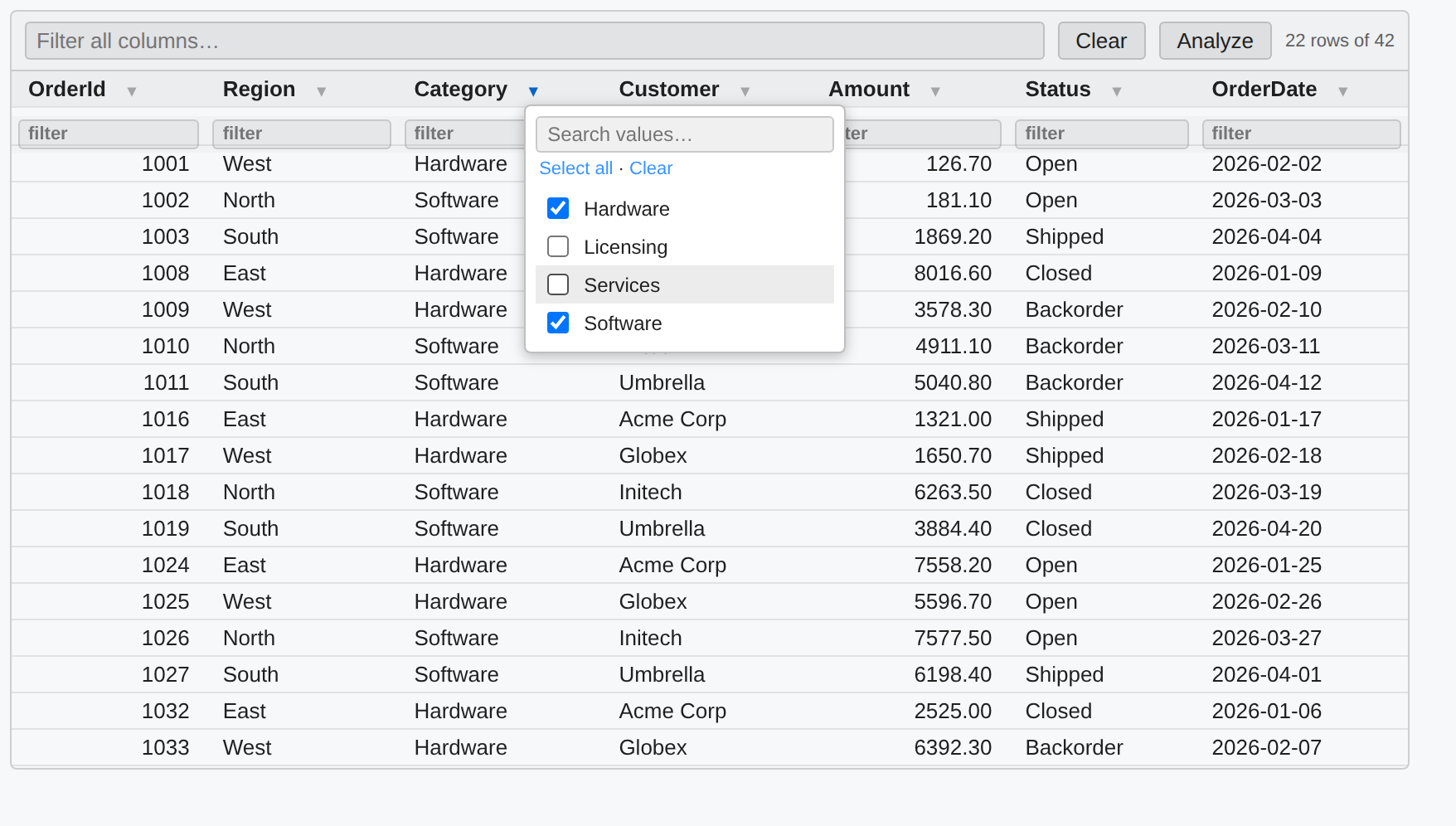
keyword/function completion, and results as the same interactive grid (sort, a
global filter, per-column filters and value pickers that combine, and Analyze)
that C# query results use.
SQL comes in three dialects, grouped together in the language picker:
| Language | Selector | Runs on |
|---|---|---|
| T-SQL | #!sql |
SQL Server, ODBC, JDBC |
| Oracle SQL | #!oraclesql |
Oracle, ODBC, JDBC |
| SQL (Generic) | #!ansisql |
ODBC, JDBC |
The dialect is a property of the cell — it decides which keywords and
functions are completed, so an Oracle cell offers NVL and never NVARCHAR. The
provider is a property of the connection, and it decides what carries the
statement; pointing a cell at a different connection never changes what language
it is written in. A pairing that cannot work is flagged while you write it and
refused by name when you run it, rather than arriving as a parse error from a
driver.
#!sql still means T-SQL, as it always has: notebooks written before the split
open, complete and run exactly as they did. #!sql-bulk, #!sql-merge,
#!sql-run and #!sql-deploy are SQL Server's own and stay on #!sql.
Non-SQL-Server connections are defined in connections.json ("$type": "Oracle",
"Odbc", "Jdbc"); the driver package is loaded per notebook with
#r "nuget: ClrKernel.Database.Provider.Oracle", and a cell naming a connection
whose package is not loaded says which line to add.
Connections are named and secret-free — passwords never go in the
notebook. Define them with #!sql-connect, or use the connection button next to
the cell's language picker, which prompts for credentials and stores the
password in your OS credential store (macOS Keychain, Windows Credential Manager,
Linux libsecret):
#!sql-connect --name analytics --server sql-warehouse --database reports --auth integrated --default
--auth integrated is Windows Integrated auth on Windows and Microsoft Entra
(Azure AD) sign-in on macOS/Linux; --auth sql --user <u> is a SQL login whose
password comes from the secret store (or the CLRKERNEL_SECRET_SQL_<NAME> env
var for headless runs). A cell targets the default connection, or one named with
a leading -- connections <name> comment. Multiple connections can be used
across cells in one notebook. A #!sql-connect --name analytics also binds a C#
variable analytics (when the name is a valid identifier) so C# cells can query
it straight away; use --var <name> for a custom variable or --no-var to skip.
See samples/Sql.nb.md.
After adding a connection with the button you can save it to a
connections.json (the prompt shows a file found up the folder tree or lets you
choose one). Only a secret reference is written — the password stays in the OS
credential store. Saved SqlServer entries are auto-loaded in later sessions,
so a saved connection resolves without re-adding it (and the same file feeds the C#
Oracle.FromConfig / Odbc.FromConfig providers).
Querying from C#
C# cells get an ergonomic query API on SqlServer — no #!sql-connect needed for
ad-hoc work. SqlServer.Connection(server, database) opens a connection (Integrated
Security by default), and .Query(sql).Results() returns rows that render as
the interactive grid and are enumerable as dynamic rows in the same object:
var dw = SqlServer.Connection("dw.db.local", "datawarehouse");

var orders = dw.Query("select * from dbo.Orders").Results();  // grid when shown…
foreach (var o in orders) Console.WriteLine($"{o.OrderId}: {o.Total}");  // …rows in code
.Results<T>() maps rows to a record or class; .Query(sql, new { id }) binds
parameters; .Scalar<T>(sql) and .Execute(sql) cover single values and
non-queries. A .Table(name) reads as a source and writes as a bulk-copy target
(createIfMissing builds it from the source schema), and .Transaction() scopes
a unit of work:
var recent = dw.Query("select * from dbo.Orders where Year = @y", new { y = 2026 }).Results<Order>();
dw.Table("stg.Orders").BulkCopyFrom(dw.Query("select * from dbo.Orders"), createIfMissing: true);
record Order(int OrderId, string Customer, decimal Total);
For a SQL login use SqlServer.Connection(server, db, user, "sql:secretRef") (password
from the secret store); SqlServer.AzureConnection(...) for Entra, or
SqlServer.Database("analytics") to reuse a registered #!sql-connect connection. See
samples/SqlQuery.nb.md.
Bulk copy & MERGE (ETL)
SQL cells can also move and upsert data, as cell magics or a C# API (both share
the same connections). #!sql-bulk streams a query's rows into a table (with a
live progress bar); #!sql-merge upserts a source into a target on key columns
and reports inserted/updated/deleted counts:
#!sql-bulk  --from analytics --query "SELECT * FROM dbo.Orders" --to warehouse --table stg.Orders --truncate
#!sql-merge --connection warehouse --target dbo.Customers --source stg.Customers --on Id
Add --create to #!sql-bulk to create the destination table from the source
schema when it doesn't already exist (the same create-from-schema the C#
.Table(name).BulkCopyFrom(query, createIfMissing: true) uses).
From C# cells, SqlServer bulk-loads any collection (POCOs, dictionaries, scalar
arrays) and runs MERGEs — SqlServer.BulkCopy("warehouse", "dbo.Items", rows),
SqlServer.Merge("warehouse", new MergeSpec { Target = "dbo.Customers", Source = "stg.Customers", KeyColumns = new[] { "Id" } }). See
samples/SqlEtl.nb.md.
Pipelines & deployment
Annotate SQL cells with -- step <name> and -- needs <a, b> to build an ETL
pipeline. #!sql-run executes the steps as a dependency DAG — independent steps
run in parallel, a failure skips everything downstream, and a live status board
tracks each step. #!sql-deploy --path <folder> deploys a folder of .sql
definitions idempotently (CREATE OR ALTER, retried across passes to resolve
cross-file dependencies). The -- step / -- needs directives and every
#!sql-* magic and flag autocomplete (Ctrl+Space) — -- needs even completes
step names from your other cells. See
samples/SqlPipeline.nb.md.
Other databases (Oracle, ODBC, JDBC)
The fluent query API isn't SQL-Server-only. Opt-in provider packages give the exact
same Query(sql).Results() experience — interactive grid + dynamic rows, typed
.Results<T>(), .Table(), .Transaction() — against other engines. Load a
provider per notebook with #r "nuget: …" so its driver isn't pulled unless you use
it:
#r "nuget: ClrKernel.Database.Provider.Oracle"
using ClrKernel.Database.Provider.Oracle;
var erp = Oracle.Connect("orahost", 1521, "ORCL", "scott", "oracle:erp");   // password from the secret store
erp.Query("select * from emp").Results()
#r "nuget: ClrKernel.Database.Provider.Odbc"
using ClrKernel.Database.Provider.Odbc;
var db = Odbc.FromConnectionString("Driver={PostgreSQL Unicode};Server=host;Database=app;");
db.Query("select * from public.orders").Results<Order>();
ClrKernel.Database.Provider.Jdbc (experimental) runs Java JDBC drivers via IKVM — you
supply the driver, as a jar or IKVM-compiled to an assembly; validate on Windows
before relying on it.
Config-file connections. Keep connection settings out of notebooks in a
connections.json (searched up the folder tree; $type selects the provider,
passwords are secret references resolved from the OS store / env var):
{
  "erp": { "$type": "Oracle", "server": "orahost", "port": 1521,
           "serviceName": "ORCL", "userId": "scott",
           "password": { "secret": "oracle:erp" } }
}
var erp = Oracle.FromConfig("erp"); // Odbc.FromConfig(...) too
All providers share the ClrKernel.Database core (the same secret store and result grid
as #!sql cells). See samples/MultiProvider.nb.md.
Analysis Services (SSAS / Fabric)
C# cells can drive Tabular models — on-prem SQL Server Analysis Services, Azure
Analysis Services, or Microsoft Fabric / Power BI semantic models — via the AnalysisServices
helper: query with DAX, read table/partition metadata, and process the model.
var cube = AnalysisServices.Connect("ssas.db.local", "DataWarehouse");   // Integrated auth
cube.Query("EVALUATE TOPN(100, 'Sales')");                   // DAX → interactive grid
cube.Tables().DisplayTable();                                // model metadata
cube.ProcessPartitions(new[] { ("Sales", "2026") });         // refresh a partition
cube.Recalculate();
AnalysisServices.ConnectFabric("Workspace", "Model") connects to a Fabric/Power BI semantic
model with Entra auth. On-prem SSAS + Integrated auth + processing generally run
on Windows (e.g. SQL Server Agent). See
samples/AnalysisServices.nb.md.
DAX cells
Set a cell's language to DAX (or start it with #!dax) to run DAX against a
cube, results in an interactive grid. Define cubes with #!dax-connect (the
default, or --connections <name> per cell); the #!dax-* magics/flags, cube
names, and DAX keywords/functions autocomplete.
#!dax-connect --name analytics --server ssas.db.local --database DataWarehouse --default
EVALUATE TOPN(100, SUMMARIZECOLUMNS('Date'[Year], "Revenue", [Total Sales]), [Revenue], DESC)
#!dax-connect --fabric --workspace W --model M targets a Fabric / Power BI
semantic model. See samples/Dax.nb.md.
Fabric warehouse writes
C# cells can write to Microsoft Fabric Warehouse tables via the Fabric
helper (ClrKernel.Database.Provider.Fabric). It bulk-inserts a data reader by staging Parquet to a
lakehouse in OneLake and loading it with OPENROWSET — the fast path for large
loads — and it can create the target table from the reader's schema using
Fabric-supported types (UTF-8 varchar, datetime2 — never nvarchar). All auth
is Microsoft Entra; no passwords are handled.
var wh = Fabric.Connect()                       // interactive / default Entra sign-in
    .Workspace("Analytics")
    .Warehouse("SalesDW")
    .WithStaging("Lakehouse_Staging");          // a lakehouse in the same workspace

// Bulk-insert any IDataReader (e.g. a SQL Server query via ClrKernel.Language.Sql):
using var conn = SqlServer.OpenConnection("analytics");
using var cmd = new SqlCommand("SELECT * FROM dbo.Orders", conn);
using var reader = cmd.ExecuteReader();
wh.BulkInsert(reader, "dbo.Orders", createIfMissing: true);
The reload-batch wrapper deletes a segment and reloads it for a set of tables in parallel — each table gets a fresh source reader from your factory:
var requests = new[] {
    new FabricReloadRequest { TableName = "FactSales", SegmentFilter = "Year = 2026" },
    new FabricReloadRequest { TableName = "FactReturns", SegmentFilter = "Year = 2026" },
};
var results = wh.ReloadBatch(
    requests,
    req => {
        var c = SqlServer.OpenConnection("analytics");
        var q = new SqlCommand($"SELECT * FROM {req.TableName} WHERE {req.SegmentFilter}", c);
        return q.ExecuteReader(CommandBehavior.CloseConnection); // reader owns/closes the connection
    },
    maxParallelism: 4);
results.DisplayTable();
For a service principal, use Fabric.ClientSecret(tenantId, clientId, secret).
Fabric.Interactive() always opens a browser sign-in so you pick the account,
instead of Fabric.Connect()'s credential chain silently reusing an ambient
az CLI or Visual Studio session. See
samples/FabricWarehouse.nb.md. (Fabric execution
needs a live tenant, so validate against your own workspace.)
Headless / scheduled execution:
jupyter nbconvert --to notebook --execute --output out.ipynb etl.ipynb
papermill etl.ipynb runs/etl_out.ipynb -k clrkernel --language .net-csharp -p run_date 2026-08-04
A failing cell exits non-zero (job schedulers see the failure); papermill also persists the partially-executed output notebook as a diagnostic artifact.
Scheduling notebooks — ClrKernel Studio (preview)
ClrKernel.Studio is a companion dotnet tool that runs notebooks as scheduled jobs
and serves a web app for editing and watching them, so you don't need an external
scheduler:
dotnet tool install --global ClrKernel.Studio
clrkernel-studio serve --notebooks ./notebooks     # http://localhost:5000
Jobs are files. A *.jobs.yaml is named for the notebook it schedules —
etl.jobs.yaml runs etl.nb.md — and holds one or more jobs, each with its own
cron and parameters, chained with dependsOn. The pair is one unit: it is edited
together, promoted together, and production can never end up holding a schedule
whose notebook is missing.
Files is a browser over the repository: notebooks open in a cell editor with
IntelliSense and per-cell execution, jobs files open as a form or as YAML over the
same buffer, and everything else opens read-only. Work happens on your own branch,
is pushed to test, and reaches prod by promotion — which is refused unless the
exact files being promoted have a green run in test at their current commit.
Dashboard is Overview, Monitoring and Notifications. Monitoring is one grid over every project's runs, filtered, sorted and paged by the server, with rerun from a row — at the branch's HEAD after a fix, or at the exact commit that failed, for reproducing one.
Every run executes in an isolated kernel process, cell by cell, with live progress
and an executed .ipynb kept as the artifact. test and prod both schedule; a
personal branch never does. Run history goes to SQLite, SQL Server, PostgreSQL, or
plain files, with optional retention that never removes a job's most recent run.
Notification rules bind events — a job failed, recovered, ran long, or something
reached production — to webhook or SMTP channels, and the delivery feed records
what failed to send as well as what arrived. Passwords are always resolved from
secret references, never stored in a notebook or a config file.
It also ships as a Docker image — see docs/docker.md for one-shot runs, compose with PostgreSQL, and running behind an nginx reverse proxy, with copy-paste files in docs/examples/docker/.
See docs/studio.md.
Build & test
A cross-platform task runner (built on Nuke) drives build,
test, format, and the VS Code extension. It needs only the .NET SDK — no extra
tools to install. Use ./build.sh on macOS/Linux, .\build.ps1 (or
build.cmd) on Windows.
./build.sh --help                        # list all targets and flags
./build.sh                               # default: restore + build + test the solution
./build.sh Build                         # build the whole solution
./build.sh Test                          # run all unit tests
./build.sh Build --project ClrKernel.Language.Http   # build one project (searches src/ then test/)
./build.sh Test  --filter Mermaid           # run a subset of tests (dotnet test --filter)
./build.sh Format                        # verify formatting  (Format --apply to fix)
./build.sh Extension                     # build the VS Code extension (npm install + tsc)
./build.sh All                           # solution build + test AND the extension
./build.sh Clean                         # delete bin/obj and the extension's out/
./build.sh --configuration Debug Build   # any target accepts --configuration
Targets chain their dependencies automatically (e.g. Test builds first), so a
bare ./build.sh restores, builds, and tests in one go.
Develop
./scripts/install-dev-kernel.sh    # kernel 'clrkernel-dev' running from bin/ output
                                   # iterate: dotnet build + restart kernel
./scripts/install-local-tool.sh    # pack + install the global tool from a local
                                   # feed; tests the full packaged experience
clrkernel --kernel-spec-details    # show which kernelspec the binary resolves
Extending the kernel: your own cell language
A cell language is one class plus one assembly attribute. Implement
ICellLanguage (from ClrKernel.Core.Scripting) — it declares its own
Selectors (#!kql), LanguageTags (the ```kql tags it claims),
DisplayName, and any Directives — then mark the assembly:
[assembly: CellLanguageExport(typeof(MyKqlCellLanguage))]
A notebook that does #r "nuget: My.ClrKernel.Language.Kql" registers it in
that notebook's session only: its selectors route immediately, its tags
execute in .nb.md files, its directives get completion and diagnostics, and
the VS Code cell-language picker refreshes. Other notebooks are untouched.
Connection types work the same way — expose a static
ConnectionProviderDescriptor Descriptor describing your settings (keys, auth
modes, which need secrets) and mark the assembly
[assembly: ConnectionProviderExport(typeof(MyProvider))]; the editor's
connection wizard is generated from it, with no extension changes.
One bound: syntax highlighting and file icons are VS Code install-time contributions, so a runtime-registered language gets full behaviour but plain text styling unless you ship a companion extension with a grammar.
License
Apache 2.0, preserving the upstream license. Original work © SciSharp (Kerry Jiang, Haiping Chen, and contributors); fork maintained by ClrKernel.
| Product | Versions Compatible and additional computed target framework versions. |
|---|---|
| .NET | net8.0 is compatible. net8.0-android was computed. net8.0-browser was computed. net8.0-ios was computed. net8.0-maccatalyst was computed. net8.0-macos was computed. net8.0-tvos was computed. net8.0-windows was computed. net9.0 was computed. net9.0-android was computed. net9.0-browser was computed. net9.0-ios was computed. net9.0-maccatalyst was computed. net9.0-macos was computed. net9.0-tvos was computed. net9.0-windows was computed. net10.0 was computed. net10.0-android was computed. net10.0-browser was computed. net10.0-ios was computed. net10.0-maccatalyst was computed. net10.0-macos was computed. net10.0-tvos was computed. net10.0-windows was computed. |
-
net8.0
- Azure.Identity (>= 1.21.0)
- Azure.Storage.Files.DataLake (>= 12.21.0)
- ClrKernel.Core.Primitives (>= 0.10.0)
- ClrKernel.Database.Entra (>= 0.10.0)
- Microsoft.Data.SqlClient (>= 5.2.2)
- Microsoft.Fabric.Api (>= 1.0.0)
- Parquet.Net (>= 5.2.0)
- Snappier (>= 1.3.1)
NuGet packages
This package is not used by any NuGet packages.
GitHub repositories
This package is not used by any popular GitHub repositories.