UmbracoPrism 3.0.0
dotnet add package UmbracoPrism --version 3.0.0
NuGet\Install-Package UmbracoPrism -Version 3.0.0
<PackageReference Include="UmbracoPrism" Version="3.0.0" />
<PackageVersion Include="UmbracoPrism" Version="3.0.0" />
<PackageReference Include="UmbracoPrism" />
paket add UmbracoPrism --version 3.0.0
#r "nuget: UmbracoPrism, 3.0.0"
#:package UmbracoPrism@3.0.0
#addin nuget:?package=UmbracoPrism&version=3.0.0
#tool nuget:?package=UmbracoPrism&version=3.0.0

One source. A spectrum of brands.
Umbraco Prism
dotnet add package UmbracoPrism
One Umbraco instance. Multiple branded portals. Native mobile app included.
Multi-tenant website branding and identity at runtime. Add a mobile app with one click.
Try it Now — No Install Required
Click the button to spin up the full Umbraco Prism stack in a browser — no local setup, no Docker, no .NET install. GitHub handles everything. The Codespace is completely throwaway when you're done.
The stack starts automatically — watch the terminal at the bottom of your screen. It polls until Keycloak, the Aspire Dashboard, and the TestSite are all ready (first boot: ~3 minutes), then prints the URLs and credentials. When the Aspire Dashboard port is detected VS Code opens it in your browser automatically.
- Wait for the terminal to print 🎉 Umbraco Prism is ready!
- Click the TestSite URL → log in with
demo@prism.local/password(Keycloak SSO) - Browse My Service Requests to see the demo service blueprint in action
Credentials at a glance:
| What | Username | Password |
|---|---|---|
| TestSite (Keycloak SSO) | demo@prism.local |
password |
Umbraco backoffice (/umbraco) |
admin@prism.local |
PrismLocal!12345 |
| Keycloak admin console | admin |
admin |
When you're done: go to github.com/codespaces, find your Codespace, and click Stop (or Delete to free quota immediately). Stopping halts billing; the Codespace resumes from where you left off.
🚀 Interactive Walkthrough — "Payment Demo Service Blueprint"
Once your stack is running, follow the step-by-step guide to see the demo service blueprint in action — with explanations of what Umbraco.Prism and the Umbraco backoffice are doing at each stage.
→ Full walkthrough: docs/walkthroughs/payment-demo.md
The walkthrough covers:
- Logging in via Keycloak SSO and submitting a payment form
- Waiting states — the form pauses and persists while a reviewer processes it (Prism's core pattern)
- Watching the service request hub show real-time status updates
- Switching to the reviewer role and advancing the service request from the admin panel
- The member page auto-updates without a refresh when the reviewer completes their action
- Behind the scenes: service blueprint definitions, state machines, the Prism process manager engine, and how persistence and real-time updates work
- Exploring further: editing service blueprint definitions, monitoring engine logs in Aspire, testing async patterns
Alternative: Planning Application walkthrough for a complete end-to-end journey covering authoring, public submission, member continuation, and back-stage review.
Try the Demo — Local Setup
Get from clone to running in five minutes. No Azure account needed.
One-time setup:
.NET 10 SDK(Download)- Trust the .NET dev certificate — run
dotnet dev-certs https --trust - Docker Desktop running (Download)
Node.js 20+(Download)- Frontend dependencies:
cd src/UmbracoPrism.Client && npm install
VS Code tip: the C#: Aspire (Full Stack) launch now validates the .NET 10 SDK and Docker first. This repo uses the Aspire AppHost SDK and NuGet packages, so you do not need
dotnet workload install aspire.
Start the full stack:
dotnet run --project src/UmbracoPrism.AppHost
Then:
- Open the Aspire dashboard at
https://localhost:17214 - Click the TestSite URL → log in with
demo@prism.local/password - Browse My Service Requests to see the demo service blueprint in action
- The MockBusinessApp runs alongside at
https://localhost:7245— it accepts the same demo credentials and powers the service blueprint engine
Optional: Explore Keycloak admin at https://localhost:8443/admin (admin / admin).
Why this matters for local dev:
- The local Keycloak uses standard OIDC code-flow scopes — no offline tokens needed for a fresh clone.
- Prism preserves the
id_tokenin the session, enabling logout callbacks to Keycloak with the requiredid_token_hint. - MockBusinessApp trusts the browser-facing Keycloak authority (
https://localhost:8443), so the service request flow validates bearer tokens against the public issuer, not the internal container URL (http://localhost:8080). - Aspire runtime state lives under
artifacts/aspire/testsite-runtime/— the demo and Playwright suite never mutate the standalone TestSite database atsrc/UmbracoPrism.TestSite/umbraco/Data/.
For detailed setup, troubleshooting, and architecture: See ASPIRE_DEV.md.
What You Get
Prism is a NuGet package providing enterprise-ready multi-tenancy and extensibility for Umbraco. Below is what the Core library provides. The TestSite is a reference implementation showing how to extend Prism for a business domain (vinyl records).
Multi-Tenant Web — One Instance, Hundreds of Brands (🔵 Core)
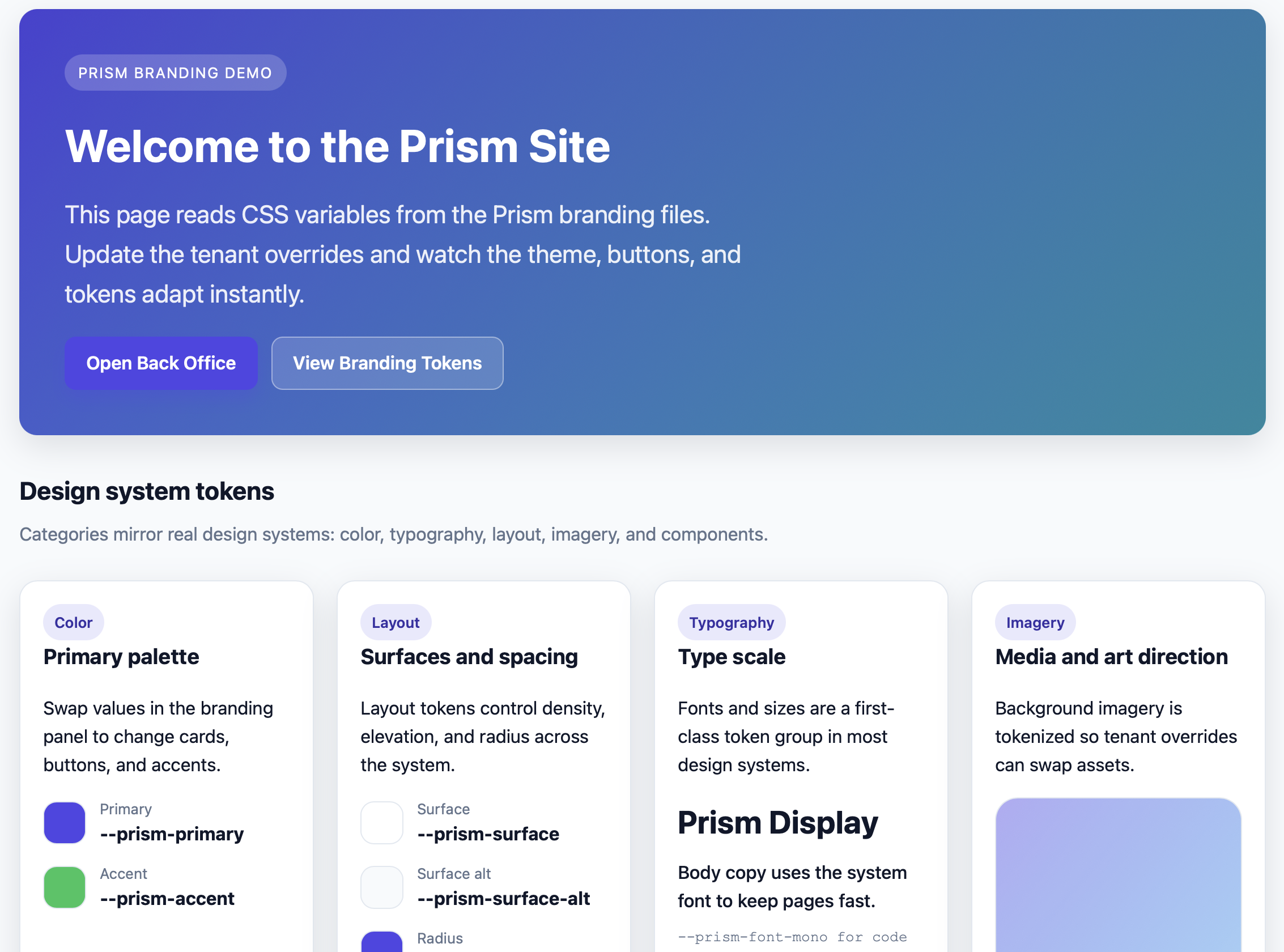
Serve distinct branded portals from one Umbraco instance. Runtime branding, domain resolution, tenant isolation.
Web features:
Domain-based tenant resolution — each client gets their own hostname
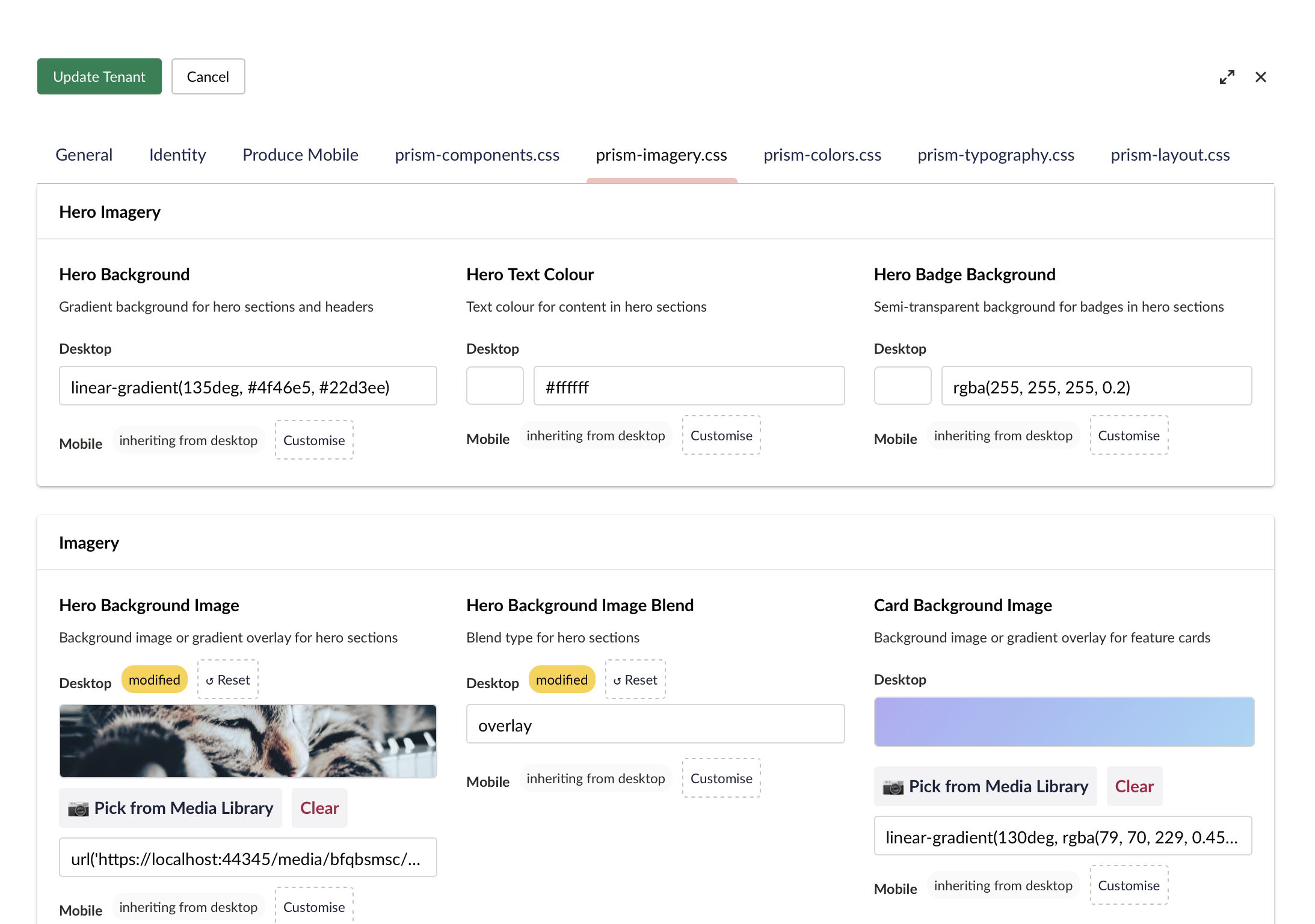
Live branding editor — CSS variables update without deploy
Branding as a Design System — annotated CSS variables become labeled form fields, grouped into sections (Colors, Typography, Components), with type-aware editors (color pickers, sliders, text inputs)
@property --prism-primary { syntax: '<color>'; inherits: true; initial-value: #4f46e5; } :root { /* @prism section: Brand Colours | label: Primary Brand Colour | description: Main brand colour used for buttons and links */ --prism-primary: #4f46e5; }Per-tenant OIDC — any OIDC-compliant provider (Entra ID, Keycloak, etc.), zero local Members
Downstream auth — propagate tenant identity to internal APIs
Tenant isolation — authorization policies enforce data boundaries
Produce Mobile — Generate Apps from Backoffice (🔵 Core)
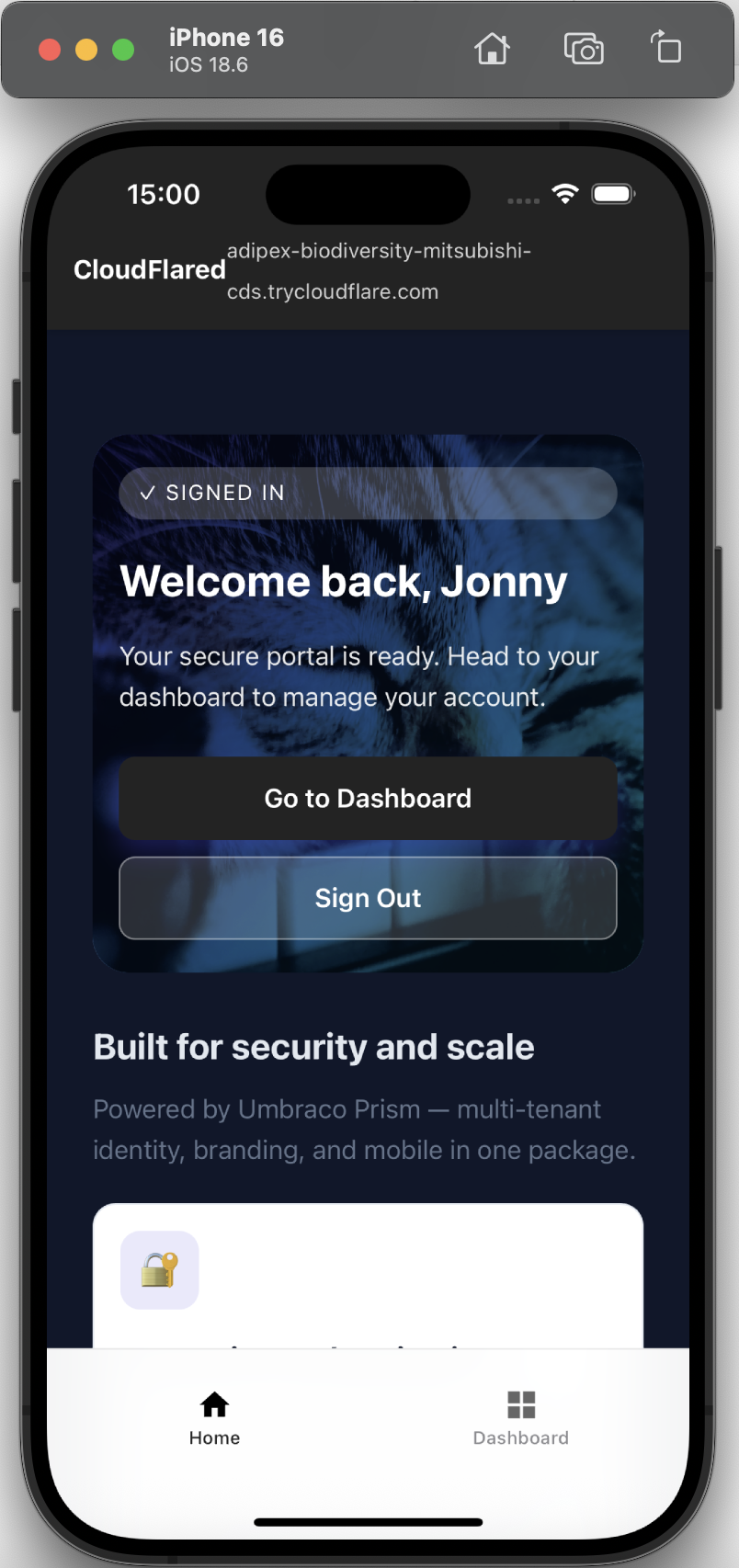
Turn tenant settings into iOS/Android apps. No complex native coding, just click Produce Mobile.
Mobile features:
- Biometric login (Face ID, fingerprint) — skip OIDC on return
- Push notifications (FCM/APNs) — content or API triggered
- Offline-ready layouts with safe-area handling
- Tenant branding at runtime (colors, logo, splash)
Run in simulator:
npm run bootstrap:ios
→ Mobile Setup | Biometric Auth
Notification Infrastructure — Extend for Your Business Logic (🔵 Core)
Prism provides a foundation for sending notifications. The Core library includes:
- Generic notification service (
IPrismNotificationService) — Send to members, genre subscribers, or broadcast - Config-driven event handling —
PrismContentPublishedHandlerautomatically triggers notifications when content is published - Subscription persistence — Built-in database schema and queries for tracking member notification preferences
- Rate limiting — Prevent notification spam with automatic throttling
Your app extends this with business-specific handlers and domain models. For example, the TestSite demo includes a PrismVinylNotificationController that triggers "back-in-stock" alerts when a vinyl record is republished.
Why this design matters for enterprise: You get the extensibility platform out of the box. Add your business logic without rebuilding the notification infrastructure.
→ Notifications Architecture | Notifications API Reference
Quick Start
1. Install
dotnet add package UmbracoPrism
Prism registers automatically via PrismComposer — no manual service registration needed.
2. Configure
Add to appsettings.json:
{
  "Prism": {
    "VaultUri": "https://your-keyvault.vault.azure.net/"
  }
}
For local dev without Azure Key Vault, see Local Authentication Walkthrough.
3. Run
dotnet run
Prism auto-creates document types (homePage, memberDashboard) on first startup.
4. Add Your First Tenant
In backoffice:
- Settings → Prism Dashboard
- Add tenant (hostname, identity settings, branding)
- OIDC tenants (Entra ID, Keycloak, etc.): enter OIDC authority and client ID, then provide the Key Vault secret name as the
OidcClientSecretReferencewith providerazure-key-vault; the localhost Keycloak demo is the only inline-secret exception
- OIDC tenants (Entra ID, Keycloak, etc.): enter OIDC authority and client ID, then provide the Key Vault secret name as the
- Visit the hostname — see branded portal
How It Works
Multi-tenancy at runtime: Middleware resolves hostname to tenant. One content tree serves hundreds of portals.
Stateless auth: No local Members. Identity deferred to OIDC providers (any OIDC-compliant system: Entra ID, Keycloak, etc.). Confidential client secrets resolve through Key Vault or the repo-owned localhost demo exception.
Secure-by-default secrets: Production tenants use vault-backed secret references, never raw values in management responses. The localhost Keycloak demo is the only inline-secret path, and runtime rejects inline generic OIDC secrets anywhere else.
Mobile generation: Tenant settings → iOS/Android app. Run in simulator immediately.
Downstream auth: Pass tenant identity to internal APIs without shared state.
Features
Prism Core provides:
- Multi-tenant web domain resolution and branding
- Per-tenant OIDC integration (any provider: Entra ID, Keycloak, etc.)
- Tenant isolation policies and secure secret management
- Notification infrastructure (event-triggered, subscription-based, rate-limited)
- iOS/Android app generation from backoffice settings
- Biometric login for mobile (Face ID, fingerprint)
- Push notifications (FCM/APNs) from Umbraco events or custom triggers
- Offline-ready layouts for mobile
Your app extends with:
- Service blueprint definitions and state machines
- Custom business logic and validation
- Application-specific notification handlers
- Domain models and business processes
Documentation
| Guide | Description |
|---|---|
| Service Blueprint Editor | |
| Embedding the Service Blueprint Editor | Primary integrator recipe. Build a business app on top of Prism. Implement ServiceBlueprintSource, wire the editor, extend the action catalog. |
| AI-Ready Service Blueprint Authoring | Let an AI agent (Claude Code or any MCP client) list, read, validate, simulate, and save your service blueprints — MapServiceBlueprintAuthoringApi() / MapServiceBlueprintAuthoringMcp(). |
| Gateway-First Authoring | How the gateway-and-route model works. Every move from one stage to another happens through a gateway. Worked example: the Leave Request 5-gateway fan-in pattern. |
| Walkthroughs | |
| Service Blueprint Walkthrough — Payment Demo | Step-by-step demo of the payment service blueprint — shows Prism's core "submit now, finish later" pattern with waiting states, real-time updates, and reviewer actions |
| Alternative Walkthrough — Planning Application Complete | Full end-to-end service blueprint covering editor authoring, public submission, member continuation, and back-stage review — demonstrates the complete service blueprint lifecycle |
| Setup & Configuration | |
| Secret Management | Configure OIDC client secrets for production tenants, understand local dev demo |
| Umbraco Setup | Install Prism, configure tenants, seed content |
| Biometric Setup | Generate signing/encryption keys for mobile biometric auth |
| Push Notifications | Configure FCM (Android) and APNs (iOS) for push |
| Notifications Design | Push notification architecture and API reference |
| Design Docs | |
| Notifications Architecture | Internal design: notification system layers |
| Notifications Backend | Internal design: backend API and service layer |
| Notifications Mobile | Internal design: Capacitor plugin integration |
| Notifications Umbraco | Internal design: Umbraco content hooks and demo site |
Architecture
Prism Core provides:
Runtime layer:
PrismTenantMiddleware— resolves hostname to tenantIPrismContext— scoped service with tenant/theme data
Identity layer:
- Dynamic OIDC — swaps
ClientId,Authority,Issuerper tenant IPrismUserContext— current user claims and tenantSecretVaultService— Azure Key Vault (Managed Identity in prod, Azure CLI local)- Downstream flow — propagate tenant identity to APIs
Notification layer:
IPrismNotificationService— Generic notifications API (send to members, subscribers, or broadcast)PrismContentPublishedHandler— Config-driven event handler for Umbraco publish events- Subscription persistence — Database schema for managing notification preferences
- Rate limiting — Automatic throttling to prevent spam
Secret Management:
- Entra ID tenants (production): Secrets stored in Azure Key Vault, referenced by
SecretKeyName - Generic OIDC tenants (production): Secrets stored in Azure Key Vault, referenced by
OidcClientSecretProvider = "azure-key-vault"plusOidcClientSecretReference - Local dev demo (Keycloak): Repo-owned secret uses
OidcClientSecretProvider = "inline"only for the seededlocalhosttenant path - Management API/UI: Responses expose
HasOidcClientSecretandOidcClientSecretProvider, never the raw secret or reference value - All confidential-client flows fail closed if a secret cannot be resolved at runtime
Your application extends Prism with:
- Business-specific notification handlers (see
PrismVinylNotificationControllerin TestSite) - Service blueprint endpoints and state machines
- Domain models and validation logic
- Custom API routes for your business processes
→ Secret Management Guide | Architecture Docs
Prerequisites
- .NET 10.0 (Download)
- Node.js 20+ (Download)
- Docker Desktop — for local demo with Aspire (Download)
- Azure Key Vault (production) or local dev without vault (see setup guide)
- OIDC Provider — any OIDC-compliant system (Keycloak included for local dev; Entra ID or others for production)
Client dependencies: Run before first build:
cd src/UmbracoPrism.Client && npm install
Setup & Development
Local Dev Tunnel (Mobile Testing)
For testing OIDC sign-in on mobile devices with an external OIDC provider, use scripts/dev/start-trycloudflare.sh:
bash scripts/dev/start-trycloudflare.sh
Automates:
- Cloudflare tunnel for
https://localhost:<port> - OIDC redirect URI update (for your provider)
- Prism tenant hostname sync
- Cleanup on exit
Security: Dev use only. Mutates your OIDC provider app config and local database.
→ Full tunnel docs in README section below
Storybook Tests (UmbracoPrism.Client)
Storybook is used for component-driven tests with the Storybook test runner + Playwright.
Local usage:
cd src/UmbracoPrism.Client
npm install
npm run storybook
In a second terminal:
cd src/UmbracoPrism.Client
npm run test-storybook
VS Code (Optional):
Optionally, install the Playwright Test extension for a convenient Testing view UI to run Playwright tests. Tests are in src/UmbracoPrism.Client/tests. You can also run npm run test:playwright:ui for the interactive runner without the extension.
Headless multi-browser + WCAG checks (recommended):
cd src/UmbracoPrism.Client
npm run test-storybook:all
CI usage (GitHub Actions):
The workflow in .github/workflows/ci-tests.yml runs the following:
cd src/UmbracoPrism.Client
npm ci
npx playwright install --with-deps
npm run test-storybook:ci:all
Localhost auth/session Playwright regressions
These behavioural-contract tests run against the real Aspire stack rather than Storybook. The suite validates Aspire prerequisites, boots its own UmbracoPrism.AppHost session, waits for the dashboard plus seeded app resources to be ready, then signs into the seeded Keycloak demo user and restarts the whole localhost stack mid-run to verify session continuity.
Before running:
- Docker Desktop must be running
dotnet dev-certs https --trustmust already be done- The default Aspire ports (
17214,44345,7245,8443) must be free because the suite owns the stack lifecycle and will not attach to an existing or partial stack
cd src/UmbracoPrism.Client
npm run test:playwright:localhost-auth
The suite uses the seeded demo identity from keycloak/realm-export.json: demo@prism.local / password.
Stable seeded content contract: on a clean TestSite database, Development startup deterministically repairs the Umbraco nodes the localhost auth/service request flows use — Home (/), Dashboard (/dashboard), Get in Touch (/get-in-touch, service blueprint key community-enquiry), My Service Requests (/my-service-requests), plus the Settings node mobile nav entries for Home/Dashboard/My Service Requests. The Razor views resolve those destinations from published content, so route lookup does not depend on root-node ordering.
Core Tests (UmbracoPrism.Core)
dotnet test UmbracoPrism.sln -c Release --filter FullyQualifiedName~UmbracoPrism.Core.Tests
Dependency Vulnerability Check
Run a transitive package vulnerability scan for the Core project:
dotnet list src/UmbracoPrism.Core/UmbracoPrism.Core.csproj package --vulnerable --include-transitive
If vulnerabilities are reported, prefer upgrading the direct package first. For transitive-only issues, add a top-level package reference in the relevant .csproj to force a patched version.
VS Code (Optional):
Optionally, install the .NET Test Explorer extension for a convenient Testing view UI to run the Core tests. Tests can also be run from the command line using dotnet test.
Packaging & Marketplace
Build the backoffice assets:
cd src/UmbracoPrism.Client
npm install
npm run build
Pack the NuGet package:
dotnet pack src/UmbracoPrism.Core/UmbracoPrism.Core.csproj -c Release -o artifacts
Marketplace metadata:
See umbraco-marketplace.json for the listing metadata (icon, screenshots, tags, description).
Accessibility (WCAG) checks:
Storybook test runner runs axe checks (WCAG 2.0/2.1 A/AA) via src/UmbracoPrism.Client/.storybook/test-runner.ts.
To opt out for a specific story, set parameters: { a11y: { disable: true } } in your .stories.ts file:
export const MyStory = {
  render: (args) => <MyComponent {...args} />,
  parameters: {
    a11y: { disable: true }  // Disables WCAG checks for this story
  }
};
Local Authentication Walkthrough
1. Choose Your OIDC Provider
Option A: Quick Start with Keycloak (Included)
- No setup needed; the local Keycloak is already running on
https://localhost:8443with the seeded demo realm - Use for immediate testing without external OIDC provider configuration
- User:
demo@prism.local/ password:password
Option B: Production-Style Setup (Entra ID, Generic OIDC, etc.)
- Create App Registration in your OIDC provider
- Redirect URI:
https://localhost:[PORT]/signin-oidc - Note the Client ID and Authority URL from your provider
2. Local Auth (Azure Key Vault)
If using an external OIDC provider and storing secrets in Key Vault:
az login --allow-no-subscriptions
Allows SecretVaultService to access Key Vault in local dev.
Key Vault Setup:
- Add secret (e.g.,
tenant-a-secret) with your OIDC Client Secret - Grant Key Vault Secrets User to your identity
3. Tenant Setup
In Prism Dashboard (backoffice):
For Keycloak (local dev):
- Hostname:
localhost:[PORT] - OIDC Authority:
https://localhost:8443/realms/prism-dev - OIDC Client ID:
prism-client - Secret Provider:
inline(only for demo; leave as is)
For External OIDC Provider (Entra ID, generic OIDC, etc.):
- Hostname:
localhost:[PORT](or your domain) - OIDC Authority: Authority URL from your provider
- OIDC Client ID: Client ID from your provider
- Secret Provider:
azure-key-vault - Secret Reference:
tenant-a-secret(or your vault secret name)
The dashboard does not round-trip raw OIDC client secrets through edit responses; production updates are reference-based, and only the seeded localhost Keycloak demo exposes an inline replace field.
4. Downstream API Auth
If your Prism frontend needs to call a secure backend (e.g., a "Member Dashboard" API), Prism can flow the current tenant’s identity and access token to that downstream system.
1. Backend API: Enabling Prism Auth
In your downstream ASP.NET Core API, register the Prism authentication handler. This allows the API to accept multi-tenant tokens from any CIAM tenant registered in your system.
// In your API's Program.cs
builder.Services.AddPrismAuthentication(builder.Configuration);
2. Backend API: Resolving the Tenant
Use the Prism identity extensions to resolve which brand the user belongs to. This ensures data isolation at the API level.
app.MapGet("/api/backoffice/me", (IConfiguration config, ClaimsPrincipal user) =>
{
    // Resolves the tenant from config (default) or a custom resolver
    var tenant = user.GetPrismTenant(PrismResolvers.FromConfig(config));

    if (tenant == null) return Results.Unauthorized();

    return Results.Ok(new {
        Brand = tenant.DisplayName,
        Code = tenant.Code
    });
}).RequireAuthorization();
3. Frontend: Calling the API
From your Umbraco site, use IPrismContext to automatically generate the correct Authorization header containing the user's access_token.
public async Task<string> GetMemberDataAsync()
{
    using var client = new HttpClient();
    // Automatically handles token extraction and refresh logic
    client.DefaultRequestHeaders.Authorization = await PrismContext.GetAuthorizationHeaderAsync();

    return await client.GetStringAsync("https://your-api.com/api/backoffice/me");
}
Sample Projects
UmbracoPrism.TestSite — Reference Umbraco v17 application. Shows a complete example of extending Prism for a business domain (vinyl record store). Includes:
- OIDC setup and tenant branding
- Custom notification handler for "back-in-stock" alerts
- Service blueprint demonstration (member submission → staff review)
- Pre-configured tenant definitions for local development
Use this as a template for building your own application on top of Prism Core.
UmbracoPrism.MockBusinessApp — Minimal service blueprint API. Shows how to implement the notification and service blueprint endpoints that Prism calls. Demonstrates AddPrismAuthentication and multi-tenant data isolation for backend services.
→ See Local Authentication Walkthrough
Stack
- Umbraco: v17.0+
- .NET: 10.0
- Auth: Stateless OIDC (any OIDC-compliant provider), Azure Key Vault, Managed Identity
- Mobile: Capacitor, TypeScript, Storybook
Phone Auth via Cloudflare Tunnel
For OIDC sign-in on mobile devices with an external provider, use HTTPS tunnel (most OIDC providers require https:// or http://localhost only).
No Domain (Temporary URL)
brew install cloudflared
cloudflared tunnel --url https://localhost:44345
Or use helper:
bash scripts/dev/start-trycloudflare.sh
Add redirect URI in your OIDC provider:
https://<random>.trycloudflare.com/signin-oidc
Helper script auto-rotates stale trycloudflare URIs.
Stable Hostname (Custom Domain)
cloudflared tunnel login
cloudflared tunnel create prism-dev
cloudflared tunnel route dns prism-dev prism-dev.<your-domain>
Create ~/.cloudflared/config.yml:
tunnel: <tunnel-id>
credentials-file: /Users/<you>/.cloudflared/<tunnel-id>.json

ingress:
  - hostname: prism-dev.<your-domain>
    service: https://localhost:44345
    originRequest:
      noTLSVerify: true
      httpHostHeader: localhost:44345
  - service: http_status:404
Run:
cloudflared tunnel run prism-dev
Redirect URI:
https://prism-dev.<your-domain>/signin-oidc
| Product | Versions Compatible and additional computed target framework versions. |
|---|---|
| .NET | net10.0 is compatible. net10.0-android was computed. net10.0-browser was computed. net10.0-ios was computed. net10.0-maccatalyst was computed. net10.0-macos was computed. net10.0-tvos was computed. net10.0-windows was computed. |
-
net10.0
- Azure.Extensions.AspNetCore.Configuration.Secrets (>= 1.3.2)
- Azure.Identity (>= 1.17.1)
- Azure.Security.KeyVault.Secrets (>= 4.8.0)
- FirebaseAdmin (>= 3.1.0)
- MailKit (>= 4.16.0)
- Microsoft.AspNetCore.Authentication.OpenIdConnect (>= 10.0.2)
- Microsoft.Identity.Web (>= 4.3.0)
- MimeKit (>= 4.16.0)
- Polly (>= 8.6.6)
- Umbraco.Cms.Api.Management (>= 17.5.3)
- Umbraco.Cms.Core (>= 17.5.3)
- Umbraco.Cms.Web.Common (>= 17.5.3)
- Umbraco.Cms.Web.Website (>= 17.5.3)
- Wayfinder (>= 0.4.8)
- Wayfinder.Engine (>= 0.4.8)
- Wayfinder.Umbraco (>= 0.6.5)
NuGet packages
This package is not used by any NuGet packages.
GitHub repositories
This package is not used by any popular GitHub repositories.
| Version | Downloads | Last Updated |
|---|---|---|
| 3.0.0 | 85 | 8/9/2026 |
| 2.0.0 | 108 | 7/28/2026 |
| 1.15.0 | 99 | 7/25/2026 |
| 1.14.0 | 114 | 7/25/2026 |
| 1.12.0 | 108 | 7/19/2026 |
| 1.11.0 | 109 | 7/3/2026 |
| 1.10.1 | 113 | 6/27/2026 |
| 1.10.0 | 127 | 6/6/2026 |
| 1.9.1 | 125 | 5/8/2026 |
| 1.9.0 | 111 | 5/7/2026 |
| 1.8.0 | 126 | 4/14/2026 |
| 1.7.1 | 126 | 4/6/2026 |
| 1.7.0 | 121 | 4/5/2026 |
| 1.6.1 | 117 | 4/3/2026 |
| 1.6.0 | 124 | 4/5/2026 |
| 1.5.1 | 125 | 4/3/2026 |
| 1.5.0 | 115 | 4/3/2026 |
| 1.4.0 | 127 | 4/3/2026 |
| 1.3.2 | 119 | 3/31/2026 |
| 1.3.1 | 106 | 3/30/2026 |