NexJob.Dashboard
6.7.0
dotnet add package NexJob.Dashboard --version 6.7.0
NuGet\Install-Package NexJob.Dashboard -Version 6.7.0
<PackageReference Include="NexJob.Dashboard" Version="6.7.0" />
<PackageVersion Include="NexJob.Dashboard" Version="6.7.0" />
<PackageReference Include="NexJob.Dashboard" />
paket add NexJob.Dashboard --version 6.7.0
#r "nuget: NexJob.Dashboard, 6.7.0"
#:package NexJob.Dashboard@6.7.0
#addin nuget:?package=NexJob.Dashboard&version=6.7.0
#tool nuget:?package=NexJob.Dashboard&version=6.7.0
NexJob.Dashboard
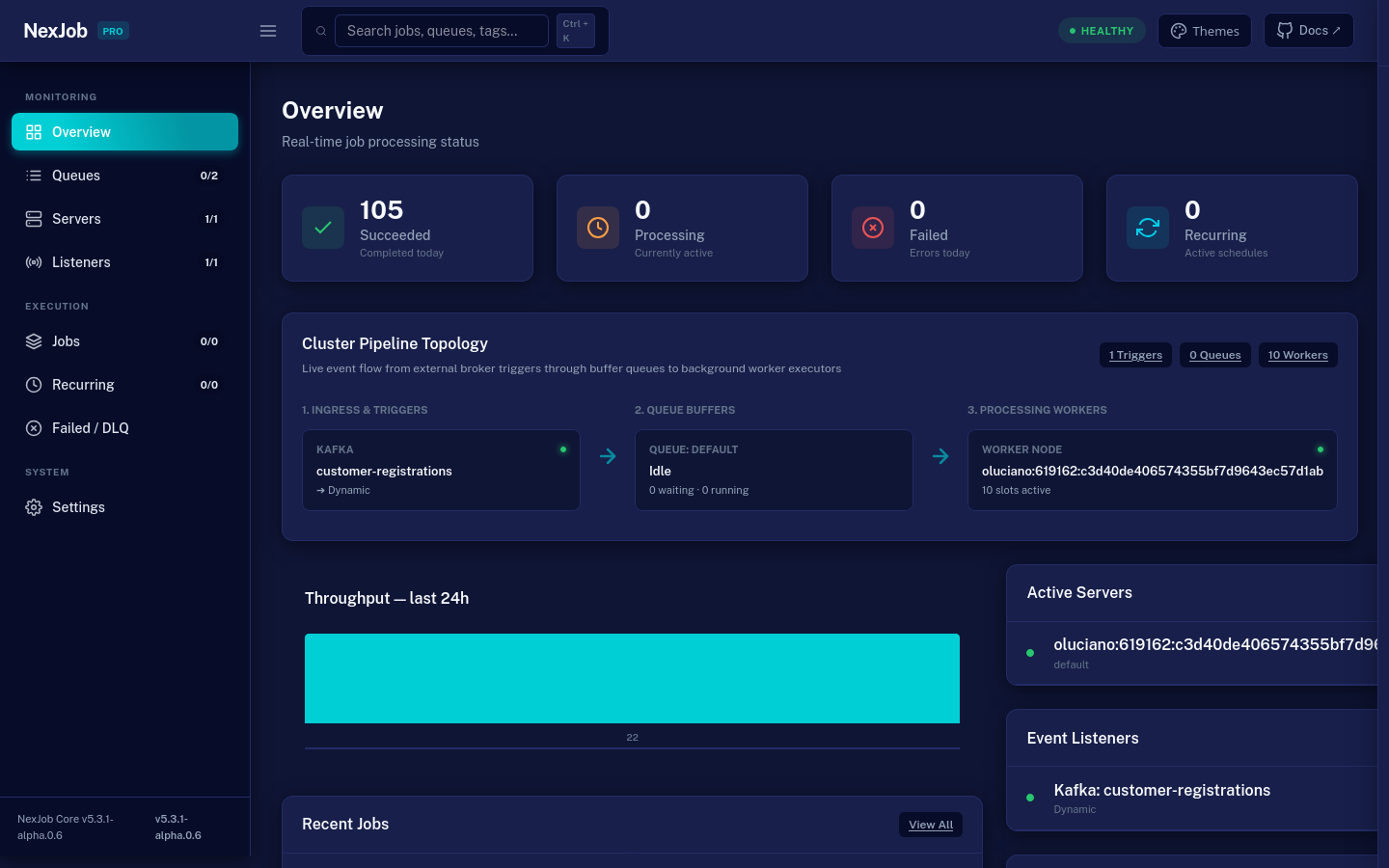
Embedded real-time monitoring dashboard middleware for NexJob in ASP.NET Core applications.
Provides a lightweight, zero-dependency web interface for monitoring background jobs, active worker nodes, queue throughput, and recurring cron schedules with live updates.
Installation
dotnet add package NexJob.Dashboard
Quick Start
Enable the dashboard middleware in Program.cs:
using NexJob;
using NexJob.Dashboard;

var builder = WebApplication.CreateBuilder(args);

// Register MemoryCache (required for metrics caching)
builder.Services.AddMemoryCache();

// Register NexJob
builder.Services.AddNexJobPostgres(builder.Configuration.GetConnectionString("NexJob")!);
builder.Services.AddNexJob();

var app = builder.Build();

// Mount dashboard middleware at /dashboard
app.UseNexJobDashboard("/dashboard", options =>
{
    options.Title = "NexJob Management Console";
    options.MetricsCacheTtl = TimeSpan.FromSeconds(3);
});

app.Run();
Features
- Multi-Cluster Dashboard Federation: Aggregate multiple isolated NexJob clusters (regional, multi-tenant, or staging vs production) in a single dashboard with live cluster switching dropdown (
?cluster={id}), cluster-isolated SSE caching, and read-only cluster protection. - Enterprise Maxton Design System: Complete visual overhaul inspired by the modern Maxton UI layout, featuring an executive 64px Top Header with responsive sidebar toggle (☰), global keyboard search (
Ctrl + K), live cluster health status badge (HEALTHY,DEGRADED,INCIDENT), and docs shortcuts. - Multi-Theme Switcher (5 Themes): Instant 1-click theme customizer offcanvas drawer supporting
Blue Theme(Midnight - default),Dark,Light,Semi-Dark(dark sidebar/header with light content), andBordered(clean 1px high-contrast borders without heavy shadows), fully persisted inlocalStorage. - Cluster Pipeline Topology Map: Native SVG & animated CSS flowchart connecting Ingress & Triggers ➔ Queue Buffers ➔ Processing Workers with live activity pulse indicators.
- Real-Time Live Log Streaming (SSE): Streaming log viewer on
/jobs/{id}dynamically appending execution console logs in real-time. - Event Triggers & Listeners Visibility: Dedicated
/listenerspage rendering active broker connections (RabbitMQ, Kafka, Azure Service Bus, SQS, etc.), consumer groups, target queues/topics, uptime, and real-time status transitions (Starting,Listening,Reconnecting,Faulted,Stopped). - Time-Window Filtering & Queue Controls: Quick period filters (
1h,6h,24h,7d,All Time) on/jobsand interactivePause/Resumebuttons on/queues. - Job Catalog & Definitions (
/catalog): Aggregated job definitions table reporting run volume, error rates, average duration, last execution timestamps, deep links to/jobs, and ad-hoc trigger execution for parameterless jobs. - Modernized Terminal & JSON Viewers: Execution logs and payload viewers formatted into dark terminal-styled code windows with header dots, syntax color tokens, and 1-click clipboard copy buttons.
- 24h Throughput Chart & Host Gauges: The Overview shows a 24-bar hourly throughput chart (average line, drop warnings) and in-memory CPU and RAM gauges for the host process, also on the Servers view. Server node IDs display as
{Host}:{PID} #{shortGuid}with the full ID in the tooltip. Nothing is persisted. - Queue Windows at a Glance: the Settings page shows each queue's execution window (hours, time zone and days of the week) next to its status.
- Live Overview: Real-time counters for
Enqueued,Processing,Succeeded,Failed,Expired,Retrying, andDead-Letterjobs via Server-Sent Events (SSE). - Job Details & Inspection: View serialized input arguments, execution history, exception stack traces, and captured console logs.
- Recurring Jobs: Monitor cron schedules, last execution timestamp, next scheduled run, and manually trigger recurring jobs on demand.
- Worker Nodes & Heartbeats: Live view of registered worker instances, process IDs, and health status.
- Read Replica Isolation: Compatible with
UseDashboardReadReplica()to ensure monitoring traffic does not impact primary database write performance. - Zero External Dependencies: 100% self-contained in native CSS and vanilla JS — zero external NPM, Webpack, or CDN dependencies.
Multi-Cluster Federation
Aggregate multiple clusters in a single dashboard instance:
app.UseNexJobDashboard("/dashboard", options =>
{
    options.Title = "Global Ops Hub";
    options.AddCluster(new DashboardCluster("us-east", "US-East Production", usEastStorage, isReadOnly: true));
    options.AddCluster(new DashboardCluster("eu-west", "EU-West Production", euWestStorage, isReadOnly: true));
    options.AddCluster(new DashboardCluster("staging", "Staging", stagingStorage, isReadOnly: false));
});
Securing the Dashboard
By default, the dashboard is open to all incoming requests. To protect it in staging and production, implement IDashboardAuthorizationHandler:
using NexJob;

public class AdminDashboardAuthorization : IDashboardAuthorizationHandler
{
    public Task<bool> AuthorizeAsync(HttpContext context)
    {
        // Example: Only allow authenticated users with the "Admin" or "Ops" role
        var isAuthorized = context.User.Identity?.IsAuthenticated == true &&
                           (context.User.IsInRole("Admin") || context.User.IsInRole("Ops"));

        return Task.FromResult(isAuthorized);
    }
}
Register the authorization handler in DI:
builder.Services.AddSingleton<IDashboardAuthorizationHandler, AdminDashboardAuthorization>();
When authorization fails, the dashboard returns 401 Unauthorized.
The standalone dashboard (
NexJob.Dashboard.Standalone) enforces the same handler but runs no authentication middleware, socontext.Useris never authenticated there. A handler used with the standalone dashboard must authenticate fromcontext.Requestitself.
Options
| Option | Type | Default | Description |
|---|---|---|---|
Title |
string |
"NexJob" |
Title shown in the browser tab and sidebar header |
EnvironmentName |
string? |
null |
Names the deployment environment (for example "Production", "Staging", "Development"). When set, the top bar shows a coloured badge and the browser tab title is prefixed ([PROD] NexJob, [STAGING] NexJob), so nobody mistakes one environment for another. Production/Prod is red, Staging/Stage/QA amber, Development/Dev/Local green (case-insensitive); any other name gets a neutral badge. On screens up to 768 px the name appears in a ribbon above the header. Names longer than 32 characters are truncated. |
MetricsCacheTtl |
TimeSpan |
3s |
Cache duration for dashboard metrics to prevent DB overload during SSE polling |
DefaultTheme |
string |
"blue-theme" |
Color theme used when the browser has no stored preference: blue-theme, semi-dark, dark, light or bordered-theme |
EnablePlayground |
bool |
false |
Enables the interactive playground drawer with demo scenarios. Off by default for production safety |
Queues |
IReadOnlyList<string>? |
null |
Optional list of queues to scope the dashboard view, nav counters, and default job listings default also covers the application's prefixed default queue ({prefix}.default). |
Clusters |
IReadOnlyList<DashboardCluster> |
[] |
Registered federated clusters for multi-cluster operations |
| Product | Versions Compatible and additional computed target framework versions. |
|---|---|
| .NET | net8.0 is compatible. net8.0-android was computed. net8.0-browser was computed. net8.0-ios was computed. net8.0-maccatalyst was computed. net8.0-macos was computed. net8.0-tvos was computed. net8.0-windows was computed. net9.0 was computed. net9.0-android was computed. net9.0-browser was computed. net9.0-ios was computed. net9.0-maccatalyst was computed. net9.0-macos was computed. net9.0-tvos was computed. net9.0-windows was computed. net10.0 is compatible. net10.0-android was computed. net10.0-browser was computed. net10.0-ios was computed. net10.0-maccatalyst was computed. net10.0-macos was computed. net10.0-tvos was computed. net10.0-windows was computed. |
-
net10.0
- NexJob (>= 6.7.0)
-
net8.0
- NexJob (>= 6.7.0)
- System.Text.Encodings.Web (>= 8.0.0)
NuGet packages (1)
Showing the top 1 NuGet packages that depend on NexJob.Dashboard:
| Package | Downloads |
|---|---|
|
NexJob.Dashboard.Standalone
Standalone dashboard for NexJob — self-hosted monitoring for Worker Services and Console Apps. |
GitHub repositories
This package is not used by any popular GitHub repositories.
| Version | Downloads | Last Updated |
|---|---|---|
| 6.7.0 | 142 | 10/19/2026 |
| 6.6.0 | 173 | 10/18/2026 |
| 6.5.1 | 234 | 10/17/2026 |
| 6.5.0 | 112 | 10/17/2026 |
| 6.4.0 | 149 | 10/16/2026 |
| 6.3.0 | 214 | 10/12/2026 |
| 6.2.1 | 161 | 10/11/2026 |
| 6.2.0 | 231 | 10/10/2026 |
| 6.1.0 | 187 | 10/10/2026 |
| 6.0.0 | 193 | 10/9/2026 |
| 5.10.0 | 151 | 10/8/2026 |
| 5.9.0 | 140 | 10/5/2026 |
| 5.8.0 | 156 | 10/4/2026 |
| 5.7.0 | 168 | 10/1/2026 |
| 5.6.2 | 113 | 10/1/2026 |
| 5.6.1 | 107 | 9/30/2026 |
| 5.6.0 | 107 | 9/30/2026 |
| 5.5.0 | 115 | 9/25/2026 |
| 5.4.1 | 108 | 9/24/2026 |
| 5.4.0 | 109 | 9/24/2026 |