NBenchmark 0.37.1
See the version list below for details.
dotnet add package NBenchmark --version 0.37.1
NuGet\Install-Package NBenchmark -Version 0.37.1
<PackageReference Include="NBenchmark" Version="0.37.1" />
<PackageVersion Include="NBenchmark" Version="0.37.1" />
<PackageReference Include="NBenchmark" />
paket add NBenchmark --version 0.37.1
#r "nuget: NBenchmark, 0.37.1"
#:package NBenchmark@0.37.1
#addin nuget:?package=NBenchmark&version=0.37.1
#tool nuget:?package=NBenchmark&version=0.37.1
NBenchmark





Straightforward benchmarking for .NET.
Benchmarking code sounds simple - run it, time it, compare. In practice the numbers are easy to get wrong: the JIT compiler is still optimizing your method during the first runs, the timer can cost more than a fast method, a single GC pause or OS context switch skews an average, and a 2% improvement you were sure you measured can be statistical noise.
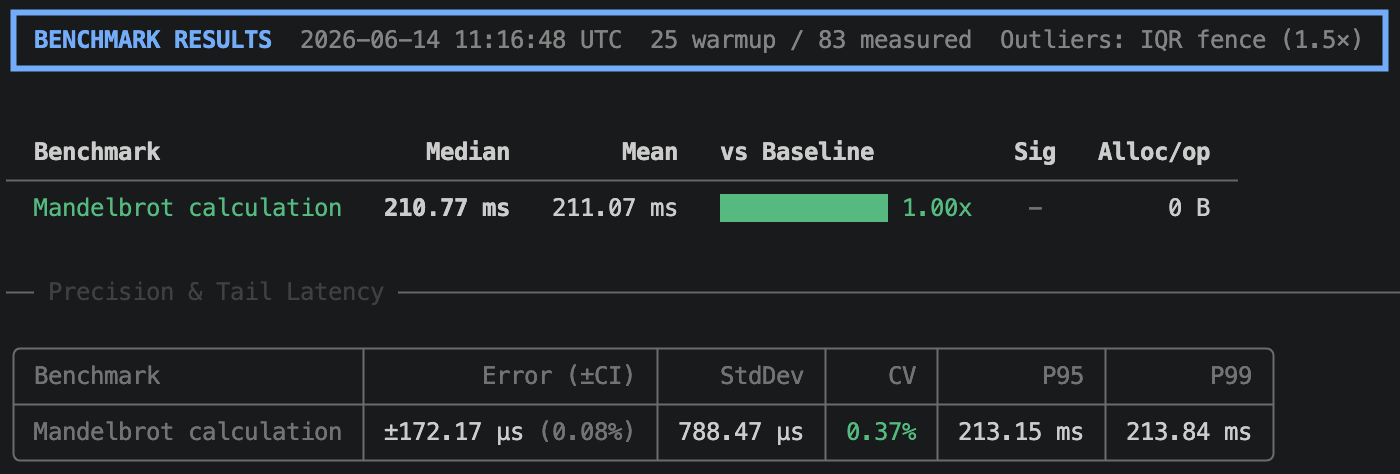
NBenchmark takes care of the statistical analysis. One line of code gives you a calibrated, warmed-up, outlier-trimmed result with a confidence interval.
var result = Benchmark.Run(() => MandelbrotCalculation(name: "Mandelbrot calculation"));
result.Print();
Why NBenchmark?
No setup required.
Benchmark.Run(() => ...)- no attributes, no class structure, no dedicated project. Drop it into a console app, a test, or a scratchpad.Measured in a clean process, by default. Each benchmark runs in its own process with a controlled runtime, so the numbers reflect your code rather than the state of whatever was running before it.
Adaptive measurement. No iteration counts to guess. The engine calibrates ops-per-sample for fast methods so timer overhead doesn't dominate, and detects when warmup has plateaued so the JIT has settled. Pin any dimension when you want a fixed, reproducible run.
Statistical rigor built in. Samples stream until the confidence interval is tight enough, then stop. Outlier trimming filters OS noise (IQR fence by default, with a bimodal-distribution warning when discarded samples look like real latency spikes rather than random jitter). A/B comparisons automatically determine whether a difference is statistically real or just noise, with an effect-size magnitude (Negligible / Small / Medium / Large) so a ✓ always means "real and at least a small effect". The built-in tests are non-parametric rank-based methods, cross-validated against SciPy and NumPy - see Significance Testing for the methodology.
Pluggable statistics. Swap in your own outlier detector (
IOutlierDetector) or significance test (ISignificanceTest) when the built-in IQR/MAD trimming and rank-based tests don't fit your domain.Low-overhead execution. The measurement loop is reflection-free and uses typed delegates to avoid virtual dispatch and boxing during timing, so the JIT optimizes your benchmark body as it would in production.
Async-native. Measures the true duration of
TaskandTask<T>work without sync-over-async wrappers.Compile-time analysis. The optional
NBenchmark.Analyzerspackage catches common benchmark authoring mistakes - dead code elimination, implicit order dependence, missing return values - as Roslyn diagnostics during build, before you ever run a measurement.
Installation
dotnet add package NBenchmark
Optional packages
| Package | Purpose |
|---|---|
NBenchmark.Analyzers |
Roslyn analyzers that catch authoring mistakes at build time |
NBenchmark.DependencyInjection |
Constructor injection for benchmark classes |
NBenchmark.Reporters.Console |
Rich terminal tables via Spectre.Console |
NBenchmark.Integration.xUnit |
Enforce performance thresholds as xUnit tests |
NBenchmark.Integration.NUnit |
Enforce performance thresholds as NUnit tests |
NBenchmark.Integration.MSTest |
Enforce performance thresholds as MSTest tests |
Four modes, one engine
1. Single mode
The fastest way to get a reliable number.
var result = Benchmark.Run(() => int.Parse("12345"));
Console.WriteLine($"P95: {result.GetPercentile(0.95)} ns, Alloc: {result.MeanAllocatedBytes} B");

var result = await Benchmark.RunAsync(async () => await FetchDataAsync());
2. Suite mode
Compare multiple implementations with a fluent API.
var results = await new BenchmarkSuite("string concat")
    .Add("plus operator", () => "a" + "b" + "c")
    .Add("interpolation",  () => $"{"a"}{"b"}{"c"}")
    .WithBaseline("plus operator")
    .WithReporter(new ConsoleReporter())
    .RunAsync();
The output includes a Ratio column and a ✓ in the Sig column when the speed difference is statistically significant.
3. Harness mode
Attribute-based discovery with a CLI, for dedicated benchmark projects.
public class StringBenchmarks
{
    [Benchmark(Baseline = true)]
    public string Concat() => "a" + "b" + "c";

    [Benchmark]
    public string Interpolate() => $"{"a"}{"b"}{"c"}";
}

await BenchmarkHarness.Create(args)
    .AddFromAssembly<StringBenchmarks>()
    .WithReporter(new ConsoleReporter())
    .RunAsync();
dotnet run -- --filter StringBenchmarks.Concat  # Run a specific benchmark
dotnet run -- --dry-run                         # Validate wiring without running
dotnet run -- --reporter json                   # Output results for CI/CD
4. Global tool
Install once, benchmark any assembly with [Benchmark] methods - no project needed.
dotnet tool install -g NBenchmark.Tool
dotnet benchmark --project ./MyApp.Benchmarks
dotnet benchmark --assembly ./bin/Release/net10.0/MyLib.dll
All harness CLI flags pass through (--filter, --reporter, --output, --threshold-pct, etc.).
Features
Parameterized benchmarks. Run the same body across multiple input values to see how an algorithm scales -
WithParameterin Suite mode,[BenchmarkCase]in Harness mode. (Suite / Harness)Categories. Tag benchmarks with
[BenchmarkCategory]and include or exclude groups from a run via CLI flags or the programmatic filter API. (Categories)Isolated runs. Run benchmarks in freshly spawned child processes so JIT, GC, and thread-pool state from earlier work can't bias later measurements; isolated by default in Harness mode. (Isolated runs)
Multi-runtime comparison. Build and run the same benchmarks across net8, net9, and net10 in separate child processes and compare side-by-side. (Multi-runtime)
Multiple launches. Repeat each benchmark as independent launches to surface run-to-run variance and produce cross-launch aggregation stats. (Multiple launches)
Environment control. Pin CPU affinity, raise process priority, and detect noisy hosts to reduce measurement noise at its source. (Environment control)
Performance gates in CI. Enforce absolute or relative performance thresholds as xUnit, NUnit, or MSTest tests that fail on regression. (Test integration)
CI regression gate. Fail the harness run with a non-zero exit code when any benchmark regresses beyond a percentage against the baseline (
--threshold-pct). (CLI reference)Runtime diagnostics. Record GC collection counts, heap state, exceptions, and CPU time per operation alongside timings. (Diagnostics)
Live telemetry. Stream per-sample, per-phase, and per-detector events to an
IMeasurementObserver, or export spans and metrics to OpenTelemetry via the built-inSystem.Diagnosticsinstrumentation. (Observers / OTel)
View the full documentation at nbenchmark.net.
| Product | Versions Compatible and additional computed target framework versions. |
|---|---|
| .NET | net8.0 is compatible. net8.0-android was computed. net8.0-browser was computed. net8.0-ios was computed. net8.0-maccatalyst was computed. net8.0-macos was computed. net8.0-tvos was computed. net8.0-windows was computed. net9.0 is compatible. net9.0-android was computed. net9.0-browser was computed. net9.0-ios was computed. net9.0-maccatalyst was computed. net9.0-macos was computed. net9.0-tvos was computed. net9.0-windows was computed. net10.0 is compatible. net10.0-android was computed. net10.0-browser was computed. net10.0-ios was computed. net10.0-maccatalyst was computed. net10.0-macos was computed. net10.0-tvos was computed. net10.0-windows was computed. |
-
net10.0
- No dependencies.
-
net8.0
- No dependencies.
-
net9.0
- No dependencies.
NuGet packages (6)
Showing the top 5 NuGet packages that depend on NBenchmark:
| Package | Downloads |
|---|---|
|
NBenchmark.Integration.Abstractions
Shared abstractions and reusable building blocks for NBenchmark integration packages. |
|
|
NBenchmark.DependencyInjection
Resolves benchmark classes from an IServiceProvider so they can have constructor dependencies. |
|
|
NBenchmark.Reporters.Console
Rich terminal table output for NBenchmark using Spectre.Console. |
|
|
NBenchmark.Integration.NUnit
Run NBenchmark benchmarks as NUnit tests with configurable performance thresholds. |
|
|
NBenchmark.Integration.MSTest
Run NBenchmark benchmarks as MSTest tests with configurable performance thresholds. |
GitHub repositories
This package is not used by any popular GitHub repositories.
| Version | Downloads | Last Updated |
|---|---|---|
| 0.37.2 | 0 | 8/1/2026 |
| 0.37.1 | 0 | 8/1/2026 |
| 0.37.0 | 32 | 7/31/2026 |
| 0.36.0 | 188 | 7/28/2026 |
| 0.35.0 | 203 | 7/25/2026 |
| 0.34.0 | 224 | 7/25/2026 |
| 0.33.0 | 226 | 7/22/2026 |
| 0.32.1 | 214 | 7/22/2026 |
| 0.32.0 | 210 | 7/21/2026 |
| 0.31.0 | 205 | 7/20/2026 |
| 0.30.3 | 218 | 7/20/2026 |
| 0.30.2 | 210 | 7/20/2026 |
| 0.30.1 | 207 | 7/20/2026 |
| 0.30.0 | 214 | 7/19/2026 |
| 0.29.0 | 214 | 7/19/2026 |
| 0.28.1 | 209 | 7/19/2026 |
| 0.28.0 | 209 | 7/18/2026 |
| 0.27.1 | 226 | 7/9/2026 |
| 0.27.0 | 221 | 7/7/2026 |
| 0.26.0 | 223 | 6/30/2026 |