ModernButtons.WinForms
1.1.0
dotnet add package ModernButtons.WinForms --version 1.1.0
NuGet\Install-Package ModernButtons.WinForms -Version 1.1.0
<PackageReference Include="ModernButtons.WinForms" Version="1.1.0" />
<PackageVersion Include="ModernButtons.WinForms" Version="1.1.0" />
<PackageReference Include="ModernButtons.WinForms" />
paket add ModernButtons.WinForms --version 1.1.0
#r "nuget: ModernButtons.WinForms, 1.1.0"
#:package ModernButtons.WinForms@1.1.0
#addin nuget:?package=ModernButtons.WinForms&version=1.1.0
#tool nuget:?package=ModernButtons.WinForms&version=1.1.0
ModernButtons.WinForms





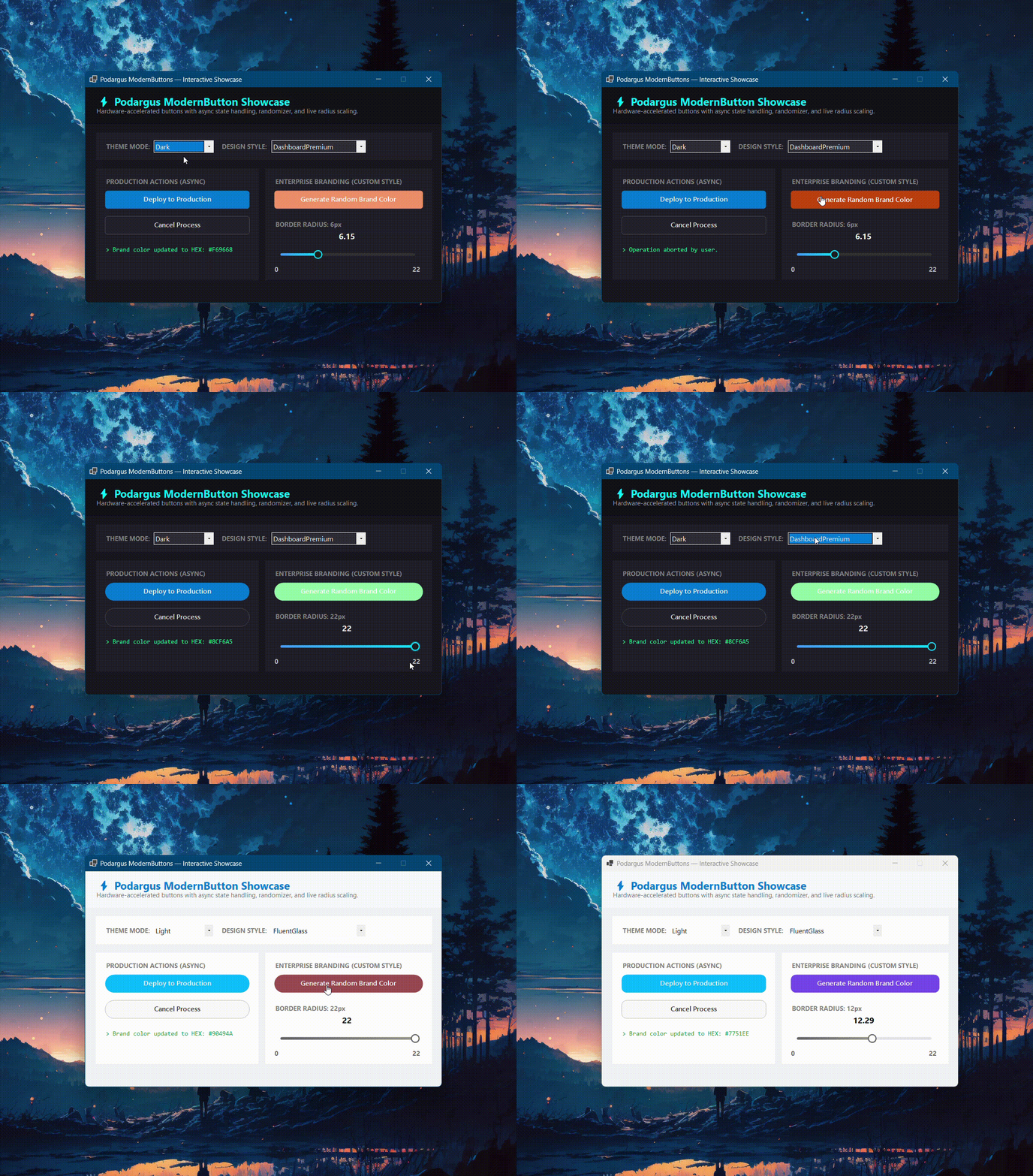
Stop using ugly, 3D gray inputs. Upgrade to anti-aliased, hardware-accelerated Modern Buttons for Windows Forms.
🛑 The Problem with Standard WinForms Buttons
The default WinForms Button is infamous for its harsh gray borders and rigid layout. Achieving smooth rounded corners, custom geometry, image-text relations, and dynamic dark mode styling using the native control is virtually impossible without breaking the click boundaries or losing native routing support.
🟢 The Podargus Solution
ModernButtons.WinForms provides a premium, zero-dependency input. It completely overrides the GDI+ drawing engine to deliver flawless geometry, tactile hover/press animations, and an advanced Layout Engine, while perfectly maintaining inheritance from the native System.Windows.Forms.Button class.
This means features like DialogResult, AcceptButton, CancelButton, AutoEllipsis, and TextImageRelation work perfectly out of the box!
🚀 Key Features
- 💠 10 Unique Geometric Shapes: Change the physical shape instantly using the
Styleproperty (Pill,Leaf,Hexagon,TearDrop,Ghost,Elevated3D, etc.). - 🎨 5 Core Color Palettes: Full support for the Podargus Design Matrix (
Dark/Light×DashboardPremium,FluentGlass,MaterialFlat,SoftNeumorphic,Cyberpunk) using theColorStyleproperty. - 🖼️ Advanced Layout Engine: Flawless support for
TextImageRelation,ImageAlign, andTextAlignalongside nativeAutoEllipsisand clippedBackgroundImagesupport. - 🎛️ Extreme Customization: Set
ColorStyletoCustomto unlock 16 independent color properties controlling the Background, Text, and Borders across Normal, Hover, Pressed, and Disabled states. - ✨ Smooth Vector Graphics: Anti-aliased corner rendering with globally customizable
BorderRadiusandBorderWidth. - ⛔ Perfect Disabled States: Automatically calculates sleek grayscale layouts for backgrounds, text, and even foreground images when
Enabled = false.
📦 Installation
Package Manager Console
Install-Package ModernButtons.WinForms

### .NET CLI
```bash
dotnet add package ModernButtons.WinForms
⚡ Quick Start & Code Examples
1. Global Theme Configuration
Instantly switch the look of your inputs to match your application's aesthetic.
using Podargus.UI.Controls.WinForms.ModernButtons.Enums;

btnSubmit.Theme = ThemeMode.Dark;
btnSubmit.ColorStyle = ButtonDesignStyle.DashboardPremium;
btnSubmit.Style = ButtonAppearanceStyle.Pill; // Changes the shape!
2. Creating an Image + Text Action Button
Creates a solid, glowing accent button with an icon perfectly positioned next to the text.
using Podargus.UI.Controls.WinForms.ModernButtons;
using Podargus.UI.Controls.WinForms.ModernButtons.Enums;

var btnSave = new ModernButton
{
    Text = "Save Changes",
    Image = Properties.Resources.SaveIcon,
    TextImageRelation = TextImageRelation.ImageBeforeText,
    IsPrimary = true,
    Theme = ThemeMode.Dark,
    ColorStyle = ButtonDesignStyle.FluentGlass,
    Style = ButtonAppearanceStyle.Leaf, // Beautiful asymmetric rounded corners
    Size = new Size(160, 45)
};

btnSave.Click += (s, e) => MessageBox.Show("Saved successfully!");
this.Controls.Add(btnSave);
3. Creating a Ghost Outline Button
Creates a transparent "Ghost" button that acts as a secondary/outline button until hovered..
var btnCancel = new ModernButton
{
    Text = "Cancel",
    IsPrimary = false,
    DialogResult = DialogResult.Cancel, // Works natively with WinForms!
    Theme = ThemeMode.Dark,
    Style = ButtonAppearanceStyle.Ghost, // Invisible background until hover
    ColorStyle = ButtonDesignStyle.DashboardPremium,
    Size = new Size(100, 40)
};

this.Controls.Add(btnCancel);
4. Extreme Custom Branding
Need to match exact corporate hex codes for every interaction state? Unlock extreme configuration using ColorStyle.Custom.
var btnBrand = new ModernButton
{
    Text = "Custom Brand Button",
    ColorStyle = ButtonDesignStyle.Custom,
    Style = ButtonAppearanceStyle.Hexagon, // Sharp geometric shape

    // Base Colors
    CustomPrimaryColor = Color.Crimson,
    CustomTextColor = Color.White,
    CustomBorderColor = Color.DarkRed,

    // Hover Colors
    CustomHoverColor = Color.LightCoral,
    CustomHoverTextColor = Color.White,

    // Pressed Colors
    CustomPressedColor = Color.Maroon,
    CustomPressedTextColor = Color.LightGray,

    BorderWidth = 2f,
    BorderRadius = 10
};
this.Controls.Add(btnBrand);
🎨 Color Palettes (ColorStyle)
| Design Style | Aesthetic Concept | Key Visual Characteristics |
|---|---|---|
DashboardPremium |
Modern Executive Suite | Sleek rounded buttons with prominent blue/cyan focus glows (Default). |
FluentGlass |
Windows 11 Fluent | High-radius rounded buttons with electric cyan accents and smooth hover states. |
MaterialFlat |
Elevated Material Flat | Flat material-inspired geometry with deep purple/indigo fills. |
SoftNeumorphic |
Soft Embossed Surfaces | High-radius pill buttons with warm coral/orange accent colors. |
Cyberpunk |
High-Voltage Industrial | Stealth black 0px-radius buttons with high-contrast glowing neon emerald borders on hover. |
Custom |
Unlocked Enterprise | Full manual control over hover, press, and background hex colors. |
🎨 Appearance & Color Matrix
| Geometry Style | Visual Characteristics |
|---|---|
| Standard | The classic hardware-accelerated rounded rectangle. |
| Pill | 100% rounded ends, popular in modern web UIs. |
| Leaf | Asymmetric rounding (top-left & bottom-right). |
| Hexagon | Aggressive, sharp-cut side angles. |
| CutCorners | 45-degree chamfered sci-fi corners. |
| TearDrop | Pointed top-left corner, fully rounded everywhere else. |
| Trapezoid | Slanted sides forming a stable base geometry. |
| Underline | Minimalist text button with an animated bottom accent bar. |
| Ghost | Transparent border-only button that fills on hover. |
| Elevated3D | Classic rounded button with subtle 3D highlight/shadow edges. |
⚙️ Specifications
| Technical Metric | Underlying Architecture Profile |
|---|---|
| Package Identity | ModernButtons.WinForms |
| Component Type | Custom Hardware-Accelerated Button Control |
| Language Target | C# (Optimized for .NET Framework 4.7.2+ & .NET 6.0/8.0+) |
| Rendering Engine | Anti-Aliased Surface Vector Paint Mapping (GDI+) |
| Target Platforms | Microsoft Windows Desktop Environment (WinForms) |
| Dependencies | None (System.Windows.Forms Base Assembly Only) |
📄 License
Distributed under the MIT License. See the repository LICENSE file for details.
Maintained by Podargus
Building zero-dependency, ultra-performance developer workflows and hardware-accelerated UI components.
| Product | Versions Compatible and additional computed target framework versions. |
|---|---|
| .NET | net6.0-windows7.0 is compatible. net7.0-windows was computed. net8.0-windows was computed. net8.0-windows7.0 is compatible. net9.0-windows was computed. net10.0-windows was computed. |
| .NET Framework | net472 is compatible. net48 is compatible. net481 was computed. |
-
.NETFramework 4.7.2
- No dependencies.
-
.NETFramework 4.8
- No dependencies.
-
net6.0-windows7.0
- No dependencies.
-
net8.0-windows7.0
- No dependencies.
NuGet packages
This package is not used by any NuGet packages.
GitHub repositories
This package is not used by any popular GitHub repositories.
v1.1.0 Massive Layout & Customization Update:
- Introduced 10 brand new physical shapes (Pill, Leaf, Hexagon, TearDrop, CutCorners, Trapezoid, Underline, Ghost, Elevated3D, Standard).
- Decoupled colors from shapes: Use `ColorStyle` for palettes and `Style` for structural geometry.
- Brand new Layout Engine fully supporting `TextImageRelation`, `ImageAlign`, and `TextAlign`.
- Perfected Disabled state rendering (auto-grayscales background, text, and foreground images natively).
- Fixed `AutoEllipsis` text trimming and `BackgroundImage` rendering (images perfectly clip to custom shapes).
- Unlocked `BorderRadius` and `BorderWidth` globally for all styles.
- Extreme Customization Mode: Added 16 new color properties allowing full manual control over Normal, Hover, Pressed, and Disabled states for Backgrounds, Text, and Borders.