MarkdownUtil 4.2.0
See the version list below for details.
dotnet tool install --global MarkdownUtil --version 4.2.0
dotnet new tool-manifest
dotnet tool install --local MarkdownUtil --version 4.2.0
#tool dotnet:?package=MarkdownUtil&version=4.2.0
nuke :add-package MarkdownUtil --version 4.2.0
MarkdownUtil


Turn a folder of Markdown files into a documentation website. One command, zero configuration.
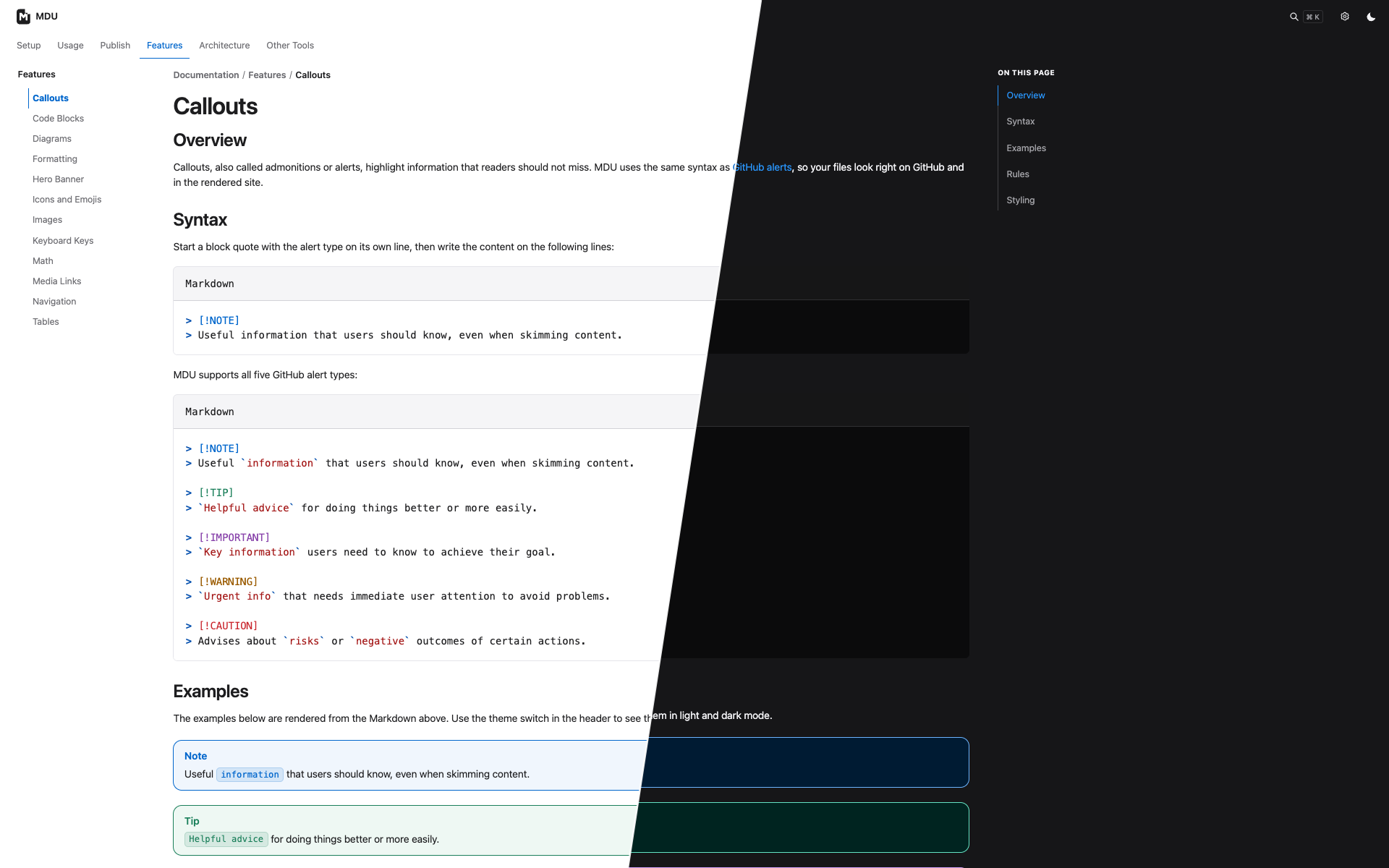
Point mdu at your docs folder and get a clean static HTML site with sidebar navigation, breadcrumbs, client-side search, dark mode, and syntax highlighting. Search results jump to matching sections and highlight the found text. There is no config file to write, no theme to set up, and no Node.js or Python toolchain to install. Your files stay plain Markdown that still reads well on GitHub.
👉 See a live example: the project documentation, rendered by mdu itself.
From Markdown to website in a minute
1. Install (requires the .NET 10 SDK):
dotnet tool install --global MarkdownUtil
2. Write your docs in a docs folder. Each folder gets a README.md as its page:
docs/
├── README.md            → start page
├── Setup/
│   └── README.md        → "Setup" section
└── Usage/
    ├── README.md        → "Usage" section
    └── Configuration.md → page inside "Usage"
3. Preview it with live reload:
mdu serve
Your site opens at http://localhost:4173 and refreshes whenever you save a file.
4. Publish it:
mdu render
Upload the generated site folder to GitHub Pages, GitLab Pages, Netlify, or any plain web server. It's just static HTML.
What you get
- 🧭 Navigation for free. The sidebar and breadcrumbs follow your folder structure. Order pages with an optional
sidebar.orderin the front matter. - 🌗 Light and dark theme that follows the visitor's system setting.
- 🔎 Fast client-side search with section links and highlighted matches.
- 📱 Responsive layout that works on phones, tablets, and desktops.
- 🎨 Syntax highlighting for code blocks.
- 🖼️ Assets included. Linked images and files are copied to the site automatically.
- ✅ Built-in linter.
mdu lintcatches broken links, wrong link casing, and missing titles before you publish.
Why MarkdownUtil?
- One .NET workflow for your docs.
mdu lint,mdu serve, andmdu renderrun from the .NET 10 tool; there is no separate Node.js or Python build toolchain. - Your folder structure becomes navigation.
README.mdfiles represent sections, and MarkdownUtil builds the sidebar and breadcrumbs from the folder tree. Setsidebar.orderonly when you want a custom order. - Catch problems before publishing. The linter checks page titles, directory names, link casing, and missing local links or images, then points to the source file and line.
- Keep your content and hosting portable. Your source stays Markdown and the generated site is static HTML you can host anywhere. The optional
sidebar.orderfield is MarkdownUtil-specific.
Commands
| Command | What it does |
|---|---|
mdu serve |
Renders, serves, and live-reloads the site. |
mdu render |
Writes the static site to ./site. |
mdu lint |
Checks the docs and reports problems. |
mdu fix |
Applies automatic fixes for supported warnings. |
mdu tree |
Prints Markdown files under ./docs or ./Docs as a tree. |
The defaults (./docs in, ./site out, port 4173) cover the common case. Pass paths or options only when your layout differs:
mdu serve ./manual ./public --port 8080 --no-browser
Lint problems point straight to the file and line:
/project/docs/Usage/README.md:7: MDU004 LocalLinkExists: Local link target './intro.md' does not exist.
Linter detected 1 error.
Install per repository
To pin the tool to a repository instead of installing it globally:
dotnet new tool-manifest
dotnet tool install --local MarkdownUtil
Skip the first command if .config/dotnet-tools.json already exists. Run the local tool with dotnet mdu, for example dotnet mdu serve.
Learn more
Project status: MarkdownUtil is under active development. Expect changes before the first stable release.
| Product | Versions Compatible and additional computed target framework versions. |
|---|---|
| .NET | net10.0 is compatible. net10.0-android was computed. net10.0-browser was computed. net10.0-ios was computed. net10.0-maccatalyst was computed. net10.0-macos was computed. net10.0-tvos was computed. net10.0-windows was computed. |
This package has no dependencies.
| Version | Downloads | Last Updated |
|---|---|---|
| 4.8.0 | 165 | 10/22/2026 |
| 4.7.0 | 114 | 10/21/2026 |
| 4.6.1 | 107 | 10/20/2026 |
| 4.6.0 | 111 | 10/20/2026 |
| 4.5.1 | 99 | 10/19/2026 |
| 4.5.0 | 108 | 10/19/2026 |
| 4.4.1 | 98 | 10/19/2026 |
| 4.4.0 | 102 | 10/19/2026 |
| 4.3.0 | 118 | 10/19/2026 |
| 4.2.0 | 110 | 10/18/2026 |
| 4.1.0 | 120 | 10/16/2026 |
| 4.0.0 | 109 | 10/16/2026 |
| 3.0.0 | 103 | 10/9/2026 |
| 2.6.0 | 562 | 12/27/2023 |
| 2.5.1 | 12,649 | 3/19/2023 |
| 2.5.0 | 652 | 2/26/2023 |
| 2.4.0 | 701 | 9/3/2022 |
| 2.3.2 | 631 | 8/19/2022 |
| 2.2.0 | 820 | 8/17/2022 |
| 2.1.1 | 604 | 8/16/2022 |