EasyCore.Consul
8.3.0
dotnet add package EasyCore.Consul --version 8.3.0
NuGet\Install-Package EasyCore.Consul -Version 8.3.0
<PackageReference Include="EasyCore.Consul" Version="8.3.0" />
<PackageVersion Include="EasyCore.Consul" Version="8.3.0" />
<PackageReference Include="EasyCore.Consul" />
paket add EasyCore.Consul --version 8.3.0
#r "nuget: EasyCore.Consul, 8.3.0"
#:package EasyCore.Consul@8.3.0
#addin nuget:?package=EasyCore.Consul&version=8.3.0
#tool nuget:?package=EasyCore.Consul&version=8.3.0
🧭 EasyCore.Consul
EasyCore.Consul 是面向 .NET 8 的生产级 HashiCorp Consul 集成库。提供服务注册与健康检查、KV 存储、分布式锁、健康实例发现与负载均衡,以及服务间 HTTP 调用能力。






🌍 Language
- 🇨🇳 中文(当前文档)
- 🇺🇸 English: README.en.md
📚 目录
🗺️ 第一部分:总览与架构
🚀 第二部分:快速上手
🧩 第三部分:KV · 锁 · 服务调用
🏭 第四部分:Demo 与生产
1. 🎯 项目定位
EasyCore.Consul 解决「在 ASP.NET Core 里安全、可运维地接入 Consul」的问题:
| 痛点 | EasyCore.Consul 做法 |
|---|---|
| 手写注册/注销易漏 | IHostedService 异步注册,停机优雅注销 |
| Catalog 可能打到不健康实例 | Health API + PassingOnly |
| HttpClient 改 DefaultHeaders 不安全 | 按请求设置 Authorization |
| 分布式锁无续约 | Session TTL + RenewPeriodic |
| 配置错误启动后才发现 | ValidateOnStart 选项校验 |
| 扩展点耦合 | 注册 / KV / 锁 / 调用按需 Add* |
1.1 ✨ 设计原则
| 原则 | 说明 |
|---|---|
| 低摩擦接入 | 几个扩展方法即可跑通注册与健康检查 |
| 按需组合 | Cache / Locking / Server 独立注册 |
| 失败可感知 | 注册失败抛错;调用返回 Succeed / Message |
| 生产默认 | 健康实例发现、稳定 ServiceId、ACL Token 支持 |
| 向后兼容 | 保留 EasyCoreConsul* / ServiceIP 等别名 |
1.2 📁 解决方案目录
EasyCore.Consul/
├── src/EasyCore.Consul/           # 核心库
│   ├── Configuration/            # Options + 校验
│   ├── Registration/             # HostedService 注册
│   ├── Cache/                    # KV
│   ├── Locking/                  # 分布式锁
│   ├── Discovery/                # 健康发现 + 负载均衡
│   ├── Invocation/               # 服务间 HTTP 调用
│   └── DependencyInjection/      # Add* / Use*
├── demo/
│   ├── Web.Consul/               # :5057 — KV / 锁 / 调用
│   ├── Web.Consul.Server/        # :5058 — 下游 API
│   └── Web.Consul.Ocelot/        # Ocelot + Consul
├── tests/EasyCore.Consul.Tests/
└── docs/svg/                     # README 架构图
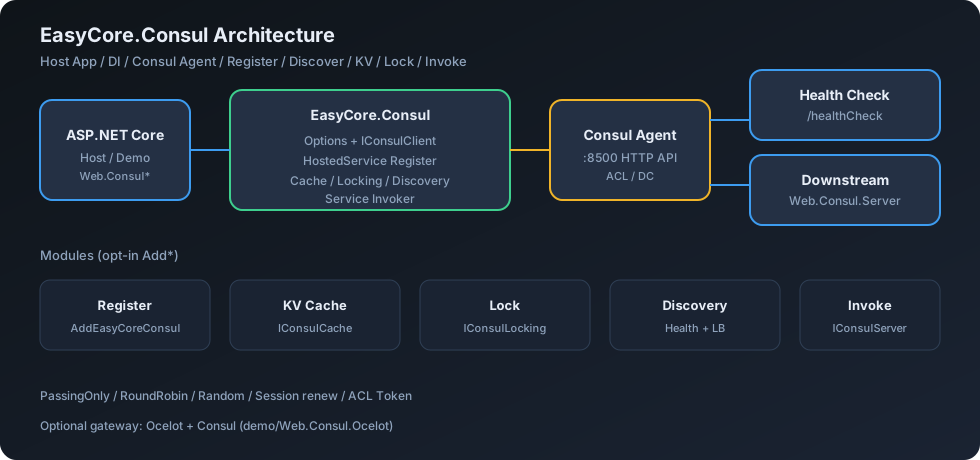
2. 🏗️ 架构与模块关系
2.1 🖼️ 组件关系图
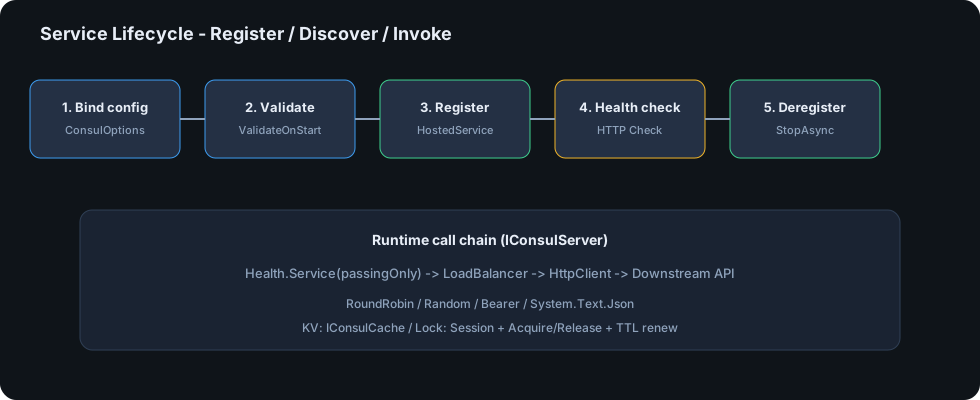
2.2 🔁 服务生命周期
2.3 📜 数据流(文字版)
[ASP.NET Core Host]
        │
        ▼
 AddEasyCoreConsul ──► ConsulOptions (ValidateOnStart)
        │
        ├─ HostedService ──► Agent.ServiceRegister / Deregister
        │
        ├─ IConsulCache ────► KV Put / Get / Delete
        ├─ IConsulLocking ──► Session + Acquire / Renew / Release
        └─ IConsulServer ───► Health.Service → LB → HttpClient
                                    │
                                    ▼
                              Downstream Service
3. 📦 NuGet / 项目清单
| 包名 / 项目 | 职责 | 是否必须 |
|---|---|---|
EasyCore.Consul |
注册、KV、锁、发现、调用 | ✅ |
demo/Web.Consul |
客户端示例 | 示例 |
demo/Web.Consul.Server |
下游服务示例 | 示例 |
demo/Web.Consul.Ocelot |
网关 + Consul 发现 | 示例 |
tests/EasyCore.Consul.Tests |
单元测试 | 开发 |
4. 📊 能力对比
| 能力 | 说明 | 接口 |
|---|---|---|
| 服务注册 | 启动注册 / 停机注销 / HTTP 健康检查 | AddEasyCoreConsul |
| KV 存储 | 字符串与强类型 JSON | IConsulCache |
| 分布式锁 | TTL 续约、await using 租约 |
IConsulLocking |
| 服务发现 | 仅健康实例(默认) | IConsulServiceDiscovery |
| 负载均衡 | RoundRobin(默认)/ Random | LoadBalance |
| 服务调用 | GET/POST/PUT/DELETE + Bearer | IConsulServer |
| 网关 | Ocelot Provider(Demo) | Web.Consul.Ocelot |
4.1 🌳 选型决策树
需要本进程注册到 Consul?
├── 是 → AddEasyCoreConsul + Register=true + HealthCheck.Http
└── 否 → AddEasyCoreConsul + Register=false(仅消费)

还需要?
├── 配置 / 缓存 → AddEasyCoreConsulCache
├── 互斥临界区 → AddEasyCoreConsulLocking
└── 调其他服务 → AddEasyCoreConsulServer
5. 💻 环境要求
| 项 | 要求 |
|---|---|
| .NET | 8.0+ |
| 宿主 | ASP.NET Core(Web / API) |
| Consul | Agent 可达(默认 http://127.0.0.1:8500) |
| 依赖 | Consul NuGet(由本包引入) |
6. 📥 安装
dotnet add package EasyCore.Consul
本地源码引用:
<ProjectReference Include="..\..\src\EasyCore.Consul\EasyCore.Consul.csproj" />
7. ⚡ 三分钟快速开始
7️⃣.1️⃣ 配置 appsettings.json
{
  "Consul": {
    "ConsulAddress": "http://127.0.0.1:8500",
    "Token": null,
    "Register": true,
    "ServiceName": "my-service",
    "ServiceAddress": "127.0.0.1",
    "ServicePort": 5057,
    "LoadBalance": "RoundRobin",
    "PassingOnly": true,
    "HealthCheck": {
      "Http": "http://127.0.0.1:5057/healthCheck",
      "Interval": "00:00:10",
      "Timeout": "00:00:05",
      "DeregisterCriticalServiceAfter": "00:01:00"
    }
  }
}
7️⃣.2️⃣ 注册服务
using EasyCore.Consul;

var builder = WebApplication.CreateBuilder(args);

builder.AddEasyCoreConsul()
    .AddEasyCoreConsulCache()
    .AddEasyCoreConsulLocking()
    .AddEasyCoreConsulServer();

builder.Services.AddControllers();

var app = builder.Build();

app.UseEasyCoreConsul(); // 映射 /healthCheck;注册由 HostedService 完成
app.MapControllers();
app.Run();
打开 Consul UI:http://127.0.0.1:8500,即可看到已注册服务。
8. ⚙️ 配置项完整说明
| 配置 | 说明 |
|---|---|
ConsulAddress |
Consul HTTP API 地址 |
Token |
可选 ACL Token |
Datacenter |
可选数据中心 |
Register |
是否自注册(默认 true) |
ServiceName |
逻辑服务名 |
ServiceId |
实例 ID;空则 {ServiceName}-{MachineName}-{Port} |
ServiceAddress / ServiceIP |
对外宣告地址 |
ServicePort |
对外宣告端口 |
Tags / Meta |
服务标签与元数据 |
HealthCheck.Http / ServiceHealthCheck |
HTTP 健康检查 URL |
HealthCheck.Interval |
检查间隔(默认 10s) |
HealthCheck.Timeout |
超时(默认 5s) |
HealthCheck.DeregisterCriticalServiceAfter |
临界后自动注销 |
LoadBalance |
RoundRobin / Random |
PassingOnly |
仅发现通过健康检查的实例(默认 true) |
9. 🗄️ KV 缓存
public class DemoController(IConsulCache cache) : ControllerBase
{
    [HttpPost("{key}")]
    public Task<bool> Put(string key, [FromBody] MyDto dto, CancellationToken ct)
        => cache.PutAsync(key, dto, ct);

    [HttpGet("{key}")]
    public Task<MyDto?> Get(string key, CancellationToken ct)
        => cache.GetAsync<MyDto>(key, ct);

    [HttpGet("raw/{key}")]
    public Task<string?> GetRaw(string key, CancellationToken ct)
        => cache.GetStringAsync(key, ct);
}
| API | 说明 |
|---|---|
PutAsync / KVPut |
写入字符串或对象(JSON) |
GetStringAsync |
原文字符串,不做 JSON 反序列化 |
GetAsync<T> / KVGet |
强类型读取;T=string 时同样按原文返回 |
DeleteAsync / KVDelete |
删除键 |
10. 🔒 分布式锁
// 推荐:自动获取 / 续约 / 释放
await locking.ExecuteLockedAsync("orders:pay", ttlSeconds: 30, async ct =>
{
    await DoWorkAsync(ct);
}, cancellationToken);

// 或手动租约
await using var lease = await locking.TryAcquireAsync(
    "orders:pay", TimeSpan.FromSeconds(30), ct);
if (lease is null) return Conflict();
| API | 说明 |
|---|---|
TryAcquireAsync |
返回 IConsulLock(含 Session 续约),失败返回 null |
ExecuteLockedAsync |
Func<CancellationToken, Task>,正确 await |
AcquireLock / ReleaseLock |
兼容旧版(无自动续约) |
⚠️ 持锁期间请保证 TTL 合理;租约对象会续约 Session,请务必
await using释放。
11. 🔗 服务发现与调用
var result = await consulServer.ServiceGetAsync<OrderDto>(
    RequestScheme.Http,
    serviceName: "order-service",
    apiPath: "/api/orders/1",
    cancellationToken: ct);

if (!result.Succeed) return Problem(result.Message);
return Ok(result.Values);
| 方法 | 说明 |
|---|---|
ServiceGetAsync |
GET |
ServicePostAsync |
POST(可带 body) |
ServicePutAsync |
PUT |
ServiceDeleteAsync |
DELETE |
发现链路:Health.Service → 负载均衡 → IHttpClientFactory 发请求。默认只选 passing 实例。
12. 🧪 Demo 项目
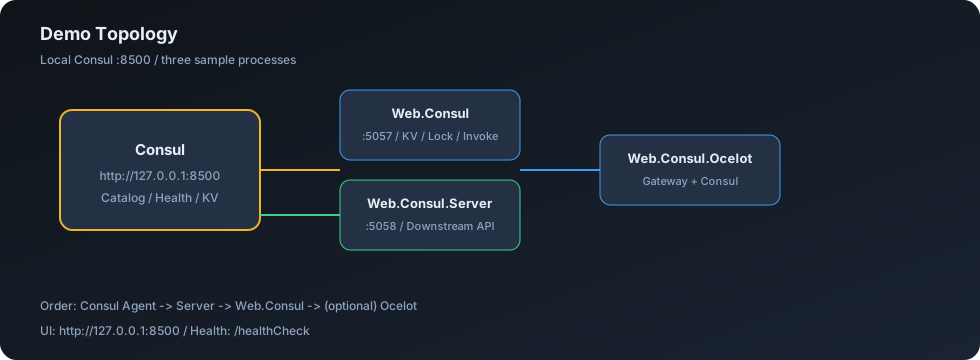
| 项目 | 端口 | 角色 | 命令 |
|---|---|---|---|
Web.Consul |
5057 | KV / 锁 / 服务调用 | dotnet run --project demo/Web.Consul |
Web.Consul.Server |
5058 | 下游 REST API | dotnet run --project demo/Web.Consul.Server |
Web.Consul.Ocelot |
— | Ocelot 网关 | dotnet run --project demo/Web.Consul.Ocelot |
# 1. 启动 Consul Agent(HTTP :8500)
# 2. 启动下游
dotnet run --project demo/Web.Consul.Server
# 3. 启动客户端
dotnet run --project demo/Web.Consul
# 4. 打开 http://127.0.0.1:8500 查看注册结果
13. 🔄 从旧版迁移
8.1.0 相对早期封装为破坏性增强(推荐升级):
| 旧版 | 8.1 |
|---|---|
UseEasyCoreConsul 内 .Wait() |
IHostedService 异步注册 |
| Catalog 发现 | Health API + PassingOnly |
ExecuteLocked(Action) |
优先 ExecuteLockedAsync(Func<..., Task>) |
WriteResult<bool> 直接暴露 |
返回 bool(语义更清晰) |
ServiceHealthCheck 扁平字段 |
HealthCheck 对象(旧字段仍可用) |
EasyCoreConsul* |
保留;推荐 AddEasyCoreConsul* |
14. ✅ 生产清单
- Consul 地址使用内网 DNS / VIP,配置 ACL
Token -
ServiceAddress使用可被其他节点访问的 IP(勿用仅本机可达地址) -
HealthCheck.Timeout保持合理(秒级),避免过长超时 - 多实例设置稳定
ServiceId或接受默认{Name}-{Machine}-{Port} - 服务调用侧开启
PassingOnly=true - 锁的 TTL 与业务临界区时长匹配,始终释放租约
- 连接失败时关注启动日志(注册失败会使 Host 启动失败)
- CI 执行
dotnet test(本仓库已提供 workflow)
15. ❓ FAQ
Q: 启动报 Options 校验失败?
A: Register=true 时必须配置 ServiceName、ServiceAddress、ServicePort 与合法 ConsulAddress。
Q: Consul UI 能看到服务但调用失败?
A: 检查健康检查是否 passing;确认 ServiceAddress 对调用方可达;确认下游已启动。
Q: 只想用 KV,不想注册自己?
A: Register: false,再 AddEasyCoreConsulCache()。
Q: 锁拿不到?
A: 可能被其他持有者占用,或 Session/Acquire 失败。查看日志;使用 TryAcquireAsync 处理 null。
Q: Ocelot Demo 与本库关系?
A: Ocelot 通过 Ocelot.Provider.Consul 自行发现;本库负责业务侧注册与调用。可同时使用。
16. 📄 License
MIT OR Apache-2.0 — 详见 LICENSE。
🤝 贡献
- Fork 并创建特性分支
- 在
tests/EasyCore.Consul.Tests补充测试 - 执行
dotnet test与dotnet build EasyCore.Consul.sln - 提交 Pull Request
欢迎 Issue / PR 🚀
| Product | Versions Compatible and additional computed target framework versions. |
|---|---|
| .NET | net8.0 is compatible. net8.0-android was computed. net8.0-browser was computed. net8.0-ios was computed. net8.0-maccatalyst was computed. net8.0-macos was computed. net8.0-tvos was computed. net8.0-windows was computed. net9.0 was computed. net9.0-android was computed. net9.0-browser was computed. net9.0-ios was computed. net9.0-maccatalyst was computed. net9.0-macos was computed. net9.0-tvos was computed. net9.0-windows was computed. net10.0 was computed. net10.0-android was computed. net10.0-browser was computed. net10.0-ios was computed. net10.0-maccatalyst was computed. net10.0-macos was computed. net10.0-tvos was computed. net10.0-windows was computed. |
-
net8.0
- Consul (>= 1.7.14.7)
NuGet packages
This package is not used by any NuGet packages.
GitHub repositories
This package is not used by any popular GitHub repositories.