EasyCore.AspNetCore.Mvc
8.3.3
See the version list below for details.
dotnet add package EasyCore.AspNetCore.Mvc --version 8.3.3
NuGet\Install-Package EasyCore.AspNetCore.Mvc -Version 8.3.3
<PackageReference Include="EasyCore.AspNetCore.Mvc" Version="8.3.3" />
<PackageVersion Include="EasyCore.AspNetCore.Mvc" Version="8.3.3" />
<PackageReference Include="EasyCore.AspNetCore.Mvc" />
paket add EasyCore.AspNetCore.Mvc --version 8.3.3
#r "nuget: EasyCore.AspNetCore.Mvc, 8.3.3"
#:package EasyCore.AspNetCore.Mvc@8.3.3
#addin nuget:?package=EasyCore.AspNetCore.Mvc&version=8.3.3
#tool nuget:?package=EasyCore.AspNetCore.Mvc&version=8.3.3
🎯 EasyCore.AspNetCore.Mvc
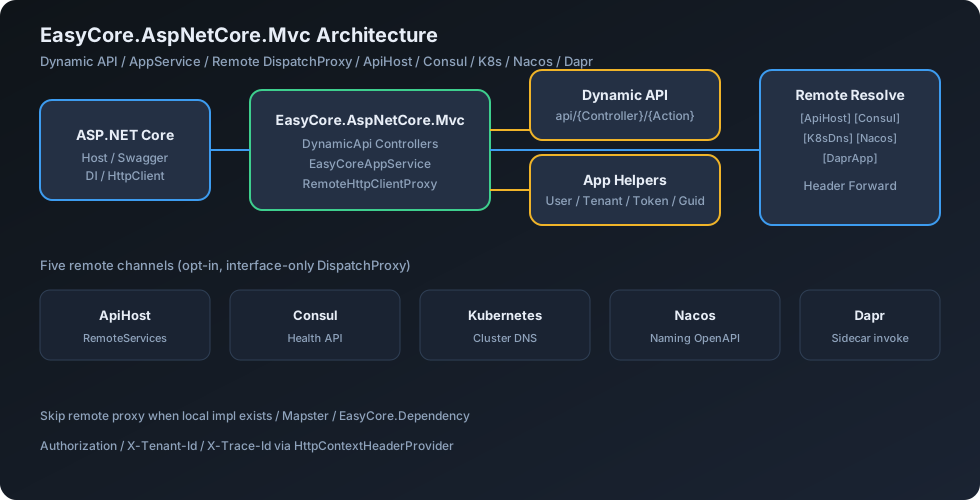
EasyCore.AspNetCore.Mvc 是面向 .NET 8 的 ASP.NET Core 应用服务与远端调用库。提供 动态 API(AppService 自动变控制器)、EasyCoreAppService 快捷上下文,以及 ApiHost / Consul / Kubernetes / Nacos / Dapr 五种远端 HTTP 动态代理(接口级
DispatchProxy)。







🌍 Language
- 中文(当前文档)
- English: README.en.md
📚 目录
第一部分:总览与架构
第二部分:快速上手
第三部分:远端代理
- 9. ApiHost(配置直连)
- 10. Consul(服务发现)
- 11. Kubernetes DNS
- 12. Nacos(服务发现)
- 13. Dapr(Sidecar 调用)
- 14. EasyCoreAppService 快捷能力
- 15. 远端鉴权与请求头透传
第四部分:Demo 与生产
1. 项目定位
EasyCore.AspNetCore.Mvc 解决「少写控制器样板、服务间像本地一样调用远端接口」的问题:
| 痛点 | EasyCore.AspNetCore.Mvc 做法 |
|---|---|
| 每个方法手写 Controller | EasyCoreAppService + AddEasyCoreDynamicApi() 自动暴露 |
远端调用散落 HttpClient |
接口 + 特性 → DispatchProxy 动态代理 |
| Provider 误被远端代理替换 | 检测到本地实现则跳过远程注册 |
| Token / 租户头难透传 | IRemoteRequestHeaderProvider 自动转发 |
| 映射库笨重 | 内置 Mapster(Mapper) |
1.1 设计原则
| 原则 | 说明 |
|---|---|
| 低摩擦接入 | 几个扩展方法 + 继承基类即可跑通 |
| 接口级代理 | 远端只注册接口代理,不激活远端实现类 |
| 通道可插拔 | ApiHost / Consul / K8s / Nacos / Dapr 按需启用 |
| 约定优于配置 | 方法名前缀推断 HTTP 动词 |
| 与生态协作 | 配合 EasyCore.Dependency、EasyCore.Consul |
1.2 解决方案目录
EasyCore.AspNetCore.Mvc/
├── src/EasyCore.AspNetCore.Mvc/     # 核心库:DynamicApi / AppService / Remote
├── demo/
│   ├── Provider/                   # :5094 — 动态 API + EFCore + Consul 注册
│   └── Consumer/                   # :5244 — ApiHost / Consul 远端调用
├── tests/EasyCore.AspNetCore.Mvc.Tests/
├── docs/svg/                       # README 架构图
└── png/EasyCoreLogo.png
2. 架构与模块关系
2.1 组件关系图
2.2 远端调用生命周期
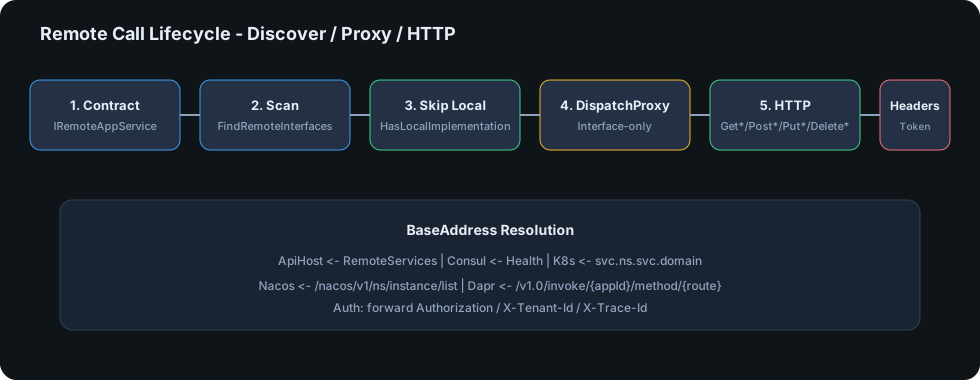
2.3 数据流(文字版)
[EasyCoreAppService]
        │
        ▼
 AddEasyCoreDynamicApi ──► MVC Controller ──► Swagger
        │
        │   (Consumer 侧)
        ▼
 [ApiHost|Consul|K8s|Nacos|Dapr] Attribute
        │
        ▼
 FindRemoteInterfaces ──► DispatchProxy ──► HttpClient
        │                                      │
        └──── 有本地实现?跳过 ◄────────────────┘
3. NuGet / 项目清单
| 包名 | 职责 | 是否必须 |
|---|---|---|
EasyCore.AspNetCore.Mvc |
动态 API、AppService、远端代理 | ✅ |
EasyCore.Dependency |
ITransientDependency 等自动 DI |
推荐 |
EasyCore.Consul |
服务注册 / KV / 锁(Consul 通道时) | 可选 |
EasyCore.EFCoreRepository |
Demo / 业务仓储(本库不强制) | 可选 |
4. 远端通道对比
| 能力 | ApiHost | Consul | Kubernetes | Nacos | Dapr |
|---|---|---|---|---|---|
| 特性 | [ApiHost("Name")] |
[ConsulService("Name")] |
[K8sDns("svc", port)] |
[NacosService("Name")] |
[DaprApp("app-id")] |
| 注册扩展 | AddEasyCoreRemoteApiClients() |
AddEasyCoreRemoteApiConsulClients() |
AddEasyCoreRemoteApiK8sClients(...) |
AddEasyCoreRemoteApiNacosClients() |
AddEasyCoreRemoteApiDaprClients() |
| 地址来源 | RemoteServices:Name |
Consul Health API | DNS:{svc}.{ns}.svc.{domain} |
Naming OpenAPI 实例列表 | 本机 sidecar HTTP invoke |
| 典型场景 | 本地联调 / 固定网关 | 多实例服务发现 | 集群内 Service | 阿里云 / 国内部署常见 | 边车网格 / 多语言互调 |
| 额外依赖 | 无 | Consul Agent | 集群 DNS | Nacos Server | Dapr sidecar |
4.1 选型决策树
远端地址如何得到?
├── 配置文件写死 BaseAddress → ApiHost
├── Consul 注册中心 → Consul
├── Nacos 注册中心 → Nacos
├── 已在 K8s 集群内 → K8sDns
└── 已注入 Dapr sidecar → Dapr
5. 环境要求
| 项 | 要求 |
|---|---|
| .NET | 8.0+ |
| 宿主 | ASP.NET Core(Web / API) |
| DI | 推荐 EasyCore.Dependency 8.0.1+ |
| Consul | 可选;使用 Consul 通道时需 Agent 可达 |
| Nacos | 可选;使用 Nacos 通道时需 Naming OpenAPI 可达 |
| Dapr | 可选;使用 Dapr 通道时需本机 sidecar HTTP 端口 |
| K8s | 可选;仅集群内 DNS 解析场景 |
6. 安装
dotnet add package EasyCore.AspNetCore.Mvc
dotnet add package EasyCore.Dependency

# Consul 通道时
dotnet add package EasyCore.Consul
7. 三分钟快速开始
7️⃣.1️⃣ 定义 AppService
using EasyCore.AspNetCore.Mvc.AppService;
using EasyCore.Dependency;

public class ProviderTestAppService : EasyCoreAppService, IProviderTestAppService
{
    public Task<PostDto> GetDto()
        => Task.FromResult(new PostDto { Name = "Hello", Age = 18 });

    public Task PostDto(PostDto dto) => Task.CompletedTask;
}
7️⃣.2️⃣ 注册
using EasyCore.AspNetCore.Mvc.AppService;
using EasyCore.AspNetCore.Mvc.DynamicApi;
using EasyCore.Dependency;

var builder = WebApplication.CreateBuilder(args);

builder.Services.AddControllers();
builder.Services.AddEndpointsApiExplorer();
builder.Services.AddSwaggerGen();

builder.Services.AddEasyCoreDynamicApi();
builder.Services.AddEasyCoreAppServices();
builder.Services.AddEasyCoreDependency();

var app = builder.Build();
if (app.Environment.IsDevelopment())
{
    app.UseSwagger();
    app.UseSwaggerUI();
}
app.MapControllers();
app.Run();
7️⃣.3️⃣ 效果预览
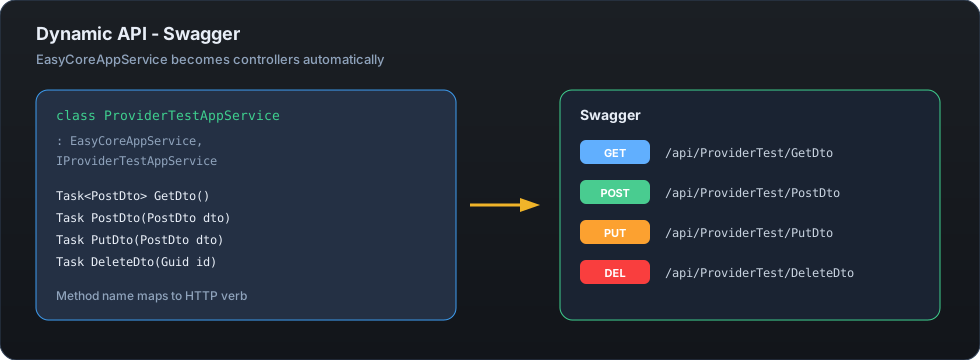
打开 Swagger 即可看到 GET/POST/PUT/DELETE 已按方法名自动生成。
8. 动态 API 与命名约定
| 规则 | 说明 |
|---|---|
| 基类 | 继承 EasyCoreAppService(或 BaseAppService) |
| 路由 | 默认 api/[controller]/[action] |
| 动词 | 方法名以 Get / Post / Put / Delete 开头 |
| 远端一致 | 远端代理使用相同命名约定推断动词 |
| 未知动词 | 远端代理抛出明确异常(避免静默错误) |
⚠️ 方法名不要使用无动词前缀(例如
EasyCoreAppService()),否则远端代理无法推断 HTTP Method。
9. ApiHost(配置直连)
9️⃣.1️⃣ 合约
using EasyCore.AspNetCore.Mvc.RemoteServices;
using EasyCore.Dependency;

[ApiHost("Provider")]
public interface IProviderTestAppService : IRemoteAppService, ITransientDependency
{
    Task<PostDto> GetDto();
    Task PostDto(PostDto dto);
    Task PutDto(PostDto dto);
    Task DeleteDto(Guid id);
}
9️⃣.2️⃣ 配置
{
  "RemoteServices": {
    "Provider": "http://localhost:5094"
  }
}
9️⃣.3️⃣ 消费端注册与调用
builder.Services.AddEasyCoreRemoteApiClients();

// 任意服务中直接注入接口
public class ConsumerTestAppService(
    IProviderTestAppService provider) : EasyCoreAppService
{
    public Task<PostDto> GetRemoteApi() => provider.GetDto();
}
Provider 宿主若已有本地实现,不会被远端代理覆盖。
10. Consul(服务发现)
🔟.1️⃣ 合约
[ConsulService("Provider")]
public interface IProviderConsulTestAppService : IRemoteAppService, ITransientDependency
{
    Task<PostDto> GetDto();
}
🔟.2️⃣ Provider 注册到 Consul
using EasyCore.Consul;

builder.AddEasyCoreConsul()
    .AddEasyCoreConsulCache()
    .AddEasyCoreConsulLocking()
    .AddEasyCoreConsulServer();

var app = builder.Build();
app.UseEasyCoreConsul(); // 映射 /healthCheck;注册由 HostedService 完成
appsettings.json 示例:
{
  "Consul": {
    "ServiceName": "Provider",
    "ServiceIP": "localhost",
    "ServicePort": 5094,
    "ServiceHealthCheck": "http://localhost:5094/healthCheck",
    "ConsulAddress": "http://localhost:8500/"
  }
}
🔟.3️⃣ Consumer 启用 Consul 客户端
builder.Services.AddEasyCoreRemoteApiConsulClients();
builder.AddEasyCoreConsul()
    .AddEasyCoreConsulCache()
    .AddEasyCoreConsulLocking()
    .AddEasyCoreConsulServer();
解析链路:Health.Service → 选择健康实例 → ConsulResolvingHandler 改写请求地址。
11. Kubernetes DNS
builder.Services.AddEasyCoreRemoteApiK8sClients(options =>
{
    options.K8sNamespace = "default";
    // 最终:{ServiceName}.default.svc.cluster.local
    options.K8sClusterDomain = "cluster.local";
});
[K8sDns("provider")]           // 默认 80 端口
[K8sDns("provider", 8080)]     // 非默认端口
public interface IProviderK8sAppService : IRemoteAppService, ITransientDependency
{
    Task<PostDto> GetDto();
}
BaseAddress 格式:http://{service}.{namespace}.svc.{clusterDomain}[:port]/
若仍传入旧值 svc.cluster.local 作为 ClusterDomain,库会自动去掉多余的 svc. 前缀。
12. Nacos(服务发现)
通过 Nacos Naming OpenAPI(不引入 nacos-sdk-csharp)获取健康实例,再由 NacosResolvingHandler 改写请求地址。Authorization 等头由 HttpContextHeaderProvider 转发。
12.1 合约
[NacosService("Provider")]                 // 可选第二参数 group
public interface IProviderNacosTestAppService : IRemoteAppService, ITransientDependency
{
    Task<PostDto> GetDto();
}
12.2 配置
{
  "Nacos": {
    "ServerAddresses": "http://localhost:8848",
    "Namespace": "",
    "GroupName": "DEFAULT_GROUP"
  }
}
可选:UserName / Password(OpenAPI 鉴权)。
12.3 Consumer 注册
builder.Services.AddEasyCoreRemoteApiNacosClients();
// 或覆盖配置:
// builder.Services.AddEasyCoreRemoteApiNacosClients(o => o.ServerAddresses = "http://nacos:8848");
解析链路:GET /nacos/v1/ns/instance/list?healthyOnly=true → 随机健康实例 → http://ip:port/。
本库只做发现与调用,不负责向 Nacos 注册服务。
13. Dapr(Sidecar 调用)
通过本机 Dapr HTTP sidecar 的 service invocation(不引入 Dapr.Client)。Authorization 等头同样透传。
13.1 合约
[DaprApp("provider")]   // Dapr app-id
public interface IProviderDaprTestAppService : IRemoteAppService, ITransientDependency
{
    Task<PostDto> GetDto();
}
13.2 配置
{
  "Dapr": {
    "HttpEndpoint": "http://127.0.0.1:3500/"
  }
}
未配置时:读环境变量 DAPR_HTTP_PORT,否则默认 http://127.0.0.1:3500/。
13.3 Consumer 注册
builder.Services.AddEasyCoreRemoteApiDaprClients();
路径改写:api/Foo/GetDto → /v1.0/invoke/provider/method/api/Foo/GetDto。
14. EasyCoreAppService 快捷能力
public async Task GetContextInfo()
{
    var tenant = CurrentTenant;          // X-Tenant-Id
    var user = CurrentUser.UserName;     // Claims
    var guid = GuidFactory.NewGuid;      // 有序 GUID
    var token = CurrentToken.RequestToken;
    var dto = Mapper.Map<PostDto>(entity); // Mapster

    await Task.CompletedTask;
}
| 成员 | 说明 |
|---|---|
CurrentUser |
当前用户 Claims |
CurrentTenant |
当前租户(X-Tenant-Id) |
CurrentToken |
请求 Bearer Token |
GuidFactory |
有序 GUID |
Mapper |
Mapster IMapper |
远端代理会通过 HttpContextHeaderProvider 尽量转发 Token / 租户等请求头。
15. 远端鉴权与请求头透传
远端 API 需要鉴权时,框架不会自行登录或换票,而是透传入站请求头:
| 头 | 说明 |
|---|---|
Authorization |
含 Bearer xxx |
X-Tenant-Id |
租户 |
X-Trace-Id |
链路追踪 |
前提:当前存在 HttpContext(来自入站 HTTP)。后台 Job / 无上下文时不会带鉴权头。
自定义头(如 X-Api-Key)可自行实现 IRemoteRequestHeaderProvider 并替换 DI 注册。
16. Demo 项目
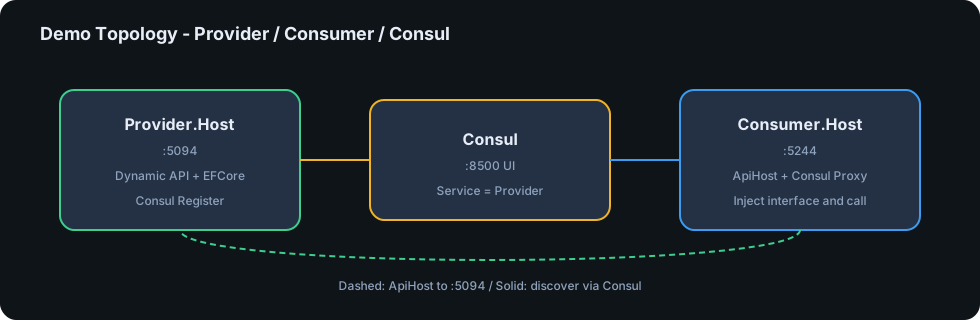
| 项目 | 端口 | 角色 | 命令 |
|---|---|---|---|
Provider.Host |
5094 | 动态 API + EFCore + Consul 注册 | dotnet run --project demo/Provider/Provider.Host |
Consumer.Host |
5244 | ApiHost / Consul 远端调用 | dotnet run --project demo/Consumer/Consumer.Host |
| Consul(可选) | 8500 | 服务发现 UI | 见 demo/docker-compose.consul.yml 或 demo/docker-compose.remote-test.yml |
| Nacos(可选) | 8848 | Naming 集成测试 | docker compose -f demo/docker-compose.remote-test.yml up -d |
| Dapr(可选) | 3500 | 真实 sidecar invoke | 同上 compose(easycore-daprd) |
| K8s(可选) | — | Docker Desktop 集群 DNS | kubectl apply -f demo/k8s/easycore-provider.yaml |
# 1. (可选)启动 Consul
docker compose -f demo/docker-compose.consul.yml up -d

# 2. 启动 Provider
dotnet run --project demo/Provider/Provider.Host
# Swagger: http://localhost:5094/swagger

# 3. 启动 Consumer
dotnet run --project demo/Consumer/Consumer.Host
# Swagger: http://localhost:5244/swagger
17. 从旧版迁移
相对早期 Demo / 文档中的写法:
| 旧版 | 当前(8.3.0) |
|---|---|
EasyCore.Dependencie / ITransientDependencie |
EasyCore.Dependency / ITransientDependency |
EasyCoreDependencie() / EasyCoreDependency() |
AddEasyCoreDependency() |
builder.EasyCoreConsul(args)... |
builder.AddEasyCoreConsul()... |
| AutoMapper | Mapster |
| 远端代理激活实现类 | 仅接口 DispatchProxy |
K8s ClusterDomain = "svc.cluster.local" |
推荐 "cluster.local"(自动兼容旧值) |
Demo App1 / App2 |
Provider / Consumer |
18. 生产清单
- 远端合约只放在 Contracts 程序集,避免循环引用
- Provider / Consumer 按环境拆分注册(勿在 Provider 误开 Client 指向自己造成环)
-
RemoteServices/ Consul / Nacos / Dapr 地址使用配置中心,勿硬编码生产密钥 - Consul:
ServiceAddress对调用方可达;开启健康检查 - Nacos:确认服务名、Group、Namespace 与健康实例
- Dapr:确认 app-id 与 sidecar HTTP 端口;生产勿暴露未鉴权 sidecar
- K8s:确认 Service 名、Namespace、端口与 ClusterDomain
- 方法名遵守 Get/Post/Put/Delete 前缀
- 公网勿暴露无鉴权的管理面;为 API 配置认证授权
- CI 执行
dotnet test(仓库已含单元测试)
19. FAQ
Q: Swagger 里看不到 AppService?
A: 确认类继承 EasyCoreAppService,并调用了 AddEasyCoreDynamicApi() + AddEasyCoreDependency()(或等价 DI 注册)。
Q: Consumer 注入远端接口却走到本地实现 / 报缺依赖?
A: 8.0 起仅在没有本地实现时注册代理。Provider 宿主会跳过;Consumer 不应引用 Provider 实现项目。
Q: Consul 调用 404 / 连不上?
A: 检查服务名是否与 [ConsulService("...")] 一致、健康检查是否 passing、ConsulAddress 是否可达。HttpClient 使用占位 BaseAddress,由 ConsulResolvingHandler 改写。
Q: Nacos 找不到实例?
A: 检查 Nacos:ServerAddresses、服务名 / Group / Namespace,以及实例是否 healthy。本库不负责服务注册。
Q: Dapr 调用失败?
A: 确认 sidecar 已启动、Dapr:HttpEndpoint 或 DAPR_HTTP_PORT 正确,且 [DaprApp] 的 app-id 与对端一致。
Q: K8s DNS 解析失败?
A: 确认 Pod 内可解析 service.namespace.svc.cluster.local,端口是否匹配;ClusterDomain 填 cluster.local。
Q: Token 会自动带上吗?
A: 会。当前请求存在 Authorization / 租户头时,远端代理会尽力转发。详见 §15。
20. License
MIT — 详见 LICENSE 与 NuGet 包声明。
🤝 贡献
- Fork 并创建特性分支
- 在
tests/EasyCore.AspNetCore.Mvc.Tests补充测试 - 执行
dotnet test与解决方案构建 - 提交 Pull Request / Merge Request
仓库: github.com/RockyWang0521/EasyCore.AspNetCore.Mvc
欢迎 Issue / PR 🚀
| Product | Versions Compatible and additional computed target framework versions. |
|---|---|
| .NET | net8.0 is compatible. net8.0-android was computed. net8.0-browser was computed. net8.0-ios was computed. net8.0-maccatalyst was computed. net8.0-macos was computed. net8.0-tvos was computed. net8.0-windows was computed. net9.0 was computed. net9.0-android was computed. net9.0-browser was computed. net9.0-ios was computed. net9.0-maccatalyst was computed. net9.0-macos was computed. net9.0-tvos was computed. net9.0-windows was computed. net10.0 was computed. net10.0-android was computed. net10.0-browser was computed. net10.0-ios was computed. net10.0-maccatalyst was computed. net10.0-macos was computed. net10.0-tvos was computed. net10.0-windows was computed. |
-
net8.0
- Consul (>= 1.7.14.7)
- Mapster (>= 7.4.0)
- Mapster.DependencyInjection (>= 1.0.1)
NuGet packages
This package is not used by any NuGet packages.
GitHub repositories
This package is not used by any popular GitHub repositories.