Devlooped.Extensions.AI
0.9.0
Prefix Reserved
See the version list below for details.
dotnet add package Devlooped.Extensions.AI --version 0.9.0
NuGet\Install-Package Devlooped.Extensions.AI -Version 0.9.0
<PackageReference Include="Devlooped.Extensions.AI" Version="0.9.0" />
<PackageVersion Include="Devlooped.Extensions.AI" Version="0.9.0" />
<PackageReference Include="Devlooped.Extensions.AI" />
paket add Devlooped.Extensions.AI --version 0.9.0
#r "nuget: Devlooped.Extensions.AI, 0.9.0"
#:package Devlooped.Extensions.AI@0.9.0
#addin nuget:?package=Devlooped.Extensions.AI&version=0.9.0
#tool nuget:?package=Devlooped.Extensions.AI&version=0.9.0


Extensions for Microsoft.Extensions.AI
Open Source Maintenance Fee
To ensure the long-term sustainability of this project, users of this package who generate revenue must pay an Open Source Maintenance Fee. While the source code is freely available under the terms of the License, this package and other aspects of the project require adherence to the Maintenance Fee.
To pay the Maintenance Fee, become a Sponsor at the proper OSMF tier. A single fee covers all of Devlooped packages.
Configurable Chat Clients
Since tweaking chat options such as model identifier, reasoning effort, verbosity and other model settings is very common, this package provides the ability to drive those settings from configuration (with auto-reload support), both per-client as well as per-request. This makes local development and testing much easier and boosts the dev loop:
{
  "AI": {
    "Clients": {
      "Grok": {
        "Endpoint": "https://api.grok.ai/v1",
        "ModelId": "grok-4-fast-non-reasoning",
        "ApiKey": "xai-asdf"
      }
    }
  }
}
var host = new HostApplicationBuilder(args);
host.Configuration.AddJsonFile("appsettings.json, optional: false, reloadOnChange: true);
host.AddChatClients();

var app = host.Build();
var grok = app.Services.GetRequiredKeyedService<IChatClient>("Grok");
Changing the appsettings.json file will automatically update the client
configuration without restarting the application.
Grok
Full support for Grok new agentic tools:
Web Search
var messages = new Chat()
{
    { "system", "You are an AI assistant that knows how to search the web." },
    { "user", "What's Tesla stock worth today? Search X and the news for latest info." },
};

var grok = new GrokClient(Environment.GetEnvironmentVariable("XAI_API_KEY")!).AsIChatClient("grok-4.1-fast");

var options = new ChatOptions
{
    Tools = [new HostedWebSearchTool()] // 👈 compatible with OpenAI
};

var response = await grok.GetResponseAsync(messages, options);
In addition to basic web search as shown above, Grok supports more advanced search scenarios, which can be opted-in by using Grok-specific types:
var grok = new GrokChatClient(Environment.GetEnvironmentVariable("XAI_API_KEY")!).AsIChatClient("grok-4.1-fast");
var response = await grok.GetResponseAsync(
    "What are the latest product news by Tesla?",
    new ChatOptions
    {
        Tools = [new GrokSearchTool()
        {
            AllowedDomains = [ "ir.tesla.com" ]
        }]
    });
You can alternatively set ExcludedDomains instead, and enable image
understanding with EnableImageUndestanding. Learn more about these filters
at web search parameters.
X Search
In addition to web search, Grok also supports searching on X (formerly Twitter):
var response = await grok.GetResponseAsync(
    "What's the latest on Optimus?",
    new ChatOptions
    {
        Tools = [new GrokXSearchTool
        {
            // AllowedHandles = [...],
            // ExcludedHandles = [...],
            // EnableImageUnderstanding = true,
            // EnableVideoUnderstanding = true,
            // FromDate = ...,
            // ToDate = ...,
        }]
    });
Learn more about available filters at X search parameters.
You can combine both web and X search in the same request by adding both tools.
Code Execution
The code execution tool enables Grok to write and execute Python code in real-time, dramatically expanding its capabilities beyond text generation. This powerful feature allows Grok to perform precise calculations, complex data analysis, statistical computations, and solve mathematical problems that would be impossible through text alone.
This is Grok's equivalent of the OpenAI code interpreter, and is configured the same way:
var grok = new GrokClient(Configuration["XAI_API_KEY"]!).AsIChatClient("grok-4-fast");
var response = await grok.GetResponseAsync(
    "Calculate the compound interest for $10,000 at 5% annually for 10 years",
    new ChatOptions
    {
        Tools = [new HostedCodeInterpreterTool()]
    });

var text = response.Text;
Assert.Contains("$6,288.95", text);
If you want to access the output from the code execution, you can add that as an include in the options:
var grok = new GrokClient(Configuration["XAI_API_KEY"]!).AsIChatClient("grok-4-fast");
var options = new GrokChatOptions
{
    Include = { IncludeOption.CodeExecutionCallOutput },
    Tools = [new HostedCodeInterpreterTool()]
};

var response = await grok.GetResponseAsync(
    "Calculate the compound interest for $10,000 at 5% annually for 10 years",
    options);

var content = response.Messages
    .SelectMany(x => x.Contents)
    .OfType<CodeInterpreterToolResultContent>()
    .First();

foreach (AIContent output in content.Outputs)
    // process outputs from code interpreter
Learn more about the code execution tool.
Collection Search
If you maintain a collection, Grok can perform semantic search on it:
var options = new ChatOptions
{
    Tools = [new HostedFileSearchTool {
        Inputs = [new HostedVectorStoreContent("[collection_id]")]
    }]
};
Learn more about collection search.
Remote MCP
Remote MCP Tools allow Grok to connect to external MCP (Model Context Protocol) servers. This example sets up the GitHub MCP server so queries about releases (limited specifically in this case):
var options = new ChatOptions
{
    Tools = [new HostedMcpServerTool("GitHub", "https://api.githubcopilot.com/mcp/") {
        AuthorizationToken = Configuration["GITHUB_TOKEN"]!,
        AllowedTools = ["list_releases"],
    }]
};
Just like with code execution, you can opt-in to surfacing the MCP outputs in the response:
var options = new GrokChatOptions
{
    // Exposes McpServerToolResultContent in responses
    Include = { IncludeOption.McpCallOutput },
    Tools = [new HostedMcpServerTool("GitHub", "https://api.githubcopilot.com/mcp/") {
        AuthorizationToken = Configuration["GITHUB_TOKEN"]!,
        AllowedTools = ["list_releases"],
    }]
};
Learn more about Remote MCP tools.
OpenAI
The support for OpenAI chat clients provided in Microsoft.Extensions.AI.OpenAI fall short in some scenarios:
- Specifying per-chat model identifier: the OpenAI client options only allow setting
a single model identifier for all requests, at the time the
OpenAIClient.GetChatClientis invoked. - Setting reasoning effort: the Microsoft.Extensions.AI API does not expose a way to set reasoning
effort for reasoning-capable models, which is very useful for some models like
o4-mini.
So solve both issues, this package provides an OpenAIChatClient that wraps the underlying
OpenAIClient and allows setting the model identifier and reasoning effort per request, just
like the above Grok examples showed:
var messages = new Chat()
{
    { "system", "You are a highly intelligent AI assistant." },
    { "user", "What is 101*3?" },
};

IChatClient chat = new OpenAIChatClient(Environment.GetEnvironmentVariable("OPENAI_API_KEY")!, "gpt-5");

var options = new ChatOptions
{
    ModelId = "gpt-5-mini",                 // 👈 can override the model on the client
    ReasoningEffort = ReasoningEffort.High, // 👈 or Medium/Low/Minimal, extension property
};

var response = await chat.GetResponseAsync(messages, options);
We provide support for the newest Minimal reasoning effort in the just-released
GPT-5 model family.
Web Search
Similar to the Grok client, we provide the WebSearchTool to enable search customization
in OpenAI too:
var options = new ChatOptions
{
    //                          👇 search in Argentina, Bariloche region
    Tools = [new WebSearchTool("AR")
    {
        Region = "Bariloche",                        // 👈 Bariloche region
        TimeZone = "America/Argentina/Buenos_Aires", // 👈 IANA timezone
        ContextSize = WebSearchToolContextSize.High      // 👈 high search context size
    }]
};
This enables all features supported by the Web search feature in OpenAI.
If advanced search settings are not needed, you can use the built-in M.E.AI HostedWebSearchTool
instead, which is a more generic tool and provides the basics out of the box.
Observing Request/Response
The underlying HTTP pipeline provided by the Azure SDK allows setting up policies that can observe requests and responses. This is useful for monitoring the requests and responses sent to the AI service, regardless of the chat pipeline configuration used.
This is added to the OpenAIClientOptions (or more properly, any
ClientPipelineOptions-derived options) using the Observe method:
var openai = new OpenAIClient(
    Environment.GetEnvironmentVariable("OPENAI_API_KEY")!,
    new OpenAIClientOptions().Observe(
        onRequest: request => Console.WriteLine($"Request: {request}"),
        onResponse: response => Console.WriteLine($"Response: {response}"),
    ));
You can for example trivially collect both requests and responses for payload analysis in tests as follows:
var requests = new List<JsonNode>();
var responses = new List<JsonNode>();
var openai = new OpenAIClient(
    Environment.GetEnvironmentVariable("OPENAI_API_KEY")!,
    new OpenAIClientOptions().Observe(requests.Add, responses.Add));
We also provide a shorthand factory method that creates the options and observes is in a single call:
var requests = new List<JsonNode>();
var responses = new List<JsonNode>();
var openai = new OpenAIClient(
    Environment.GetEnvironmentVariable("OPENAI_API_KEY")!,
    OpenAIClientOptions.Observable(requests.Add, responses.Add));
Tool Results
Given the following tool:
MyResult RunTool(string name, string description, string content) { ... }
You can use the ToolFactory and FindCall<MyResult> extension method to
locate the function invocation, its outcome and the typed result for inspection:
AIFunction tool = ToolFactory.Create(RunTool);
var options = new ChatOptions
{
    ToolMode = ChatToolMode.RequireSpecific(tool.Name), // 👈 forces the tool to be used
    Tools = [tool]
};

var response = await client.GetResponseAsync(chat, options);
// 👇 finds the expected result of the tool call
var result = response.FindCalls<MyResult>(tool).FirstOrDefault();

if (result != null)
{
    // Successful tool call
    Console.WriteLine($"Args: '{result.Call.Arguments.Count}'");
    MyResult typed = result.Result;
}
else
{
    Console.WriteLine("Tool call not found in response.");
}
If the typed result is not found, you can also inspect the raw outcomes by finding
untyped calls to the tool and checking their Outcome.Exception property:
var result = response.FindCalls(tool).FirstOrDefault();
if (result.Outcome.Exception is not null)
{
    Console.WriteLine($"Tool call failed: {result.Outcome.Exception.Message}");
}
else
{
    Console.WriteLine($"Tool call succeeded: {result.Outcome.Result}");
}
The ToolFactory will also automatically sanitize the tool name
when using local functions to avoid invalid characters and honor
its original name.
Console Logging
Additional UseJsonConsoleLogging extension for rich JSON-formatted console logging of AI requests
are provided at two levels:
- Chat pipeline: similar to
UseLogging. - HTTP pipeline: lowest possible layer before the request is sent to the AI service,
can capture all requests and responses. Can also be used with other Azure SDK-based
clients that leverage
ClientPipelineOptions.
Rich JSON formatting is provided by Spectre.Console
The HTTP pipeline logging can be enabled by calling UseJsonConsoleLogging on the
client options passed to the client constructor:
var openai = new OpenAIClient(
    Environment.GetEnvironmentVariable("OPENAI_API_KEY")!,
    new OpenAIClientOptions().UseJsonConsoleLogging());
For a Grok client with search-enabled, a request would look like the following:
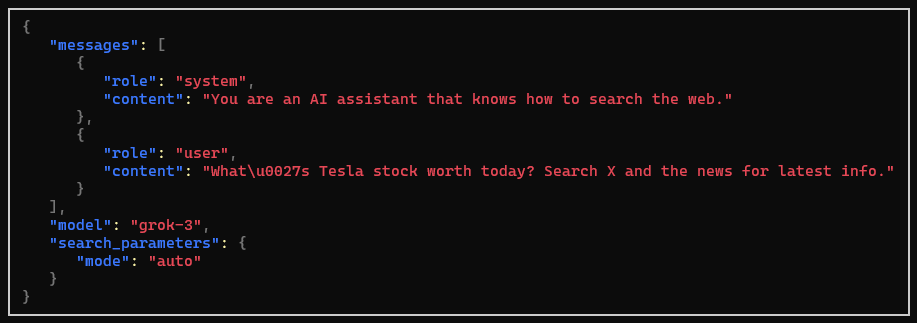
Both alternatives receive an optional JsonConsoleOptions instance to configure
the output, including truncating or wrapping long messages, setting panel style,
and more.
The chat pipeline logging is added similar to other pipeline extensions:
IChatClient client = new GrokChatClient(Environment.GetEnvironmentVariable("XAI_API_KEY")!, "grok-3-mini")
    .AsBuilder()
    .UseOpenTelemetry()
    // other extensions...
    .UseJsonConsoleLogging(new JsonConsoleOptions()
    {
        // Formatting options...
        Border = BoxBorder.None,
        WrapLength = 80,
    })
    .Build();
Sponsors


| Product | Versions Compatible and additional computed target framework versions. |
|---|---|
| .NET | net8.0 is compatible. net8.0-android was computed. net8.0-browser was computed. net8.0-ios was computed. net8.0-maccatalyst was computed. net8.0-macos was computed. net8.0-tvos was computed. net8.0-windows was computed. net9.0 was computed. net9.0-android was computed. net9.0-browser was computed. net9.0-ios was computed. net9.0-maccatalyst was computed. net9.0-macos was computed. net9.0-tvos was computed. net9.0-windows was computed. net10.0 is compatible. net10.0-android was computed. net10.0-browser was computed. net10.0-ios was computed. net10.0-maccatalyst was computed. net10.0-macos was computed. net10.0-tvos was computed. net10.0-windows was computed. |
-
net10.0
- Azure.AI.OpenAI (>= 2.7.0-beta.2)
- Devlooped.Extensions.AI.Grok (>= 0.9.0)
- Microsoft.Extensions.AI (>= 10.0.1)
- Microsoft.Extensions.AI.AzureAIInference (>= 10.0.0-preview.1.25559.3)
- Microsoft.Extensions.AI.OpenAI (>= 10.0.1-preview.1.25571.5)
- Microsoft.Extensions.Configuration.Abstractions (>= 10.0.0)
- Microsoft.Extensions.Configuration.Binder (>= 10.0.0)
- Microsoft.Extensions.Hosting.Abstractions (>= 10.0.0)
- Microsoft.Extensions.Logging (>= 10.0.0)
- Spectre.Console (>= 0.54.0)
- Spectre.Console.Json (>= 0.54.0)
-
net8.0
- Azure.AI.OpenAI (>= 2.7.0-beta.2)
- Devlooped.Extensions.AI.Grok (>= 0.9.0)
- Microsoft.Extensions.AI (>= 10.0.1)
- Microsoft.Extensions.AI.AzureAIInference (>= 10.0.0-preview.1.25559.3)
- Microsoft.Extensions.AI.OpenAI (>= 10.0.1-preview.1.25571.5)
- Microsoft.Extensions.Configuration.Abstractions (>= 10.0.0)
- Microsoft.Extensions.Configuration.Binder (>= 10.0.0)
- Microsoft.Extensions.Hosting.Abstractions (>= 10.0.0)
- Microsoft.Extensions.Logging (>= 10.0.0)
- Spectre.Console (>= 0.54.0)
- Spectre.Console.Json (>= 0.54.0)
NuGet packages (2)
Showing the top 2 NuGet packages that depend on Devlooped.Extensions.AI:
| Package | Downloads |
|---|---|
|
Smith
Run AI-powered C# files using Microsoft.Extensions.AI and Devlooped.Extensions.AI |
|
|
Devlooped.Agents.AI
Extensions for Microsoft.Agents.AI |
GitHub repositories
This package is not used by any popular GitHub repositories.