NanoByte.StructureEditor
4.0.0
dotnet add package NanoByte.StructureEditor --version 4.0.0
NuGet\Install-Package NanoByte.StructureEditor -Version 4.0.0
<PackageReference Include="NanoByte.StructureEditor" Version="4.0.0" />
<PackageVersion Include="NanoByte.StructureEditor" Version="4.0.0" />
<PackageReference Include="NanoByte.StructureEditor" />
paket add NanoByte.StructureEditor --version 4.0.0
#r "nuget: NanoByte.StructureEditor, 4.0.0"
#:package NanoByte.StructureEditor@4.0.0
#addin nuget:?package=NanoByte.StructureEditor&version=4.0.0
#tool nuget:?package=NanoByte.StructureEditor&version=4.0.0
NanoByte Structure Editor




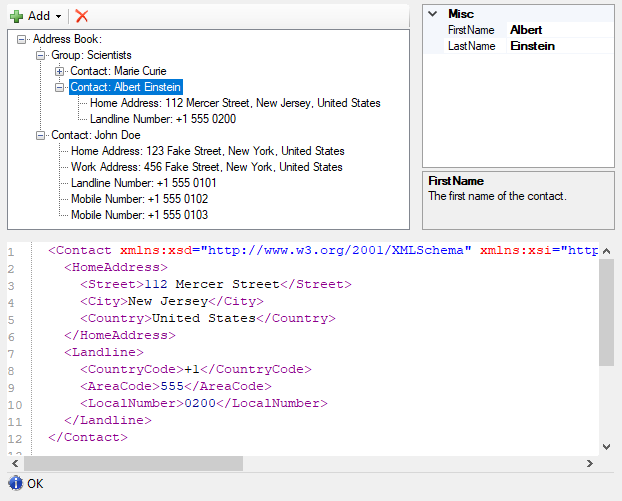
NanoByte Structure Editor is a .NET library that helps you build split-screen editors for your data structures, consisting of:
- a collapsible tree-view of the data structure,
- a graphical editor for the currently selected node in the tree (auto-generated or custom) and
- a text editor with a serialized (e.g., XML or JSON) representation of the currently selected node.
This allows you to create an IDE-like experience for your users when editing complex domain specific languages, configuration files, etc..
Usage
The library is available for two GUI toolkits. Both share the same API for describing your data structure, storage and undo/redo. Add a reference to the NuGet package matching your application:
| NanoByte.StructureEditor.WinForms | NanoByte.StructureEditor.EtoForms | |
|---|---|---|
| GUI toolkit | Windows Forms | Eto.Forms |
| Platforms | Windows | Windows, Linux, macOS |
| Frameworks | .NET Framework 4.5+, .NET 10.0+ | .NET Framework 4.7.2+, .NET 10.0+ |
| Default node editor | PropertyGridNodeEditor<T> |
PropertyEditorNodeEditor<T> |
| Text editor | ICSharpCode.TextEditor with syntax highlighting | Plain monospaced text box, replaceable via TextEditorFactory.Default |
| Sample | src/Sample.WinForms |
src/Sample.EtoForms |
An Eto.Forms application additionally needs an Eto.Platform.* package for each platform it runs on (e.g., Eto.Platform.Windows, Eto.Platform.Gtk, Eto.Platform.Mac64).
The code snippets below work with both packages unless noted otherwise. Import the namespace matching your package (NanoByte.StructureEditor.WinForms or NanoByte.StructureEditor.EtoForms).
Initialization
Create an instance of StructureEditor<T> and add it to your Form.
WinForms:
var editor = new StructureEditor<MyData>();
Controls.Add(editor);
Eto.Forms:
var editor = new StructureEditor<MyData>();
form.Content = editor;
Alternatively, you may want to derive your own class from StructureEditor<T>. This lets you keep the description of your data structure in one place and, with WinForms, use the graphical designer in Visual Studio (which does not support generic types) to place the editor on your Form.
public class MyDataEditor : StructureEditor<MyData>
{}
You need to "describe" your data structure to the editor. You can do this directly after instantiating the editor or in the constructor of your derived class.
- Call
DescribeRoot()and then use the fluent API provided as a return value to describe the properties on your main data type. - Call
Describe<TContainer>()to describe the properties on a data typeTContainerexposed by another property. You can use multiple calls with different type parameters to describe arbitrarily deep hierarchies.
The fluent API provides the following methods:
.AddProperty()describes a property..AddRequiredProperty()describes a property that cannot be set tonull..AddPolymorphicProperty()describes a polymorphic property. After calling it you chain.AddElement()calls for each specific type the property can hold..AddRequiredPolymorphicProperty()describes a polymorphic property that cannot be set tonull..AddList()describes a list..AddPolymorphicList()describes a polymorphic list. After calling it you need to chain.AddElement()calls for each specific type of element the list can hold.
There are numerous overloads for each of these methods, e.g., allowing you to specify a custom editor control for a data type or to keep the auto-generated one.
editor.DescribeRoot("Address Book")
      .AddList("Group", x => x.Groups);
editor.Describe<IContactContainer>()
      .AddList("Contact", x => x.Contacts);
editor.Describe<Contact>()
      .AddRequiredProperty("Home Address", x => PropertyPointer.For(() => x.HomeAddress))
      .AddProperty("Work Address", x => PropertyPointer.ForNullable(() => x.WorkAddress))
      .AddPolymorphicList(x => x.PhoneNumbers)
      .AddElement("Landline Number", () => new LandlineNumber())
      .AddElement("Mobile Number", () => new MobileNumber());
Storage
Use the Open() method to load an XML file into the editor:
editor.Open(CommandManager<AddressBook>.Load(path));
Use the Save() method on the CommandManager property to save the editor's content as an XML file:
editor.CommitPendingChanges(); // Eto.Forms only
editor.CommandManager.Save(path);
With Eto.Forms, input in a control that still has the focus may not have been applied yet. Call CommitPendingChanges() before saving to make sure the latest input is included.
Serialization formats
The text editor uses XML by default. To use JSON (System.Text.Json) instead, add a reference to the NanoByte.StructureEditor.Json NuGet package and set the Serializer property:
editor.Serializer = JsonStructureSerializer.Instance;
To load and save files in the same format, use SerializingCommandManager<T>. Passing one to Open() also sets the editor's Serializer:
editor.Open(SerializingCommandManager<AddressBook>.Load(path, JsonStructureSerializer.Instance));
editor.CommandManager.Save(path);
For Newtonsoft.Json), add a reference to the NanoByte.StructureEditor.NewtonsoftJson instead and use NewtonsoftJsonStructureSerializer.
Polymorphic lists and properties need extra attributes or settings to round-trip through JSON. See Serialization formats for details.
Samples
Take a look at the sample projects for a more complete setup, including custom node editors and undo/redo functionality. Both use the same data model from src/Sample:
Building
The source code is in src/, config for building the API documentation is in doc/ and generated build artifacts are placed in artifacts/. The source code does not contain version numbers. Instead the version is determined during CI using GitVersion.
To build install Visual Studio 2026 v18.12 or newer and run .\build.ps1.
On Linux and macOS you can run ./build.sh to compile the solution with the .NET SDK. This skips the .NET Framework targets that require Visual Studio, the unit tests (which depend on WinForms) and the documentation.
Contributing
We welcome contributions to this project such as bug reports, recommendations and pull requests.
This repository contains an EditorConfig file. Please make sure to use an editor that supports it to ensure consistent code style, file encoding, etc.. For full tooling support for all style and naming conventions consider using JetBrains' ReSharper or Rider products.
| Product | Versions Compatible and additional computed target framework versions. |
|---|---|
| .NET | net10.0 is compatible. net10.0-android was computed. net10.0-browser was computed. net10.0-ios was computed. net10.0-maccatalyst was computed. net10.0-macos was computed. net10.0-tvos was computed. net10.0-windows was computed. |
| .NET Framework | net45 is compatible. net451 was computed. net452 was computed. net46 was computed. net461 was computed. net462 was computed. net463 was computed. net47 was computed. net471 was computed. net472 is compatible. net48 was computed. net481 was computed. |
-
.NETFramework 4.5
- NanoByte.Common (>= 3.5.3)
-
.NETFramework 4.7.2
- NanoByte.Common (>= 3.5.3)
-
net10.0
- NanoByte.Common (>= 3.5.3)
NuGet packages (4)
Showing the top 4 NuGet packages that depend on NanoByte.StructureEditor:
| Package | Downloads |
|---|---|
|
NanoByte.StructureEditor.WinForms
WinForms controls for building split-screen editors for data structures |
|
|
NanoByte.StructureEditor.NewtonsoftJson
Newtonsoft.Json serialization support for split-screen editors for data structures |
|
|
NanoByte.StructureEditor.EtoForms
Cross-platform Eto.Forms controls for building split-screen editors for data structures |
|
|
NanoByte.StructureEditor.Json
System.Text.Json serialization support for split-screen editors for data structures |
GitHub repositories
This package is not used by any popular GitHub repositories.
| Version | Downloads | Last Updated |
|---|---|---|
| 4.0.0 | 0 | 11/22/2026 |
| 3.0.1 | 276 | 11/1/2026 |
| 3.0.0 | 161 | 10/30/2026 |
| 2.2.0 | 280 | 10/17/2026 |
| 2.1.10 | 140 | 10/9/2026 |
| 2.1.9 | 360 | 10/1/2026 |
| 2.1.8 | 500 | 9/9/2026 |
| 2.1.7 | 195 | 9/8/2026 |
| 2.1.6 | 335 | 8/30/2026 |
| 2.1.5 | 386 | 8/21/2026 |
| 2.1.4 | 247 | 8/16/2026 |
| 2.1.3 | 292 | 8/7/2026 |
| 2.1.2 | 236 | 7/26/2026 |
| 2.1.1 | 157 | 7/25/2026 |
| 2.1.0 | 804 | 6/23/2026 |
| 2.0.2 | 242 | 6/19/2026 |
| 2.0.1 | 203 | 6/19/2026 |
| 2.0.0 | 175 | 6/16/2026 |
| 1.0.10 | 478 | 5/20/2026 |
| 1.0.9 | 166 | 5/17/2026 |