Karls.BetterSecretsTool
1.0.2
dotnet tool install --global Karls.BetterSecretsTool --version 1.0.2
dotnet new tool-manifest
dotnet tool install --local Karls.BetterSecretsTool --version 1.0.2
#tool dotnet:?package=Karls.BetterSecretsTool&version=1.0.2
nuke :add-package Karls.BetterSecretsTool --version 1.0.2
Karls Better Secrets Tool 


An easier way to manage your .NET User Secrets from the command line.
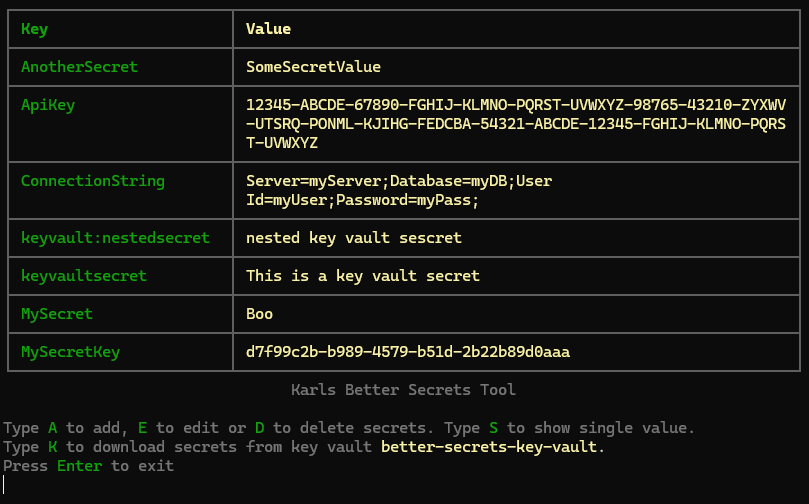
Installation
As a local tool:
dotnet new tool-manifest # if you don't have a manifest already
dotnet tool install Karls.BetterSecretsTool
As a global tool:
dotnet tool install -g Karls.BetterSecretsTool
While a global tool is convenient since it is always available, a local tool ensures that everyone working on the project uses the same version of the tool and that new versions are picked up automatically by tools such as Dependabot/Renovatebot.
Usage
Run better-secrets in the directory of your project to manage its user secrets.
As a local tool:
dotnet better-secrets
As a global tool:
dotnet-better-secrets
Using dnx if on .NET 10 SDK:
dnx Karls.BetterSecretsTool
Azure Key Vault Integration
You can download secrets from an Azure Key Vault into your user secrets store. This can be very useful to easily get a bunch of default secrets into your development environment.
To do this you need to add a new property to your .csproj file,
<UserSecretsKeyVault>:
  <PropertyGroup>
    <UserSecretsId>b6a435f3-371e-4719-bd15-d257df8962c4</UserSecretsId>
    <UserSecretsKeyVault>local-dev-key-vault</UserSecretsKeyVault>
  </PropertyGroup>
The value of the property is the name of your key vault. The tool will then
try to access the key vault using DefaultAzureCredential.
This means that if you are logged in with the Azure CLI (az login) and have
access to the key vault, it should just work. If not it might prompt you to
login in a browser.
You need to have at least the Key Vault Secrets User role assigned in the
key vault.
License
The project is released under the MIT license. Parts of the code are derived from the ASP.Net Core repository which is licensed by the .NET Foundation under the MIT license. See individual file headers for details.
| Product | Versions Compatible and additional computed target framework versions. |
|---|---|
| .NET | net8.0 is compatible. net8.0-android was computed. net8.0-browser was computed. net8.0-ios was computed. net8.0-maccatalyst was computed. net8.0-macos was computed. net8.0-tvos was computed. net8.0-windows was computed. net9.0 was computed. net9.0-android was computed. net9.0-browser was computed. net9.0-ios was computed. net9.0-maccatalyst was computed. net9.0-macos was computed. net9.0-tvos was computed. net9.0-windows was computed. net10.0 was computed. net10.0-android was computed. net10.0-browser was computed. net10.0-ios was computed. net10.0-maccatalyst was computed. net10.0-macos was computed. net10.0-tvos was computed. net10.0-windows was computed. |
This package has no dependencies.