EdiFabric.Native.X12
1.2.2
Prefix Reserved
dotnet add package EdiFabric.Native.X12 --version 1.2.2
NuGet\Install-Package EdiFabric.Native.X12 -Version 1.2.2
<PackageReference Include="EdiFabric.Native.X12" Version="1.2.2" />
<PackageVersion Include="EdiFabric.Native.X12" Version="1.2.2" />
<PackageReference Include="EdiFabric.Native.X12" />
paket add EdiFabric.Native.X12 --version 1.2.2
#r "nuget: EdiFabric.Native.X12, 1.2.2"
#:package EdiFabric.Native.X12@1.2.2
#addin nuget:?package=EdiFabric.Native.X12&version=1.2.2
#tool nuget:?package=EdiFabric.Native.X12&version=1.2.2
ediFabric Native X12 - C# bindings
ediFabric Native is a self-contained, high-performance X12 EDI native shared library. It converts X12 EDI to JSON (and back), validates transaction sets, and generates acknowledgments — callable from any language with a C foreign-function interface (C, C++, Rust, Go, Python, Node.js, Java/JNA, .NET, …). No .NET runtime, JVM, or other dependency is required on the target machine.
C# P/Invoke bindings for ediFabric Native.
| File | Purpose |
|---|---|
EdiFabric.Native.X12/NativeMethods.cs |
DllImport declarations mirroring the C header |
EdiFabric.Native.X12/EdiFabricX12.cs |
managed API over those declarations (the EdiFabric.Native.X12 NuGet package) |
EdiFabricNativeExample/Program.cs |
runnable walkthrough of every entry point |
c-abi-edifabric_x12_tools.h |
the C header these bindings mirror |
PUBLISHING.md |
how the NuGet package is built and published |
Install
dotnet add package EdiFabric.Native.X12
The package targets .NET 10 or later (on .NET 8 or 9, install version 1.2.0, which has the 1.2.0
native library, without the split and merge fix in 1.2.1) and bundles the ediFabric Native library for
Windows x64, Linux x64 and arm64 (glibc 2.34 or later), and macOS arm64 (12 or
later). .NET copies the library for your platform to the build output, under
runtimes/<rid>/native/ or, when you build or publish for a specific runtime, next
to your application, and the bindings load it from there. A library you set in
EdiFabricX12.LibraryPath or EDIFABRIC_X12_LIB takes precedence over the bundled one.
Requirements
- .NET 10.0 SDK or later to build this repository; the package runs on .NET 10 or later
- 64-bit Windows, Linux, or macOS
- The native library for your platform (bundled in the NuGet package; download it when you run the example from a clone):
| Platform | File |
|---|---|
| Windows | edifabric-x12-tools.dll |
| Linux | edifabric-x12-tools.so |
| macOS | edifabric-x12-tools.dylib |
- Evaluate with the demo serial key
bd96a836feca45cb91c86ee65d281f52without creating an account. It works for ediFabric Native, .NET and Cloud, and has a limited quota. Once it runs out, sign up free for Community to get your own evaluation serial key. Community never expires, requires no credit card, and is for non-production use. The first 14 days after you subscribe have unlimited operations, then the quota is 250 per day. To extend the unlimited period, ask through the support portal or at support@edifabric.com. After signup, retrieve your serial from Your Account. - Download the ediFabric Native library.
Plus your model files (per transaction set) and a map file that tells the engine where to find them. See Model map for details.
Getting started
Use the demo serial key bd96a836feca45cb91c86ee65d281f52, which needs no account, or sign up free for Community at
edifabric.com/pricing to get your own evaluation serial key.
Then download the library from
here.
Put the native library in the repository root, then run the walkthrough with your serial:
cd EdiFabricNativeExample
dotnet run -- --serial bd96a836feca45cb91c86ee65d281f52
The project copies the library next to the executable on build. It authorizes with your Community (or paid) serial, loads the model map, and calls every function in the ABI, printing what each one returns.
======================================================================
Parse: parse (mode 2, JSON + validation report)
======================================================================
  1754 bytes total, validation starts at offset 1708
  validation -> {"errors":[],"errors_count":0,"data_count":10}
Options:
dotnet run -- --serial YOUR_SERIAL     # Community or paid serial (required)
dotnet run -- --lib /opt/edifabric     # library file or the folder holding it
You can also set EDIFABRIC_SERIAL instead of passing --serial.
The library is resolved through a DllImportResolver that tries
EdiFabricX12.LibraryPath, then EDIFABRIC_X12_LIB, then the application
directory, the package's runtimes/<rid>/native/ folder under it, and a few levels
above it, before falling back to the default .NET probing logic. The serial comes from --serial, then EDIFABRIC_SERIAL.
All strings and payloads cross the boundary as UTF‑8 byte buffers
(pointer + length). Every function returns 0 on success or a non-zero
error code.
Usage
Add the EdiFabric.Native.X12 package (see Install). Or copy
NativeMethods.cs and EdiFabricX12.cs into your project and enable unsafe blocks:
<PropertyGroup>
  <AllowUnsafeBlocks>true</AllowUnsafeBlocks>
</PropertyGroup>
using EdiFabric.Native.X12;

const string serial = "your-serial";   // from your Community or paid plan

EdiFabricX12.Load();                    // optional, any call loads on demand
EdiFabricX12.EnsureToken(serial, seconds: 3600);   // every plan: license the process (see Licensing)
EdiFabricX12.SetMap($$"""{"default": "{{serial}}", "maps": {}}""");

var edi = File.ReadAllBytes("837p.txt");
var result = EdiFabricX12.Parse(edi);
Console.WriteLine(result.Transactions);
Parse accepts a string or a ReadOnlySpan<byte>, so EDI read straight from
disk needs no intermediate decoding.
Validation and acknowledgments
ParseResult splits the native output for you: Transactions is the JSON, and
Report is the validation and acknowledgment section that follows it.
var config = """
{
  "validate": { "snip_level": 2, "max_errors": 0 },
  "ack": { "gen997": false, "supress_ta1": false }
}
""";

var result = EdiFabricX12.Parse(edi, ParseMode.JsonValidateAck, config);
using var report = JsonDocument.Parse(result.Report);
Console.WriteLine(report.RootElement.GetProperty("errors_count").GetInt32());
| Mode | Constant | Output |
|---|---|---|
| 1 | ParseMode.Json |
transaction-set JSON |
| 2 | ParseMode.JsonValidate |
JSON plus a validation report |
| 3 | ParseMode.JsonValidateAck |
JSON plus validation and a 999/997/TA1 acknowledgment |
Streaming large interchanges
EnumerateSplit streams one transaction set (or repeating loop) at a time with
flat memory use. segment_id must be ST or the first segment of a repeating loop.
var config = """{ "split": { "segment_id": "LX", "segment_depth": 6, "loop_id": "2400" } }""";

foreach (var part in EdiFabricX12.EnumerateSplit(edi, ParseMode.Json, config))
    Handle(Encoding.UTF8.GetString(part.Payload));
EnumerateMerge streams a full interchange JSON document back out one segment at a time:
using var output = File.Create("out.edi");
foreach (var segment in EdiFabricX12.EnumerateMerge(result.Transactions))
{
    output.Write(segment);
    output.Write("\r\n"u8);
}
Both wrap the underlying StartSplit/Split/GetResult and
StartMerge/Merge/GetResult sequences, which you can also drive directly.
Building EDI
var edi = EdiFabricX12.Build(result.Transactions, postfix: "\r\n"); // null for compact output
API reference
Conventions used by every function:
- Returns
int:0= success, non-zero = error code. - Inputs are UTF‑8
byte*+int length. - Output functions use grow-and-retry: if the buffer is too small the call
returns
1(InsufficientCapacity) and writes the required size into the length out-parameter; reallocate and call again. - Exceptions never cross the boundary.
Every wrapper throws EdiFabricException when the native call returns a
non-zero status. Buffer growth (InsufficientCapacity) is retried automatically.
| Group | Members |
|---|---|
| Loading | Load, LibraryPath, ResolvedLibraryPath |
| Lifecycle | InitLogger, ShutdownLogger, ClearCache |
| Licensing | EnsureToken, GetAppVersion, GetToken, ValidateToken, SetToken, GetTokenExpiration, GetTokenExpirationTicks, SetSerial |
| Model map | SetMap |
| Processing | Parse, StartSplit, Split, Build, StartMerge, Merge, GetResult |
| Errors | GetError, FreeError, Check |
| Wrappers | EnumerateSplit, EnumerateMerge |
| Types | ParseMode, LogLevel, EdiFabricErrorCode, EdiFabricException, ParseResult, SplitStep, SplitPart, EdiFabricX12.Raw |
GetError frees the native string for you. Use EdiFabricX12.Raw.GetError with
FreeError only when you want to own the unmanaged memory yourself. Builds that
do not export free_error fall back to Marshal.FreeHGlobal.
Licensing
You can evaluate with the demo serial key bd96a836feca45cb91c86ee65d281f52
without creating an account. It works for ediFabric Native, .NET and Cloud. Once the limited
quota for this provisional key runs out, an account and a Community subscription are required
to continue the evaluation.
Sign up free for the Community plan to get your own evaluation serial key. Community never expires, requires no credit card, and is for non-production evaluation, learning, and prototyping (unlimited operations for the first 14 days after you subscribe, then 250 per day; to extend the unlimited period, ask through the support portal or at support@edifabric.com). After signup, copy your serial from Your Account.
If you hit the Community daily quota, native calls return error 639; upgrade at edifabric.com/pricing if you want to continue.
Use EnsureToken on every plan. Since ediFabric Native 1.2.0 it's the one licensing call for Community, Developer,
Enterprise and Perpetual, in place of SetSerial. Call it once at startup with your serial and the number of seconds a
token must still be valid, and it keeps the process licensed from then on.
| Plan | What EnsureToken does |
|---|---|
| Community and the demo serial | Checks the serial online on every operation, as SetSerial does |
| Developer, Enterprise and Perpetual | Gets a token, caches it on disk and refreshes it before it expires, so operations are checked locally |
The token cache is %LOCALAPPDATA%\EdiFabric\tokens on Windows, ~/Library/Caches/EdiFabric/tokens on macOS, and
$XDG_CACHE_HOME/edifabric/tokens (or ~/.cache/edifabric/tokens) on Linux, so every process on the machine reuses
the token. Set EDIFABRIC_TOKEN_CACHE to another folder, or to none to turn the cache off. When the license server
can't be reached, a cached token that's still valid keeps working; without one, calls return error 640.
// Every plan (recommended): license the process; tokens are refreshed when they expire within N seconds
EdiFabricX12.EnsureToken(serial, seconds: 3600);
Console.WriteLine(EdiFabricX12.GetTokenExpiration());   // DateTime, or null when unset

// Enterprise and Perpetual, when your hosts manage tokens themselves: fetch / validate / set an offline token
var token = EdiFabricX12.GetToken(serial);
EdiFabricX12.ValidateToken(token);
EdiFabricX12.SetToken(token);
SetSerial still works, but it checks the serial online on every operation, on every plan. SetToken is for Enterprise and
Perpetual hosts that fetch and distribute offline tokens themselves.
Self-service offline tokens last 30 days, so refresh them before they expire. If your hosts can't refresh a token, Enterprise and Perpetual can request a 1-year token, and Perpetual gets a new one free every year, if approved. Long-lived tokens are issued after the trial or evaluation period to registered companies using professional email addresses, and are non-refundable once issued. See how to request one. Treat every token as a secret, and keep it out of source control.
Model map
SetMap tells the engine where to find transaction-set models. Keys are
message:version. Set default to your serial to resolve unmapped transaction
sets through the online spec service, or leave it null (or "") and map
everything locally.
The example builds that JSON at runtime instead of hard-coding paths. Online
fallback is a JsonObject with default set to your serial:
var map = new JsonObject
{
    ["default"] = serial,
    ["maps"] = new JsonObject(),
};

EdiFabricX12.SetMap(map.ToJsonString());
For local models, load a map file and rewrite each entry's location to the
folder that actually holds the JSON files (see DemoSetLocalMap in
EdiFabricNativeExample/Program.cs):
var mapLocation = Path.GetFullPath("map");
var localMap = JsonNode.Parse(File.ReadAllText(Path.Combine(mapLocation, "map.json")))!.AsObject();
var maps = localMap["maps"]!.AsObject();
foreach (var entry in maps)
    entry.Value!["location"] = mapLocation;

EdiFabricX12.SetMap(localMap.ToJsonString());
map.json lists each transaction set; location is filled in at runtime so the
same file works from any working directory:
{
  "default": "",
  "maps": {
    "837:005010X222A1": { "type": 1, "name": "model837P.json", "location": "" },
    "834:005010X220A1": { "type": 1, "name": "model834.json",  "location": "" }
  }
}
You can also mix both: keep default as your serial and add local entries under
maps for the transaction sets you ship on disk.
All X12 transactions, such as 837P, 834 and 850, are represented as ediFabric Native JSON models. The models are the same on every plan, Community or paid.
Standard models come from the EDI spec library. Open the transaction, for example 837P, and under Download select Native model. Downloads need a free sign-in, as the Community plan is enough, and accepting the license agreement once; every plan includes 50 spec downloads a day. The specs the public examples use, such as 837P, 834, 835, 850 and 810, are a free sample that downloads without signing in. To parse, you don't need to download standard models at all: with default set to your serial, the engine gets them from the online spec service.
Custom models come from the EDI Spec Builder, which you use signed in to your free account. When a trading partner changes the standard, open the transaction in the EDI spec library and select Customize in Spec Builder, or import your own OpenEDI file. Edit the OpenEDI schema until it matches the partner's guide and select Update. Then, on the ediFabric Native tab, select Download Native.
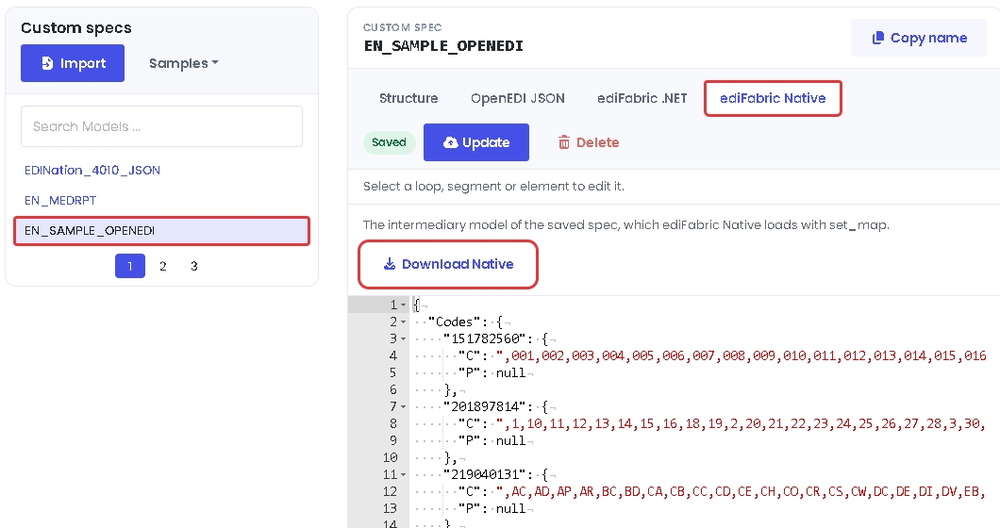
Save the downloaded file where the map can name it, and add it to maps under its message:version key, for example 837:005010X222A1. The file is the compiled layout the engine loads, not the OpenEDI schema. To change a model, edit the spec in the EDI Spec Builder and download it again. See EDI models and OpenEDI format.
Configuration JSON
All JSON uses snake_case keys and is case-insensitive.
ParseConfig (parse)
{
  "validate": { "regex": null, "date_format": null, "time_format": null,
                "skip_seq_count": false, "skip_hl_seq": false,
                "snip_level": 0, "max_errors": 0 },
  "ack":      { "supress_ta1": false, "ak901p": false,
                "gen_for_valid": false, "gen997": false }
}
validate— applied whenmode ≥ 2;snip_levelis1–4.ack— applied whenmode == 3.
All sections are optional for parse.
SplitConfig (start_split)
{
  "split":    { "segment_id": "ST", "segment_depth": 0, "loop_id": null }
}
split— required forstart_split.
Splitting is possible for the following boundaries:
- Transaction - for files that contain batches of transactions.
- Repeating loop - for files that contain batches of loops, such as order lines, claims or benefit enrollments.
The splitter must be configured as follows:
segment_id— the name of the segment to split by. It must be either ST or the first segment in the repeatable loop (Mandatory).segment_depth— the depth of the segment in the model hierarchy (Mandatory).loop_id— the name of the loop for the segment specified in segment_id (Optional).
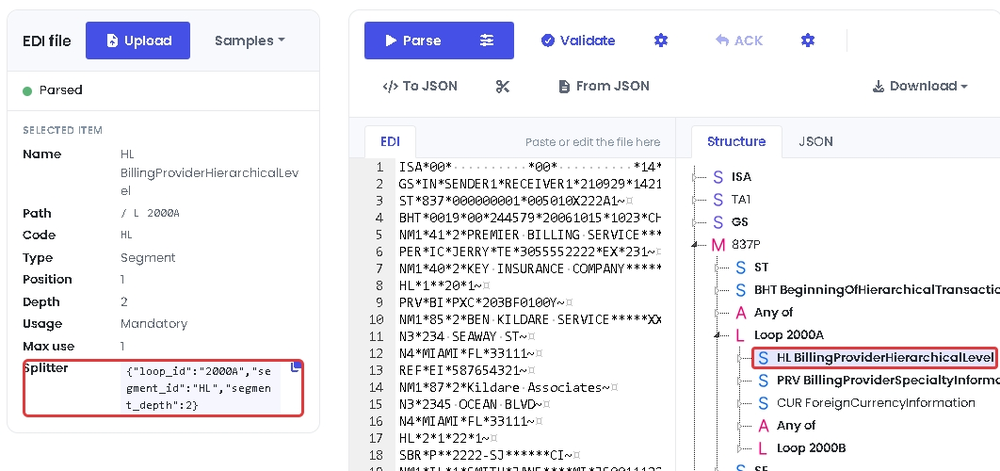
The values for the splitter are in EdiNation, the free X12 editor. Load a file, select Parse, and select the first segment of the loop in the Structure tab. For example, to split an 837P by loop 2000A, load the 837P sample from Samples and select the HL segment in loop 2000A. Under Selected item, segment_id is Code, loop_id is the last item in Path, and segment_depth is Depth.
If a segment shows no Splitter, the file can't be split by that segment.
The easiest way to get the splitter configuration is to select the copy button next to Splitter, which copies the three values as JSON. Paste them as the value of split.
Threading
The library holds process-global state (model map, active split reader, active
merge writer, last result, license) behind an internal lock. Parse and Build
are independent per call, but each split or merge sequence must run to completion
without another split or merge interleaving from a different thread.
Error codes
0 is success and 1 means the output buffer was too small. Library-level codes
are exposed as EdiFabricErrorCode, and GetError(code) returns the message.
Validation codes (elements, segments, transaction sets, groups, and interchanges)
appear in the parse report when mode ≥ 2.
Error 639 means the Community (evaluation) daily quota was exceeded. Upgrade your plan at edifabric.com/pricing if you wish to continue.
Parser and library
| Code | Meaning |
|---|---|
| 1 | The suggested output buffer size is too small |
| 501 | Unexpected error. Contact support@edifabric.com and include a sample project/file to reproduce the issue |
| 502 | No connection to EdiNation API |
| 503 | The model map configuration is invalid. Check the paths and the model file names are correct |
| 611 | The input buffer is either null or its size is nill |
| 612 | The logger failed to log |
| 613 | The map configuration file is invalid |
| 614 | The output capacity must be positive |
| 615 | Models map must be set before parsing or splitting |
| 616 | Mode must be any of: 1 - Parse, 2 - Parse and Validate, 3 - Parse and Validate and Acknowledge |
| 617 | Parser failed. Contact support@edifabric.com and include a sample project/file to reproduce the issue |
| 618 | Validation failed. Contact support@edifabric.com and include a sample project/file to reproduce the issue |
| 619 | Validation serializer failed. Contact support@edifabric.com and include a sample project/file to reproduce the issue |
| 620 | The token is invalid. Contact support@edifabric.com for assistance |
| 621 | The configuration file is invalid |
| 622 | The split segment ID must not be blank |
| 623 | Call StartSplit before splitting |
| 624 | The result can't be retrieved. Contact support@edifabric.com and include a sample project/file to reproduce the issue |
| 625 | Result buffer size mismatched |
| 626 | Call StartMerge before merging |
| 627 | The output buffer is either null or its size is nill |
| 628 | The serial number is missing or incorrect. GetToken doesn't work with Developer license |
| 629 | License was not installed. Contact support@edifabric.com for assistance |
| 630 | No license to use this version. Contact support@edifabric.com for assistance |
| 631 | The token has expired. Get and set a new token to continue |
| 632 | The token is missing. Set token to continue |
| 633 | Reached the maximum number of licenses. Set token to continue |
| 634 | Environment not recognized for licensing or reached the maximum number of licenses |
| 635 | Serial or token not found. Either set token or serial to continue |
| 636 | The rate to get serials was exceeded for your license. Wait for 60 seconds and try again or upgrade your license |
| 637 | Invalid JSON. Enable logging for additional details |
| 638 | The operation is not supported by your license |
| 639 | Community daily quota exceeded. Your license has reached its daily call limit. Upgrade your plan at edifabric.com to continue |
| 640 | The license server can't be reached and no valid token is cached. Check the internet connection, firewall and proxy settings, and try again. Contact support@edifabric.com if this continues |
Troubleshooting
DllNotFoundException — the library is not on any searched path. Set
EdiFabricX12.LibraryPath before the first call, or set EDIFABRIC_X12_LIB.
Error 615 on parse — call SetMap before parsing or splitting. ClearCache
resets the map, so reload it afterwards.
Error 628 / 635 on parse — license the process first with EnsureToken, on any plan, or with SetToken and an offline token.
Error 633 on ensure_token / get_token — the plan's machine quota is used up. Contact support.
Error 639 — the Community (evaluation) daily quota was exceeded. Wait until the next day, or upgrade your plan if you wish to continue.
Error 640 — the license server can't be reached and no valid token is cached. Check the internet connection, firewall and proxy settings. A cached token that's still valid keeps working, so this happens only before the first token, or after a token expired.
Links
- Documentation
- Product page
- Community plan (free signup)
- Your Account
- Support: support@edifabric.com
| Product | Versions Compatible and additional computed target framework versions. |
|---|---|
| .NET | net10.0 is compatible. net10.0-android was computed. net10.0-browser was computed. net10.0-ios was computed. net10.0-maccatalyst was computed. net10.0-macos was computed. net10.0-tvos was computed. net10.0-windows was computed. |
-
net10.0
- No dependencies.
NuGet packages
This package is not used by any NuGet packages.
GitHub repositories
This package is not used by any popular GitHub repositories.
| Version | Downloads | Last Updated |
|---|---|---|
| 1.2.2 | 102 | 11/12/2026 |
Native library 1.2.2: the Linux libraries link OpenSSL statically, so they no longer use the system OpenSSL and work in host processes that bring their own, such as Node.js. Includes 1.2.1's fix: start_split and start_merge copy their input. Targets .NET 10. Projects on .NET 8 or 9 can use 1.2.0, which has the 1.2.0 library without this fix: dotnet add package EdiFabric.Native.X12 --version 1.2.0