ConfigCat.Client
10.0.0
dotnet add package ConfigCat.Client --version 10.0.0
NuGet\Install-Package ConfigCat.Client -Version 10.0.0
<PackageReference Include="ConfigCat.Client" Version="10.0.0" />
<PackageVersion Include="ConfigCat.Client" Version="10.0.0" />
<PackageReference Include="ConfigCat.Client" />
paket add ConfigCat.Client --version 10.0.0
#r "nuget: ConfigCat.Client, 10.0.0"
#:package ConfigCat.Client@10.0.0
#addin nuget:?package=ConfigCat.Client&version=10.0.0
#tool nuget:?package=ConfigCat.Client&version=10.0.0
ConfigCat SDK for .NET


ConfigCat SDK for .NET provides easy integration for your application to ConfigCat.
Supported runtimes
- .NET 6+
- .NET Framework 4.6.2+
- Other runtimes which implement .NET Standard 2.0+ like .NET Core 2.0+, Xamarin.Android 8.0+, Xamarin.iOS 10.14+, etc. (For more details, see the Platform compatiblity section below.)
Getting started
1. Install the package with NuGet
The core package, which works across all supported .NET applications, can be installed as follows:
dotnet add package ConfigCat.Client
or
Install-Package ConfigCat.Client
For ASP.NET Core applications and other modern .NET applications built on .NET Generic Host (Microsoft.Extensions.Hosting)
or .NET's standard dependency injection (Microsoft.Extensions.DependencyInjection),
it's recommended to install the integration package:
dotnet add package ConfigCat.Extensions.Hosting
or
Install-Package ConfigCat.Extensions.Hosting
For Unity, see the instructions here.
2. Import ConfigCat namespaces to your application
If using the core package:
using ConfigCat.Client;
If using the integration package:
using ConfigCat.Client;
using ConfigCat.Extensions.Hosting;
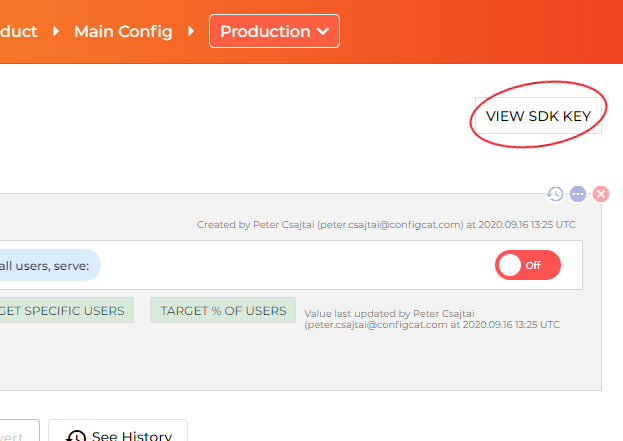
3. Go to the <a href="https://app.configcat.com/sdkkey" target="_blank">ConfigCat Dashboard</a> to get your SDK Key:
4. Obtain a ConfigCat client instance:
If using the core package:
var client = ConfigCatClient.Get("#YOUR-SDK-KEY#");
You can acquire singleton client instances for your SDK keys using the ConfigCatClient.Get(sdkKey: <sdkKey>) static factory method.
(However, please keep in mind that subsequent calls to ConfigCatClient.Get() with the same SDK Key return a shared client instance, which was set up by the first call.)
If using the integration package:
First, configure your application host or DI services:
If your application uses the modern, linear, property-based configuration style:
var configCatBuilder = builder.UseConfigCat();
configCatBuilder.AddDefaultClient(options =>
{
    options.SdkKey = "#YOUR-SDK-KEY#";
});
If your application uses the traditional, callback-based approach:
builder.ConfigureConfigCat(configCatBuilder =>
{
    configCatBuilder.AddDefaultClient(options =>
    {
        options.SdkKey = "#YOUR-SDK-KEY#";
    });
});
If your application performs setup via a host builder not compatible with .NET Generic Host or manually builds a DI container using ServiceCollection:
services.AddConfigCat(configCatBuilder =>
{
    configCatBuilder.AddDefaultClient(options =>
    {
        options.SdkKey = "#YOUR-SDK-KEY#";
    });
});
Build the application host or DI container.
Finally, resolve the singleton
IConfigCatClientservice from the DI container via constructor injection, method injection, etc., or byServiceProvider.GetRequiredService<IConfigCatClient>(). E.g.:var client = app.Services.GetRequiredService<IConfigCatClient>();
5. Get your setting value:
var isMyAwesomeFeatureEnabled = await client.GetValueAsync("isMyAwesomeFeatureEnabled", false);

if (isMyAwesomeFeatureEnabled)
{
    doTheNewThing();
}
else
{
    doTheOldThing();
}
6. On application exit:
If using the core package:
client.Dispose();
To ensure graceful shutdown of the client, you should invoke the Dispose() method. (The client implements the IDisposable interface.)
Alternatively, you can close all open clients at once using the ConfigCatClient.DisposeAll() method.
If using the integration package:
You don't need to explicitly dispose of the resolved IConfigCatClient service. It will be automatically disposed when the application host or DI container is disposed.
Getting user-specific setting values with targeting
This feature allows you to get different setting values for different users in your application by passing a User Object to GetValueAsync().
Read more about targeting here.
var currentUser = new User("#USER-IDENTIFIER#");

var isMyAwesomeFeatureEnabled = await client.GetValueAsync(
	"isMyAwesomeFeatureEnabled",
	defaultValue: false,
	user: currentUser);
Sample/demo apps
- Sample Console App
- Sample Multi-Page Web App
- Sample Single-Page Web App
- Sample Mobile/Windows Store App
- Sample Windows Service (Worker Service built on .NET Generic Host)
Polling modes
The ConfigCat SDK supports 3 different polling strategies to fetch feature flags and settings from the ConfigCat CDN. Once the latest data is downloaded, it is stored in the cache, then the SDK uses the cached data to evaluate feature flags and settings. Read more about polling modes and how to use them at ConfigCat Docs.
Platform compatibility
The ConfigCat SDK supports all the widespread .NET JIT runtimes, everything that implements .NET Standard 2.0+ and supports TLS 1.2 should work. Starting with v9.3.0, it can also be used in applications that employ trimmed self-contained or various ahead-of-time (AOT) compilation deployment models.
Based on our tests, the SDK is compatible with the following runtimes/deployment models:
- .NET Framework 4.6.2+ (including Ngen)
- .NET Core 2.0+, .NET 5+ (including Crossgen2/ReadyToRun and Native AOT)
- Mono 5.10+
- .NET for Android (formerly known as Xamarin.Android)
- .NET for iOS (formerly known as Xamarin.iOS)
- Unity 2021.3+ (Mono JIT)
- Unity 2021.3+ (IL2CPP)<sup><small>*</small></sup>
- Universal Windows Platform 10.0.16299.0+ (.NET Native)<sup><small>**</small></sup>
- WebAssembly (Mono AOT/Emscripten, also known as wasm-tools)
<sup><small>*</small></sup>Unity WebGL also works but needs a bit of extra effort: you will need to enable WebGL compatibility by calling the ConfigCatClient.PlatformCompatibilityOptions.EnableUnityWebGLCompatibility method. For more details, see Sample Scripts.<br/>
<sup><small>**</small></sup>To make the SDK work in Release builds on UWP, you will need to add <Namespace Name="System.Text.Json.Serialization.Converters" Browse="Required All"/> to your application's .rd.xml file. See also this discussion.
We strive to provide an extensive support for the various .NET runtimes and versions. If you still encounter an issue with the SDK on some platform, please open a GitHub issue or contact support.
Need help?
Contributing
Contributions are welcome. For more info please read the Contribution Guideline.
About ConfigCat
ConfigCat is a feature flag and configuration management service that lets you separate releases from deployments. You can turn your features ON/OFF using <a href="https://app.configcat.com" target="_blank">ConfigCat Dashboard</a> even after they are deployed. ConfigCat lets you target specific groups of users based on region, email or any other custom user attribute.
ConfigCat is a <a href="https://configcat.com" target="_blank">hosted feature flag service</a>. Manage feature toggles across frontend, backend, mobile, desktop apps. <a href="https://configcat.com" target="_blank">Alternative to LaunchDarkly</a>. Management app + feature flag SDKs.
| Product | Versions Compatible and additional computed target framework versions. |
|---|---|
| .NET | net5.0 was computed. net5.0-windows was computed. net6.0 is compatible. net6.0-android was computed. net6.0-ios was computed. net6.0-maccatalyst was computed. net6.0-macos was computed. net6.0-tvos was computed. net6.0-windows was computed. net7.0 was computed. net7.0-android was computed. net7.0-ios was computed. net7.0-maccatalyst was computed. net7.0-macos was computed. net7.0-tvos was computed. net7.0-windows was computed. net8.0 is compatible. net8.0-android was computed. net8.0-browser was computed. net8.0-ios was computed. net8.0-maccatalyst was computed. net8.0-macos was computed. net8.0-tvos was computed. net8.0-windows was computed. net9.0 was computed. net9.0-android was computed. net9.0-browser was computed. net9.0-ios was computed. net9.0-maccatalyst was computed. net9.0-macos was computed. net9.0-tvos was computed. net9.0-windows was computed. net10.0 was computed. net10.0-android was computed. net10.0-browser was computed. net10.0-ios was computed. net10.0-maccatalyst was computed. net10.0-macos was computed. net10.0-tvos was computed. net10.0-windows was computed. |
| .NET Core | netcoreapp2.0 was computed. netcoreapp2.1 was computed. netcoreapp2.2 was computed. netcoreapp3.0 was computed. netcoreapp3.1 was computed. |
| .NET Standard | netstandard2.0 is compatible. netstandard2.1 is compatible. |
| .NET Framework | net461 was computed. net462 is compatible. net463 was computed. net47 was computed. net471 was computed. net472 was computed. net48 was computed. net481 was computed. |
| MonoAndroid | monoandroid was computed. |
| MonoMac | monomac was computed. |
| MonoTouch | monotouch was computed. |
| Tizen | tizen40 was computed. tizen60 was computed. |
| Xamarin.iOS | xamarinios was computed. |
| Xamarin.Mac | xamarinmac was computed. |
| Xamarin.TVOS | xamarintvos was computed. |
| Xamarin.WatchOS | xamarinwatchos was computed. |
-
.NETFramework 4.6.2
- System.Text.Json (>= 8.0.5)
- System.Text.RegularExpressions (>= 4.3.1)
-
.NETStandard 2.0
- System.Text.Json (>= 8.0.5)
- System.Text.RegularExpressions (>= 4.3.1)
-
.NETStandard 2.1
- System.Text.Json (>= 8.0.5)
- System.Text.RegularExpressions (>= 4.3.1)
-
net6.0
- System.Text.Json (>= 8.0.5)
-
net8.0
- No dependencies.
NuGet packages (9)
Showing the top 5 NuGet packages that depend on ConfigCat.Client:
| Package | Downloads |
|---|---|
|
OpenFeature.Contrib.Providers.ConfigCat
ConfigCat provider for .NET |
|
|
Musement.Extensions.Configuration.ConfigCat
A .NET configuration provider for ConfigCat |
|
|
Codelux
Codelux is a collection of tools that simplify and abstract processes such as dependency injection, caching, configuration, mapping etc. Codelux.ServiceStack includes various ServiceStack helper libraries that make OrmLite model mapping, dependency injection and bootstrapping simple, elegant and clean. Additionally, Codelux.Plugins provides a base plugin framework for a pluggable architecture design. |
|
|
ConfigCat.Extensions.Hosting
An official package that provides a streamlined way to integrate the ConfigCat SDK into ASP.NET Core applications and other modern .NET applications built on .NET Generic Host (Microsoft.Extensions.Hosting) or .NET's standard dependency injection (Microsoft.Extensions.DependencyInjection). |
|
|
OpenFeature.Providers.ConfigCat
ConfigCat provider for .NET |
GitHub repositories (1)
Showing the top 1 popular GitHub repositories that depend on ConfigCat.Client:
| Repository | Stars |
|---|---|
|
VladislavAntonyuk/MauiSamples
.NET MAUI Samples
|
| Version | Downloads | Last Updated |
|---|---|---|
| 10.0.0 | 119,245 | 7/13/2026 |
| 9.5.1 | 595,209 | 6/2/2026 |
| 9.5.0 | 258,568 | 3/16/2026 |
| 9.4.3 | 832,401 | 8/8/2025 |
| 9.4.2 | 89,573 | 6/23/2025 |
| 9.4.1 | 88,461 | 6/3/2025 |
| 9.4.0 | 42,037 | 5/30/2025 |
| 9.3.2 | 1,790,527 | 10/9/2024 |
| 9.3.1 | 692,384 | 9/11/2024 |
| 9.3.0 | 59,106 | 8/28/2024 |
| 9.2.0 | 554,455 | 5/13/2024 |
| 9.1.0 | 463,592 | 3/21/2024 |
| 9.0.1 | 408,493 | 1/9/2024 |
| 9.0.0 | 116,714 | 11/21/2023 |
| 8.2.0 | 513,990 | 7/26/2023 |
| 8.1.1 | 112,919 | 6/23/2023 |
| 8.1.0 | 36,409 | 6/12/2023 |
| 8.0.0 | 28,245 | 5/26/2023 |
| 7.2.0 | 933,028 | 1/11/2023 |
| 7.1.0 | 51,019 | 12/16/2022 |