AvaloniaTerminal 1.0.0-alpha.11
dotnet add package AvaloniaTerminal --version 1.0.0-alpha.11
NuGet\Install-Package AvaloniaTerminal -Version 1.0.0-alpha.11
<PackageReference Include="AvaloniaTerminal" Version="1.0.0-alpha.11" />
<PackageVersion Include="AvaloniaTerminal" Version="1.0.0-alpha.11" />
<PackageReference Include="AvaloniaTerminal" />
paket add AvaloniaTerminal --version 1.0.0-alpha.11
#r "nuget: AvaloniaTerminal, 1.0.0-alpha.11"
#:package AvaloniaTerminal@1.0.0-alpha.11
#addin nuget:?package=AvaloniaTerminal&version=1.0.0-alpha.11&prerelease
#tool nuget:?package=AvaloniaTerminal&version=1.0.0-alpha.11&prerelease
AvaloniaTerminal


Avalonia terminal control built on top of XTerm.NET.
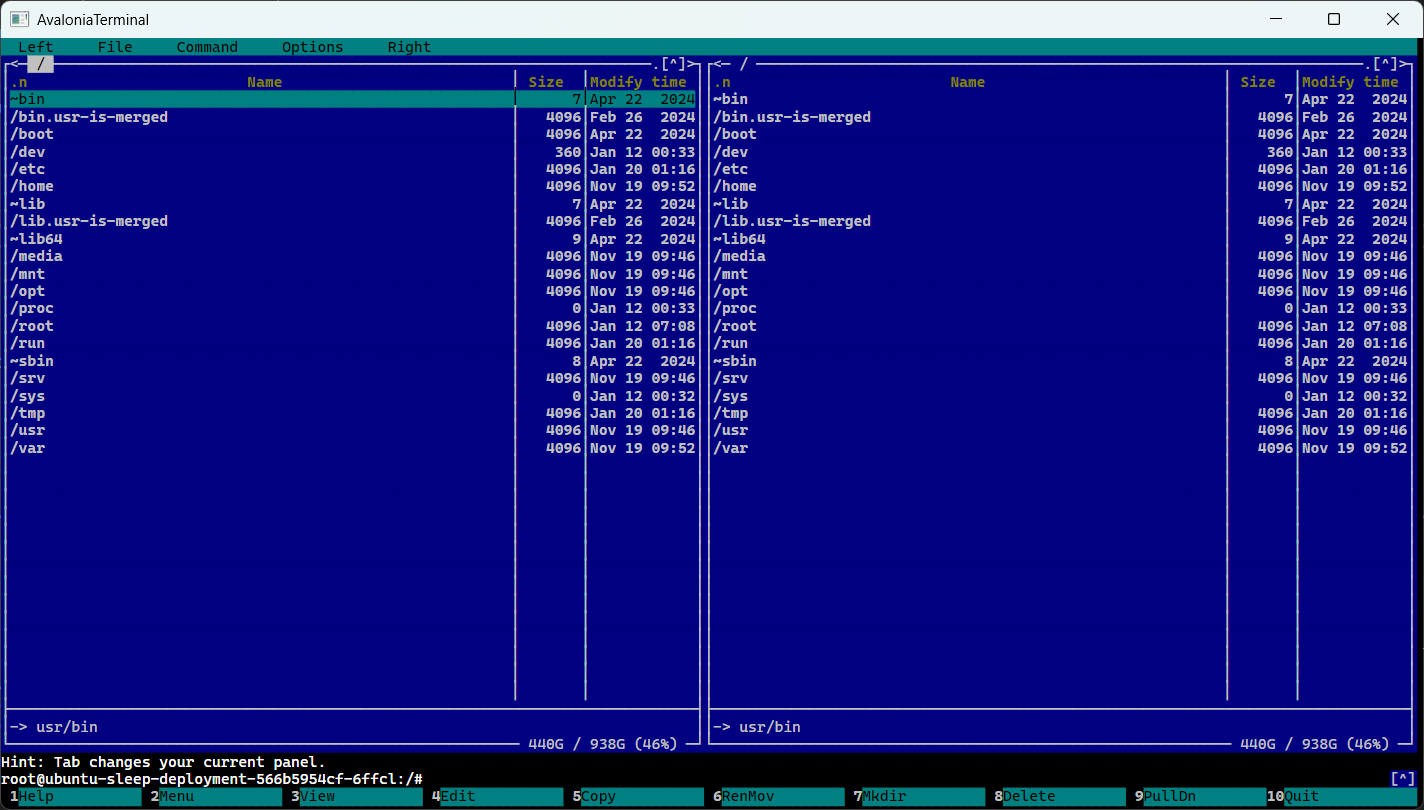
Features
- Terminal rendering backed by
XTerm.NET - Scrollback with mouse wheel, scrollbar,
PageUp, andPageDown - Caret rendering with theme-aware default styling
- Text selection with drag, double-click word selection, triple-click row selection, and drag auto-scroll
- Bindable selection state via
SelectedTextandHasSelection - Search helpers for finding and navigating matches in the terminal buffer
- Mouse reporting mode support for xterm-compatible terminal apps
- Host-friendly context menu and clipboard hooks
- Configurable right-click behavior via
RightClickAction - Model-driven API for feeding terminal output and sending user input
- Sample desktop app with
Shell,Scroll, andSelectiontabs - Windows sample shell backed by ConPTY, with redirected-shell fallback when ConPTY is unavailable
- Sample shell disables resize reflow to avoid TUI resize corruption in apps such as
mc
Install
dotnet add package AvaloniaTerminal
Basic Usage
Add the control in XAML:
<Window
    xmlns="https://github.com/avaloniaui"
    xmlns:x="http://schemas.microsoft.com/winfx/2006/xaml"
    xmlns:terminal="using:AvaloniaTerminal">
    <terminal:TerminalControl Name="TerminalView" />
</Window>
Create and assign a TerminalControlModel in code-behind or a view model:
using Avalonia.Controls;

namespace MyApp;

public partial class MainWindow : Window
{
    private readonly TerminalControlModel _terminal = new();

    public MainWindow()
    {
        InitializeComponent();
        TerminalView.Model = _terminal;
    }
}
You can also pass TerminalOptions when you need non-default terminal behavior:
var model = new TerminalControlModel(new TerminalOptions
{
    ReflowOnResize = false,
});
Feed terminal output:
_terminal.Feed("Hello from AvaloniaTerminal\r\n");
Receive user input:
_terminal.UserInput += bytes =>
{
    // Send bytes to a pty, process stdin, socket, ssh session, etc.
};
Common Integration Pattern
The usual flow is:
- Create a
TerminalControlModel - Bind or assign it to
TerminalControl.Model - Forward terminal output into
model.Feed(...) - Forward
model.UserInputto your process or remote shell
Example with a local process or remote session:
var model = new TerminalControlModel();

model.UserInput += bytes =>
{
    process.StandardInput.BaseStream.Write(bytes, 0, bytes.Length);
    process.StandardInput.BaseStream.Flush();
};

_ = Task.Run(async () =>
{
    var buffer = new byte[4096];

    while (true)
    {
        var read = await process.StandardOutput.BaseStream.ReadAsync(buffer);
        if (read == 0)
        {
            break;
        }

        model.Feed(buffer, read);
    }
});
Core APIs
TerminalControlModel:
Feed(string)/Feed(byte[], int)for terminal outputSend(string)/Send(byte[])for programmatic inputScrollLines(int),PageUp(),PageDown(),ScrollToYDisp(int)Search(string),SelectNextSearchResult(),SelectPreviousSearchResult()SelectAll(),ClearSelection()SelectedText,HasSelectionScrollOffset,MaxScrollbackCaretColumn,CaretRow,IsCaretVisibleIsMouseModeActiveSizeChangedTerminal,SelectionService,SearchService
TerminalControl:
ModelSelectedText,HasSelectionRightClickActionIsMouseModeActiveFontFamily,FontSize,CaretBrush,SelectionBrushSelectAll()CopySelection()CopySelectionAsync()Paste(string)PasteFromClipboardAsync()Search(string)SelectNextSearchResult()SelectPreviousSearchResult()ContextRequested
TerminalOptions used by TerminalControlModel:
ScrollbackConvertEolTabStopWidthTermNameReflowOnResize
Selection And Context Menus
Clients often want to enable a context menu item only when text is selected. TerminalControl exposes that directly:
if (TerminalView.HasSelection)
{
    var text = TerminalView.CopySelection();
}
You can also bind against SelectedText and HasSelection from the control or the model, or handle ContextRequested for a custom menu.
Selection behavior:
- drag selects text
- double-click selects a word or expression
- triple-click selects a full row
- dragging above or below the viewport auto-scrolls and keeps extending the selection
Right-click behavior is configurable:
ContextMenu: raiseContextRequestedCopyOrPaste: copy when selection exists, otherwise paste from the clipboardNone: ignore right-click
Example:
<terminal:TerminalControl RightClickAction="CopyOrPaste" />
Programmatic clipboard helpers:
await TerminalView.CopySelectionAsync();
await TerminalView.PasteFromClipboardAsync();
ContextRequested carries:
- pointer position relative to the control
- current
SelectedText - current
HasSelection
Search
Search is buffer-based
var count = TerminalView.Search("error");

if (count > 0)
{
    TerminalView.SelectNextSearchResult();
}
Useful model properties:
SearchResultCountCurrentSearchResultIndexLastSearchText
Mouse Reporting
When the terminal application enables mouse reporting, TerminalControl forwards pointer press, release, and motion events to XTerm.NET instead of using them for text selection. This allows interactive terminal applications to receive mouse input.
This is controlled by the terminal app, not by the Avalonia host. If an app does not switch the terminal into xterm mouse mode, the control will keep using the pointer for normal text selection.
Styling
The library includes terminal color resources in:
The desktop sample includes those resources automatically. If you host the control yourself, include the style resource in your application when needed:
<Application.Styles>
    <StyleInclude Source="avares://AvaloniaTerminal/Styles/Colors.axaml" />
</Application.Styles>
Useful styling hooks on TerminalControl:
FontFamilyFontSizeCaretBrushSelectionBrush
Samples
The repo includes a shared samples project and a desktop sample host.
Current sample tabs:
Shell: starts a platform-appropriate shell- Windows: prefers ConPTY-backed
pwsh.exe, with redirected fallback - macOS/Linux: uses the existing redirected-shell sample backend
- uses
RightClickAction="CopyOrPaste" - constructs the model with
ReflowOnResize = falseto keep full-screen TUIs stable during window resize
- Windows: prefers ConPTY-backed
Scroll: preloaded scrollback sampleSelection: demonstrates selection and bindable selected text
Desktop sample host:
Shared sample controls:
src/AvaloniaTerminal.Samples/ShellControl.axamlsrc/AvaloniaTerminal.Samples/ScrollSampleControl.axamlsrc/AvaloniaTerminal.Samples/SelectionControl.axaml
Running The Sample App
dotnet run --project src/AvaloniaTerminal.Desktop
Sample shell notes
- On Windows, the sample uses ConPTY when available.
- Full-screen TUIs such as
mcrender correctly with the current ambiguous-width fix and with resize reflow disabled in the sample shell. - Mouse interaction in TUIs still depends on the application enabling xterm mouse reporting. Remote Linux apps often do this; some local Windows console apps may not.
Testing
The repo has headless tests covering terminal behavior without needing a visible desktop session.
dotnet test --project tests/AvaloniaTerminal.Tests/AvaloniaTerminal.Tests.csproj -f net10.0
| Product | Versions Compatible and additional computed target framework versions. |
|---|---|
| .NET | net8.0 is compatible. net8.0-android was computed. net8.0-browser was computed. net8.0-ios was computed. net8.0-maccatalyst was computed. net8.0-macos was computed. net8.0-tvos was computed. net8.0-windows was computed. net9.0 is compatible. net9.0-android was computed. net9.0-browser was computed. net9.0-ios was computed. net9.0-maccatalyst was computed. net9.0-macos was computed. net9.0-tvos was computed. net9.0-windows was computed. net10.0 is compatible. net10.0-android was computed. net10.0-browser was computed. net10.0-ios was computed. net10.0-maccatalyst was computed. net10.0-macos was computed. net10.0-tvos was computed. net10.0-windows was computed. |
NuGet packages (1)
Showing the top 1 NuGet packages that depend on AvaloniaTerminal:
| Package | Downloads |
|---|---|
|
AvaloniaTerminal.Samples
Package Description |
GitHub repositories (1)
Showing the top 1 popular GitHub repositories that depend on AvaloniaTerminal:
| Repository | Stars |
|---|---|
|
IvanJosipovic/KubeUI
Kubernetes User Interface
|
| Version | Downloads | Last Updated |
|---|---|---|
| 1.0.0-alpha.11 | 65 | 3/27/2026 |
| 1.0.0-alpha.10 | 44 | 3/26/2026 |
| 1.0.0-alpha.9 | 30 | 3/26/2026 |
| 1.0.0-alpha.8 | 99 | 3/22/2026 |
| 1.0.0-alpha.7 | 4,332 | 11/1/2025 |
| 1.0.0-alpha.6 | 106 | 10/31/2025 |
| 1.0.0-alpha.5 | 99 | 10/31/2025 |
| 1.0.0-alpha.4 | 181 | 10/31/2025 |
| 1.0.0-alpha.3 | 8,550 | 1/28/2025 |
| 1.0.0-alpha.2 | 142 | 1/24/2025 |
| 1.0.0-alpha.1 | 133 | 1/24/2025 |