AbpMcp 0.6.0
dotnet add package AbpMcp --version 0.6.0
NuGet\Install-Package AbpMcp -Version 0.6.0
<PackageReference Include="AbpMcp" Version="0.6.0" />
<PackageVersion Include="AbpMcp" Version="0.6.0" />
<PackageReference Include="AbpMcp" />
paket add AbpMcp --version 0.6.0
#r "nuget: AbpMcp, 0.6.0"
#:package AbpMcp@0.6.0
#addin nuget:?package=AbpMcp&version=0.6.0
#tool nuget:?package=AbpMcp&version=0.6.0
abp-mcp




Your ABP app, ready for AI agents, with the permissions you already have.
abp-mcp turns your ABP Framework application services into tools that Claude, Cursor and any other Model Context Protocol (MCP) client can call. Add one attribute, and an agent can use your app the way a signed-in user does: same permissions, same tenant, same validation, same business rules.
[McpTool]                                              // ← the whole integration
public class LoanAppService : ApplicationService, ILoanAppService
{
    /// <summary>Check out an edition to a member. Refused with LIBRARY:MEMBER_SUSPENDED
    /// if the member is suspended.</summary>
    [Authorize(LibraryPermissions.Loans.CheckOut)]
    public async Task<LoanDto> CheckOutAsync(CheckOutDto input) { /* your code */ }
}
An agent connected to /mcp now sees a Loan_CheckOut tool, described by your doc comment, with a JSON schema built
from CheckOutDto, but only if its token has Loans.CheckOut. Calling it runs your method with the same validation,
unit of work, feature checks and audit logging as your REST endpoint.
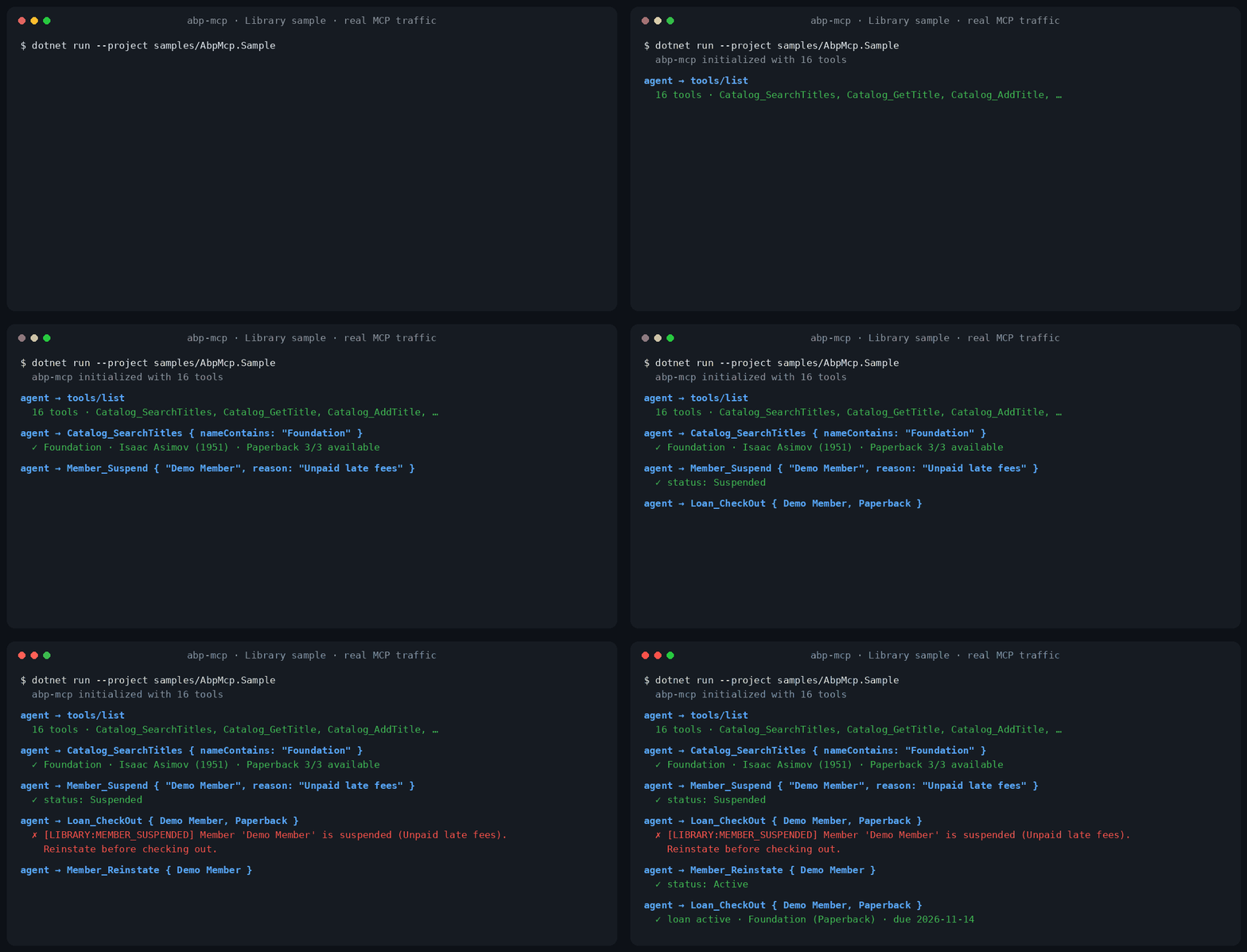
<sub>Real MCP traffic from the bundled Library sample, rendered from a recorded session.</sub>
Why you'll like it
- Zero config: depend on
AbpMcpModule, map the endpoint, tag a service. abp-mcp finds your[McpTool]assemblies in the ABP module graph by itself. - Same rules as your REST API:
[Authorize](permissions, roles, schemes), validation, unit of work,[RequiresFeature], multi-tenancy and audit logging all apply to every tool call. - Agents only see what they may call:
tools/listis filtered by the caller's permissions, and every call is checked again. - Opt-in, never "expose everything": a service is invisible until you mark it
[McpTool], and[McpIgnore]hides single methods. - Descriptions agents understand: your XML doc comments become tool and parameter descriptions. Schemas come from your real DTOs, with enums, nested objects and DataAnnotations constraints.
- Errors agents can act on: your business exception codes reach the agent as
[LIBRARY:MEMBER_SUSPENDED] …, and invalid input names the field. Never a stack trace. - Built for production: turn a tool off on every instance without a redeploy, protect local servers from
malicious web pages, and push
tools/list_changedto connected agents. - Explains itself:
/mcp/_explaintells you why a method is, or isn't, a tool.
Install
In a layered ABP solution, the attributes and the server go in different projects:
# *.Application: the [McpTool] and [McpIgnore] attributes only, with no dependencies
dotnet add src/MyApp.Application package AbpMcp.Abstractions

# *.HttpApi.Host (or your single-project app): the MCP server
dotnet add src/MyApp.HttpApi.Host package AbpMcp
AbpMcp.Abstractions keeps ASP.NET Core, MVC and the MCP SDK out of your Application layer. AbpMcp depends on it,
so a single-project app only needs AbpMcp. Code built against an earlier AbpMcp, with the attributes in
AbpMcp.dll, keeps working: AbpMcp forwards them.
Requires .NET 10 and ABP Framework 10.1 or later. (0.3.0-alpha is the last release for .NET 9 / ABP 9.2.)
Crash course
1. Mount the endpoint
Add AbpMcpModule to your host module and map /mcp:
[DependsOn(typeof(AbpMcpModule) /*, your other modules */)]
public class MyAppHttpApiHostModule : AbpModule
{
    public override void OnApplicationInitialization(ApplicationInitializationContext context)
    {
        var app = context.GetApplicationBuilder();
        app.UseRouting();
        app.UseConfiguredEndpoints(endpoints => endpoints.MapAbpMcp());
    }
}
By default /mcp requires an authenticated caller, like the rest of your API.
2. Tag your services
[McpTool]
public class ProductAppService : ApplicationService, IProductAppService
{
    [Authorize("Products.Create")]
    public Task<ProductDto> CreateAsync(CreateProductDto input) => /* ... */;
}
Each public method becomes a tool named Service_Method, so ProductAppService.CreateAsync is Product_Create.
[McpTool] on a single method exposes just that method, and [McpIgnore] hides one (also when declared on the
interface).
No assembly registration is needed: abp-mcp scans the module graph for assemblies that reference AbpMcp or
AbpMcp.Abstractions and declare [McpTool] services. To choose assemblies yourself, turn discovery off and register them:
Configure<AbpMcpOptions>(opts =>
{
    opts.AutoDiscoverAssemblies = false;
    opts.ExposedAssemblies.Create(typeof(MyAppApplicationModule).Assembly);
});
An app service ABP serves through a hand-written controller ([RemoteService(IsEnabled = false)] plus a controller
in *.HttpApi, typically for file uploads or custom routes) cannot be a tool: ABP's api-definition describes the
controller, not the service. /mcp/_explain lists such a service and says why. Wrap its JSON-friendly operations in a
thin, remoted [McpTool] app service instead; see
hand-written controllers.
3. Connect an agent
Any MCP client that speaks streamable HTTP can connect. With Claude Code:
claude mcp add --transport http my-app https://your-host/mcp --header "Authorization: Bearer $TOKEN"
Agents call your tools with the same bearer tokens your ABP identity server issues to every other client.
Letting Claude sign users in directly. Claude Code, Claude Desktop and claude.ai connectors can run the browser sign-in themselves when your host publishes MCP OAuth metadata. MCP OAuth for ABP + OpenIddict sets up the API host and the AuthServer, keeps MCP tokens apart from REST tokens, and ends with a checklist.
Signing in as yourself, without pasting tokens. The abp-mcp bridge runs on each user's machine: it signs them in through your existing OpenIddict clients (browser sign-in, or a password where needed), keeps the token fresh, reaches intranet and VPN-only hosts, and can limit an environment to read-only tools. It comes as an npm package for Claude Code and a one-click extension for Claude Desktop:
npx -y abp-mcp profiles add staging --url https://staging-api.example.com/mcp --auth browser --client-id MyApp_Mcp
npx -y abp-mcp login staging
npx -y abp-mcp install staging --claude-code
4. Check what's exposed
Two diagnostic endpoints answer the "why isn't my tool showing up?" question without a debugger:
curl https://your-host/mcp/_discover   # the tools the caller can see, with schemas and required permissions
curl 'https://your-host/mcp/_explain?service=Loan'
{
  "service": "AbpMcp.Sample.Library.LoanAppService",
  "method": "CheckOutAsync",
  "included": true,
  "reason": "Included: [McpTool] on class LoanAppService."
}
5. Write descriptions agents understand
Agents choose tools by their descriptions. abp-mcp uses your XML doc comments: the <summary> describes the tool and
each <param> describes its argument. When a method has no docs, the description falls back to a mechanical
Invoke LoanAppService.CheckOutAsync., so document the methods agents will use, especially anything destructive and
the errors it can return. To override a description or name without touching the docs:
[McpTool(Description = "Refund an order in full. Irreversible.", Name = "Billing_Refund")]
public Task RefundAsync(Guid orderId) => /* ... */;
What the agent sees
This is the bundled sample, unedited. tools/list advertises your doc comment and a schema built from the DTO:
{
  "name": "Loan_CheckOut",
  "description": "Check out an edition to a member for a number of days (default 14, at most 90). Refused with LIBRARY:MEMBER_SUSPENDED if the member is suspended, LIBRARY:NO_COPIES_AVAILABLE if every copy is on loan, or LIBRARY:MEMBER_NOT_FOUND / LIBRARY:EDITION_NOT_FOUND for an unknown id.",
  "inputSchema": {
    "type": "object",
    "properties": {
      "input": {
        "type": "object",
        "properties": {
          "memberId": { "type": "string", "format": "uuid" },
          "editionId": { "type": "string", "format": "uuid" },
          "durationDays": { "type": "integer" }
        },
        "description": "The member, the edition, and optionally the loan length in days."
      }
    },
    "required": ["input"]
  }
}
When a business rule says no, the agent gets your code and message, and can explain it or fix the cause:
→ tools/call Loan_CheckOut { "input": { "memberId": "1111…", "editionId": "6050…" } }
← isError: true
  [LIBRARY:MEMBER_SUSPENDED] Member 'Demo Member' is suspended (Unpaid late fees). Reinstate before checking out.
When it succeeds, the result is your DTO, as structured content that matches the advertised output schema:
{
  "titleName": "Foundation",
  "format": "Paperback",
  "memberName": "Demo Member",
  "dueAt": "2026-11-14T21:19:46.3880113Z",
  "status": "Active",
  "isOverdue": false
}
A caller without the permission never sees the tool, and gets [FORBIDDEN] Missing permission: … if it calls it
anyway. Every error code is a constant in AbpMcpErrorCodes.
Try the sample (60 seconds, zero setup)
The repo ships a runnable ABP host with a small library domain (titles, editions, members, loans), seeded with classic books. It has 16 tools, and anonymous access is turned on so you can try it without a token.
dotnet run --project samples/AbpMcp.Sample
claude mcp add --transport http library http://localhost:5000/mcp
Then ask Claude to find Foundation and check it out for the demo member. Or explore it from a terminal:
curl http://localhost:5000/mcp/_discover | jq '.tools[] | {name, description}'
For Claude Desktop, add this to claude_desktop_config.json
(%APPDATA%\Claude\claude_desktop_config.json on Windows, ~/Library/Application Support/Claude/claude_desktop_config.json on macOS)
and restart it:
{
  "mcpServers": {
    "abp-mcp-sample": {
      "type": "streamable-http",
      "url": "http://localhost:5000/mcp"
    }
  }
}
How it works
abp-mcp runs inside your ABP host. It reads the same API description ABP uses for its own client proxies, keeps the
[McpTool] services, and serves them through the official MCP C# SDK:
sequenceDiagram
    autonumber
    participant Agent as 🤖 Claude / Cursor / any MCP client
    participant MCP as /mcp endpoint<br/>(in-process)
    participant Service as Your <code>IApplicationService</code>
    participant DB as 💾 EF Core / your data store

    Agent->>MCP: tools/list
    MCP->>MCP: filter by the caller's ABP permissions
    MCP-->>Agent: only the tools this user can call

    Agent->>MCP: tools/call Loan_CheckOut
    MCP->>MCP: re-check permission, validate input,<br/>features, unit of work, audit
    MCP->>Service: CheckOutAsync(input)
    Service->>DB: INSERT INTO Loans
    Service-->>MCP: LoanDto
    MCP-->>Agent: structured result
Compared with a generic OpenAPI → MCP bridge
| abp-mcp | A generic OpenAPI → MCP bridge (typical) | |
|---|---|---|
| Runs | Inside your ABP host, one NuGet package | As a separate process in front of your API |
| What becomes a tool | Only what you mark [McpTool] |
Every operation in the spec, unless you filter |
tools/list per user |
Filtered by the caller's ABP permissions | The same list for everyone |
| Descriptions | Your XML doc comments, or [McpTool(Description)] |
OpenAPI summaries, if there are any |
| Errors | Your business codes: [LIBRARY:MEMBER_SUSPENDED] … |
An HTTP status and a response body |
| "Why isn't this a tool?" | /mcp/_explain |
– |
| Turn one tool off everywhere | An ABP setting, no redeploy | Reconfigure or redeploy the bridge |
Running in production
Authentication and tenancy
/mcp sits on your normal request pipeline, so ABP's authentication and ICurrentTenant resolution work unchanged. A
token issued for tenant T calls into tenant T's data, and header, cookie or route tenant resolvers work as for any
ABP endpoint. Cross-tenant impersonation is deliberately not supported.
By default /mcp, /mcp/_discover and /mcp/_explain require the host's default policy, so any authenticated caller
passes. To let only some tokens reach MCP, for example those carrying an MCP scope, name a policy. It guards all three
endpoints, so a token that cannot call tools cannot read the tool catalogue either:
Configure<AbpMcpOptions>(opts => opts.AuthorizationPolicy = "McpOnly"); // any policy name, or an ABP permission name
MapAbpMcp().RequireAuthorization("McpOnly") is not the same: it covers /mcp only. The option is ignored when
AllowAnonymous is true.
Browser-based clients
Desktop agents and CLIs send no Origin header and connect as they are. A request that carries one, such as the MCP
Inspector's web UI, is refused with 403 unless its origin is listed, as the MCP transport spec requires. This stops a
web page from driving your local or intranet MCP server through the user's browser:
Configure<AbpMcpOptions>(opts => opts.AllowedOrigins.Add("http://localhost:6274")); // MCP Inspector
Turning a tool off (kill switch)
To pull a misbehaving tool without a redeploy, disable it by name. It disappears from tools/list, is refused on
tools/call with DISABLED, and is flagged "disabled": true in /mcp/_discover. To make connected agents re-read
the tool list right away, call IAbpMcpToolListChangedNotifier.NotifyToolListChangedAsync().
On every instance: set the global ABP setting AbpMcp.DisabledTools to a comma-separated list of tool names.
With ABP Setting Management and the shared distributed cache
(e.g. Redis) a multi-instance deployment already uses, every instance picks it up within
AbpMcpOptions.DisabledToolsSettingCacheDuration (10 seconds by default):
await settingManager.SetGlobalAsync(AbpMcpSettingNames.DisabledTools, "Loan_CheckOut,Member_Suspend");
Without Setting Management, put it in configuration:
{ "Settings": { "AbpMcp.DisabledTools": "Loan_CheckOut,Member_Suspend" } }. Tenant and user values are ignored.
In this process only: add names to AbpMcpOptions.DisabledTools. A tool listed in either place is disabled.
Large tool sets: on-demand tools
Every tool in tools/list costs the agent context before the first message: its name, description and schemas. With
hundreds of tools, a large Jira-style API or many [McpTool] services, that is a large share of the window, and most
of those tools are rarely used. Make them on demand. They leave tools/list, and four small gateway tools appear in
their place:
| Gateway tool | What it returns |
|---|---|
mcp_search_tools(query, limit?) |
Keyword matches across every tool the caller may use, listed or on demand, best first (default 10, at most 50): name, a one-line description, http_method, read_only and listing. No schemas. |
mcp_describe_tools(names) |
For up to 20 names: the description, inputSchema and outputSchema, shaped as tools/list advertises them. A name the caller may not use is reported in not_found, like an unknown one. |
mcp_call_tool(name, arguments) |
The tool's own result, exactly as a direct tools/call returns it. |
mcp_call_tools(calls, mode) |
Up to 20 calls in one request. sequential (the default) stops at the first error and reports the rest as skipped; parallel runs every call. Each result has name, status (ok, error, skipped), isError, and the tool's structuredContent, or its content when it has none. |
Tag a service or a method, or decide from the host without touching the service:
[McpTool(Listing = McpToolListing.OnDemand)]   // AbpMcp.Abstractions, next to [McpTool]
public class ReportingAppService : ApplicationService, IReportingAppService { /* ... */ }

Configure<AbpMcpOptions>(o =>
{
    o.ToolListing.OnDemand("Jira*", "*_Delete");   // tool-name globs: * and ?, case-sensitive
    o.ToolListing.Listed("Jira_GetIssue");         // a pin: wins over every OnDemand pattern
});
Precedence, highest first: a Listed pin, an OnDemand pattern, [McpTool(Listing = ...)] on the method (else on the
class), then the default, listed. Patterns match the final tool name, ToolNamePrefix included, and apply to add-in
tools too. The listing is decided when the tool set is built, at startup and on IDynamicMcpToolRegistry.Refresh().
An on-demand tool keeps every guarantee a listed one has. Search and describe use the same permission and kill-switch
filter as tools/list, so a tool the caller cannot use is never found or described. Every call goes through the same
dispatcher as a direct tools/call, with the same permission check, validation, unit of work, audit entry and error
codes, and a direct tools/call by name still works. The gateway tools are listed only while at least one tool is on
demand; their names are reserved, and the kill switch turns them off like any tool. parallel means the calls are
independent: each one runs whatever the others return. They still run one at a time inside the request, because a
request's scoped services, such as an injected DbContext or ABP's audit log, are not safe for concurrent use.
/mcp/_discover shows each tool's listing and an approximate schema_tokens cost (characters / 4 of its description
and schemas), plus the totals for listed, gateway and on-demand tools. /mcp/_explain says whether the attribute or
which option pattern made a tool on demand.
Running more than one instance
MCP sessions are stateful by default, and a session lives in the memory of the instance that created it. Behind a
load balancer without session affinity, the next request often lands on another instance, which does not know the
Mcp-Session-Id and answers 404. Clients see intermittent "session not found" failures. Pick one of:
| Option | Cost |
|---|---|
| Session affinity at the load balancer | Infrastructure work; a session dies with its instance |
AbpMcpOptions.Stateless = true |
No server push: tools/list_changed from IAbpMcpToolListChangedNotifier and the kill switch is not pushed to connected agents. They see the new list on their next tools/list. |
The SDK's ISessionMigrationHandler (HttpServerTransportOptions) |
Stateful, with sessions recoverable across instances, but the host has to store session state somewhere shared |
Configure<AbpMcpOptions>(opts => opts.Stateless = true); // any instance answers any request; no initialize needed
Stateless sets the MCP SDK's HttpServerTransportOptions.SessionMode. If your module configures
HttpServerTransportOptions itself, that configuration wins.
Errors the agent sees
A failed tool call returns isError: true with [CODE] message, so an agent can tell "fix the input" from "retry"
from "give up". The codes are stable (AbpMcpErrorCodes):
| Raised by your service | Code |
|---|---|
AbpValidationException, or arguments that do not match the schema |
VALIDATION_ERROR, with each member's error |
AbpAuthorizationException, or a failed permission, role or feature check |
FORBIDDEN |
EntityNotFoundException |
NOT_FOUND: There is no Book with id = … |
AbpDbConcurrencyException (the record changed since it was read; REST answers 409) |
CONFLICT: The record was changed by someone else since it was read. Read it again and retry with the new values. |
BusinessException / UserFriendlyException |
its own code, e.g. LIBRARY:MEMBER_SUSPENDED (BUSINESS_ERROR if it has none) |
| The call was cancelled | CANCELLED |
| A disabled tool, or an unknown tool name | DISABLED, UNKNOWN_TOOL |
| Anything else | INTERNAL: An internal error occurred. Details are logged, never sent. |
Everything else
- Dynamic tools and enrichment: implement
IAbpMcpAddinto add tools that no single service backs, or to enrich the generated ones. Change the tool set at runtime and notify connected agents withIAbpMcpToolListChangedNotifier. See dynamic add-ins. - Naming:
AbpMcpOptions.ToolNamePrefix, or replaceToolNameNormalizerentirely. - Output schemas: on by default (
IncludeOutputSchema); list results are advertised and returned as{ "result": [...] }, as MCP requires an object. - Without an ABP module:
builder.Services.AddAbpMcp(...)andapp.MapAbpMcp()work too.
How do we know it works?
Agents act on behalf of real users, so a gap between the MCP path and your REST API would be a security hole. More than 350 automated tests run on every build, in three layers:
- End to end, with the official MCP SDK client: the bundled sample is booted in memory and driven over streamable
HTTP. Tests cover the
tools/listshape, structured results, error codes,Originrules, session lifetime andtools/list_changeddelivery. - Same rules as REST, one concern at a time: integration tests cover
[Authorize](permissions, roles, schemes), ABP validation, unit-of-work rollback,[RequiresFeature]and[RequiresGlobalFeature], and audit logging. These tests run for both virtual and non-virtual methods, because ABP's interceptors only cover virtual ones. - List and call are both gated:
tools/listhides what the caller can't use andtools/callchecks again, and both paths are tested.
Every bug fix ships with a test that would have caught it, and CodeQL scans every pull request.
Documentation
| Guide | What it covers |
|---|---|
| Dynamic add-ins | IAbpMcpAddin, dynamic tools, enriching tools, changing the tool set at runtime |
| MCP OAuth for ABP + OpenIddict | Letting Claude sign users in directly: protected-resource metadata, a separate audience for MCP tokens, the OpenIddict resource and client, and a deployment checklist |
| Hand-written controllers | Services served by a hand-written controller ([RemoteService(IsEnabled = false)]): why they are not tools, and the wrapper pattern |
| The abp-mcp bridge | Connecting Claude Code and Claude Desktop as the signed-in user: the OpenIddict client, token lifetimes, retries |
| Design | Premises, the approaches considered, and what is deliberately out of scope |
| Changelog | What each release changed |
The API reference ships as XML documentation, so your editor shows it as you type.
Status and roadmap
This is 0.6.0. It runs in production, but the API may still change before 1.0: minor versions may include breaking changes, and the changelog describes them. Coming next:
- choosing tools with type and method predicates (#11) and include/exclude filters (#12)
- a Roslyn analyzer that flags
[McpTool]on a non-application service (#14) - an eShopOnAbp integration sample (#17)
Have a question? Want to help?
Questions, ideas and bug reports are welcome as issues. To contribute code or docs, read the contributing guide first; it has the design rules every change follows. Please report security problems through private reporting, not in public issues.
src/AbpMcp/                      the library (package AbpMcp; net10.0)
samples/AbpMcp.Sample/           the Library sample host (16 tools, seeded data)
test/AbpMcp.Tests/               unit tests
test/AbpMcp.IntegrationTests/    integration tests, and end-to-end tests with the MCP SDK client (EndToEnd/)
docs/                            guides and README assets
To run the tests:
dotnet test
Credits and licence
MIT licence.
abp-mcp is built on ABP Framework and the official Model Context Protocol C# SDK. It is maintained by Tekthar.
Sister project: CASL .NET, permissions you can read out loud, for .NET.
| Product | Versions Compatible and additional computed target framework versions. |
|---|---|
| .NET | net10.0 is compatible. net10.0-android was computed. net10.0-browser was computed. net10.0-ios was computed. net10.0-maccatalyst was computed. net10.0-macos was computed. net10.0-tvos was computed. net10.0-windows was computed. |
-
net10.0
- AbpMcp.Abstractions (>= 0.6.0)
- Microsoft.Extensions.Options.ConfigurationExtensions (>= 10.0.14)
- ModelContextProtocol.AspNetCore (>= 2.3.1)
- Volo.Abp.AspNetCore.Mvc (>= 10.1.1)
NuGet packages
This package is not used by any NuGet packages.
GitHub repositories
This package is not used by any popular GitHub repositories.
| Version | Downloads | Last Updated |
|---|---|---|
| 0.6.0 | 130 | 11/7/2026 |
| 0.5.0 | 101 | 11/6/2026 |
| 0.4.1 | 96 | 11/6/2026 |
| 0.4.0 | 117 | 10/31/2026 |
| 0.3.0-alpha | 98 | 10/30/2026 |
| 0.2.1-alpha | 146 | 10/9/2026 |
See https://github.com/tekthar/abp-mcp/releases for release notes.